


Course membership community access becomes difficult when payments, memberships, LearnDash, BuddyBoss, and other plugins all start making access decisions independently.
Each system may work correctly on its own.
The problems usually appear when their responsibilities overlap.
A payment succeeds, so WooCommerce grants access.
A membership becomes active, so MemberPress grants access again.
LearnDash adds the learner to a Group.
BuddyBoss adds the same person to a community.
Then six months later the member downgrades, a renewal fails, or an administrator changes something manually.
Now the real question appears:
Which system is actually responsible for deciding what this person should still have access to?
A cleaner architecture is:
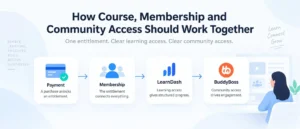
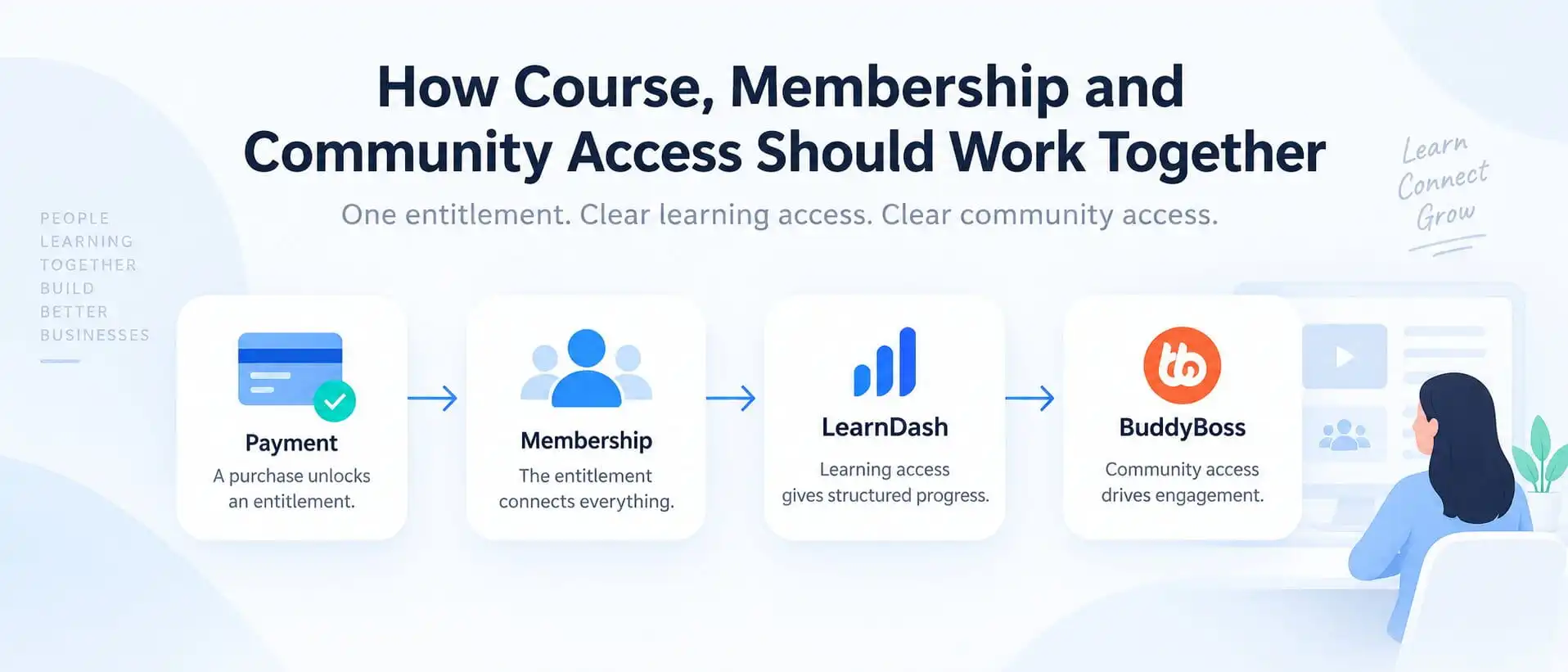
Payment or commercial event → Membership / entitlement → Learning access + Community access
Then each platform has a clear job.
LearnDash handles learning.
BuddyBoss handles community.
The membership or entitlement layer decides what the customer currently qualifies for.
That separation makes the platform easier to understand, support, test, and expand.
Course Membership Community Access: The Short Answer
The simplest model is:
Commerce confirms what happened financially.
Membership or entitlement determines what the customer currently owns.
LearnDash delivers the learning access.
BuddyBoss delivers the community access.
The mistake is letting every plugin become its own entitlement system.
For example, a Professional membership might include:
- Courses 1 through 5
- a Professional LearnDash Group
- a private BuddyBoss community
- premium member resources
- selected events
The membership entitlement should define that package.
LearnDash and BuddyBoss should implement it.
They should not independently reinterpret what “Professional” means.
Why Access Architecture Matters More Than Plugin Choice
It is easy to focus too much on which plugin has which feature.
But an LMS can use excellent plugins and still have poor access architecture.
Imagine a site running:
- WooCommerce
- MemberPress
- LearnDash
- BuddyBoss
- automation between them
- custom WordPress roles
Every one of those systems can potentially influence access.
That becomes dangerous when the same business rule is copied into several places.
Suppose the business decides Professional members should no longer receive Course 5.
Where does that rule live?
MemberPress?
LearnDash?
A WooCommerce product?
A BuddyBoss access condition?
A custom automation?
If changing one membership tier requires checking five systems, the architecture is already too difficult to maintain.
That is why I prefer to decide responsibility first and plugins second.
Start With the Commercial Event
The first layer is the financial event.
That could be:
- a successful purchase
- a new subscription
- a renewal
- a failed renewal
- a refund
- a cancellation
- a company contract
- a manual administrative approval
The payment or commerce system should primarily answer:
What happened commercially?
WooCommerce, for example, can connect orders or subscription statuses to LearnDash course and Group enrollment through the official LearnDash integration. LearnDash provides controls for deciding which WooCommerce order or subscription statuses grant or deny enrollment.
That is useful.
But the commercial event is not always the same thing as the final entitlement.
A failed renewal may enter a grace period.
A refund may remove one purchase but not another membership.
A company licence might remain active until a contract end date rather than immediately following an individual payment.
So the next layer needs to interpret the business rule.
The Membership or Entitlement Layer
This layer answers:
What should this person have access to right now?
That may depend on:
- membership tier
- subscription status
- company licence
- user role
- manual assignment
- contract dates
- purchased package
- another business rule
For example:
Professional Membership
might resolve to:
- Courses 1–5
- Professional LearnDash Group
- Professional BuddyBoss Group
- premium resource library
If the member upgrades to Enterprise, the entitlement changes.
If they downgrade to Starter, the entitlement changes again.
The critical point is that the entitlement should be defined once.
The systems downstream should follow it.
If you are still deciding whether a separate membership layer is necessary at all, see Do You Actually Need MemberPress With LearnDash?.
What LearnDash Should Control
LearnDash should own the learning layer.
That includes:
- courses
- lessons and topics
- quizzes
- course progression
- certificates
- enrolment
- LearnDash Groups
- Group Leaders
- progress
- learning reports
LearnDash Groups are designed to organize users, assign courses, automatically enroll group members into those courses, and allow Group Leaders to track progress and performance.
This makes them useful for:
- cohorts
- membership tiers
- corporate clients
- departments
- locations
- certification programs
For example:
Professional entitlement → Professional LearnDash Group → Courses 1–5
That is a clean relationship.
LearnDash does not need to know why the customer qualifies for Professional access.
It only needs to receive the correct learning entitlement.
If the distinction between LearnDash Groups and community groups is still unclear, I covered that in LearnDash Groups vs BuddyBoss Groups: What’s the Difference and Which Should Control Access?.
What BuddyBoss Should Control
BuddyBoss should own the social experience.
That includes:
- community Groups
- discussions
- messaging
- member interaction
- activity
- community visibility
- engagement
BuddyBoss supports access controls based on conditions including WordPress roles, profile types, membership levels, and LearnDash Groups or memberships.
That makes it possible to implement rules such as:
Professional membership → Professional community
or:
Enterprise company account → private company community
That is useful.
But BuddyBoss still should not become the commercial source of truth if another system already owns membership status.
A better relationship is:
Entitlement says the user qualifies → BuddyBoss grants the relevant community access
For the broader division of responsibilities between LearnDash and BuddyBoss, see LearnDash + BuddyBoss: How the Architecture Should Actually Work.
What WooCommerce or the Payment Layer Should Control
The commerce layer should own transactional responsibilities.
That normally includes:
- checkout
- payments
- orders
- refunds
- coupons
- subscription transactions
- payment status
It should not necessarily become the place where every course, membership, and community rule is defined.
WooCommerce can absolutely control LearnDash enrollment directly when the business model is product-based. LearnDash’s official WooCommerce integration supports course and Group access based on order and subscription status.
But if the business is actually membership-first, it may be cleaner for WooCommerce to handle the transaction while the membership layer owns the ongoing entitlement.
That distinction is exactly why I would decide what the customer is buying before wiring plugins together.
For a deeper comparison, see WooCommerce vs MemberPress for Selling LearnDash Courses.
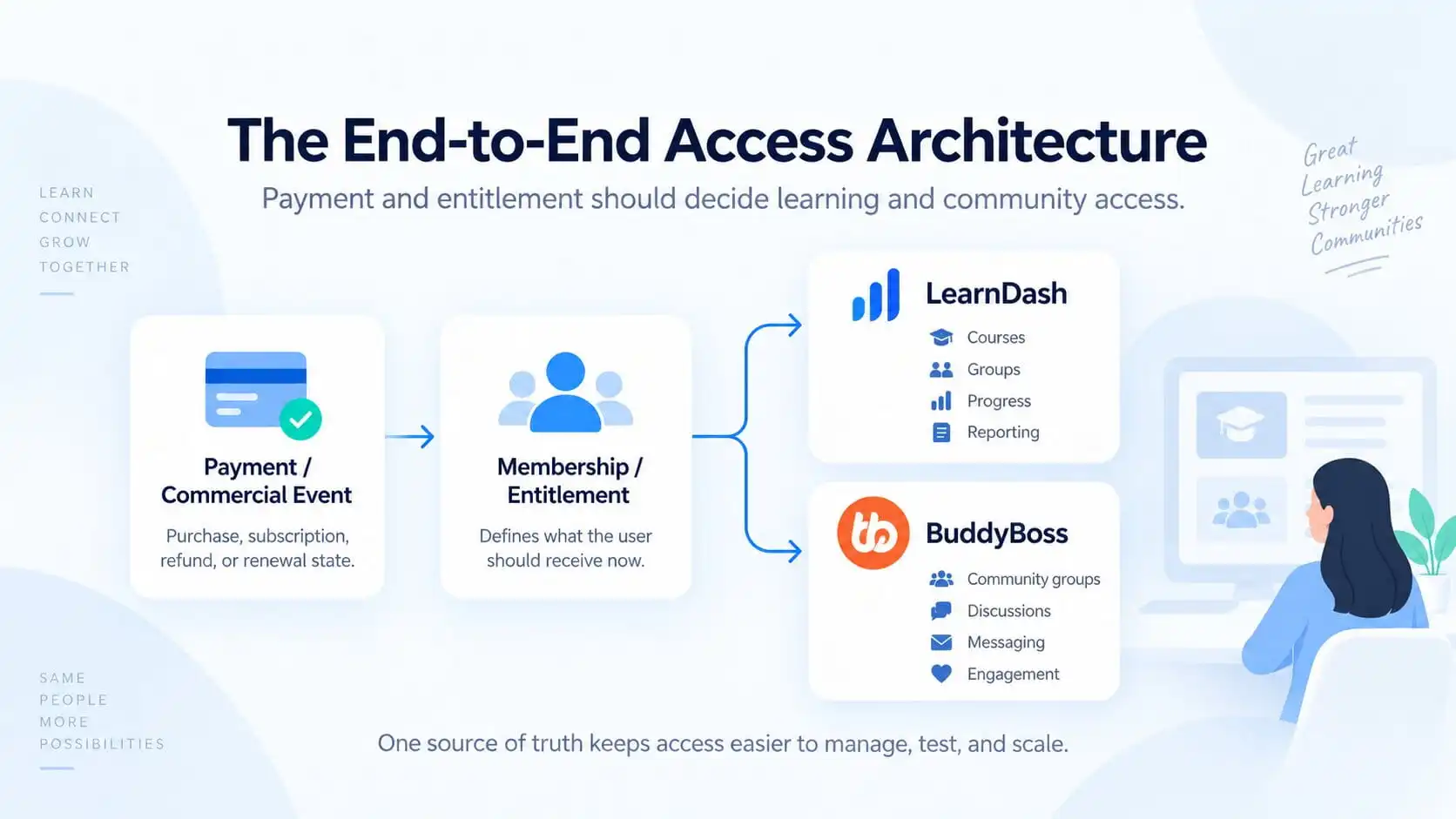
The End-to-End Access Architecture
The model I would aim for is:
Payment / Commercial Event → Membership / Entitlement → LearnDash Learning Access + BuddyBoss Community Access
LearnDash then controls:
- courses
- Groups
- enrolment
- progress
- reporting
BuddyBoss controls:
- social Groups
- discussions
- messaging
- engagement
The lifecycle then feeds back through the entitlement layer:
Renewal → Upgrade → Downgrade → Expiry
This creates one predictable path.
LearnDash itself supports several Group access modes, including Free, Buy Now, Recurring, and Closed. Importantly, LearnDash specifically says not to use its Buy Now or Recurring Group modes when a shopping cart or membership plugin is already selling that Group access; the Closed mode is intended for that external-control scenario.
That is a good architectural principle:
Do not make two systems independently sell or govern the same entitlement unless there is a deliberate reason.
What Happens After Purchase
Suppose someone buys Professional Membership.
A clean flow is:
1. Payment succeeds.
2. Membership becomes active.
3. Entitlement resolves to Professional.
4. LearnDash grants Professional learning access.
5. BuddyBoss grants Professional community access.
6. Other Professional-only resources are unlocked.
That makes the purchase easy to trace.
You can answer:
Why does this user have Course 4?
Because: Professional entitlement → Professional LearnDash access.
And:
Why can this user enter the private community?
Because: Professional entitlement → Professional BuddyBoss access.
The answer is not:
“Several plugins happened to add them.”
What Happens on Renewal
A successful renewal normally confirms that the entitlement should continue.
The clean lifecycle is:
Renewal succeeds → Membership stays active → Access remains unchanged
You usually do not need to remove and re-add every permission.
That can create unnecessary side effects.
The entitlement remains valid, so the learning and community layers remain valid.
What Happens on Upgrade
Imagine:
Starter → Professional
Starter includes:
- Courses 1–2
- Starter Community
Professional includes:
- Courses 1–5
- Professional Community
- premium resources
The upgrade should add only what becomes newly available.
That might mean:
- add Courses 3–5
- grant Professional Community
- unlock premium resources
- preserve previous progress
- retain any access Professional still includes
The business entitlement changes once.
The downstream systems update accordingly.
What Happens on Downgrade
Downgrades are where access systems often become messy.
Imagine:
Professional → Starter
The user should perhaps:
- keep Courses 1–2
- lose Courses 3–5
- leave Professional Community
- receive or retain Starter Community
- keep historical learning progress
- lose premium resources
That last distinction matters:
Removing access is not the same as deleting history.
The learner may lose current access to Course 4 without the business wanting their old completion or progress data erased.
That rule needs to be designed deliberately.
What Happens on Cancellation or Expiry
Cancellation and expiry also need a written business rule.
Possible outcomes include:
- remove all paid access immediately
- keep access until the current billing period ends
- use a grace period
- move the member to a free tier
- preserve completed courses
- preserve certificates
- remove only community access
- retain account history
LearnDash Groups themselves can also have start and end dates, and a Group end date can end access to the Group and its associated courses.
That is useful for a learning cohort.
But it should not accidentally become a second membership-expiry system if another platform already owns the commercial lifecycle.
Course Access Is Not the Same as Membership Access
This distinction is important.
A membership may include:
- courses
- downloads
- community
- events
- resources
- discounts
LearnDash only needs to know about the learning portion.
The membership system may know that the customer is a Professional member.
LearnDash only needs the result:
Professional member → Courses 1–5
That keeps the LMS focused on learning rather than forcing it to represent the entire business relationship.
MemberPress, for example, can map one membership to multiple LearnDash courses and automatically grant or remove that course access based on membership status.
That is a good example of membership status sitting above course access.
Community Access Is Not the Same as Course Access
The same principle applies to BuddyBoss.
A person might be allowed to take Course A without being allowed into Community B.
Or they might lose course access but retain access to an alumni community.
Or Enterprise members may have a private company community while sharing the same LearnDash curriculum as Professional members.
So:
course access ≠ community access
They may come from the same entitlement.
But they do not need to be identical.
That separation gives the business much more flexibility later.
When LearnDash Groups Belong in the Architecture
LearnDash Groups make sense when learning access needs structure beyond individual course enrollment.
Examples include:
- cohorts
- company accounts
- classes
- departments
- membership tiers
- certification tracks
LearnDash Groups can automatically enroll members into associated courses, assign Group Leaders, and support group-level reporting and management.
They can also support start dates, end dates, paid access, and cohort-style schedules.
Use them when the learning structure requires them.
Do not use them merely because another system also has something called a Group.
When BuddyBoss Groups Belong in the Architecture
BuddyBoss Groups belong where the business needs a community space.
For example:
- cohort discussions
- private company communities
- membership-tier communities
- peer support
- professional networking
- accountability groups
The same audience may exist in both LearnDash and BuddyBoss.
But the responsibilities remain different.
One handles the learning relationship.
The other handles the social relationship.
You can synchronize them when the business case genuinely matches.
You do not need to synchronize every Group on the site.
A Three-Tier Membership Example
Imagine:
|
Starter
|
Professional
|
Enterprise
|
|---|---|---|
|
Courses 1 - 2
|
Courses 1 - 5
|
All courses
|
|
Starter community
|
Professional community
|
Company LearnDash Group
|
|
|
Premium resources
|
Private company community
|
|
|
|
Manager reporting
|
The important thing is that the membership tier defines the entitlement once.
LearnDash receives the learning portion.
BuddyBoss receives the community portion.
Corporate Training Example
Now imagine a company buys 100 seats.
The contract defines:
Acme Corporation is entitled to 100 active learners until December 31.
The responsibilities could be:
|
Commercial / Entitlement
|
LearnDash
|
BuddyBoss
|
|---|---|---|
|
Company contract
|
Acme learning Group
|
Acme community
|
|
100-seat eligibility
|
Required courses
|
Employee discussion
|
|
Contract dates
|
Progress tracking
|
Announcements
|
|
Renewal status
|
Group Leader reporting
|
Peer support
|
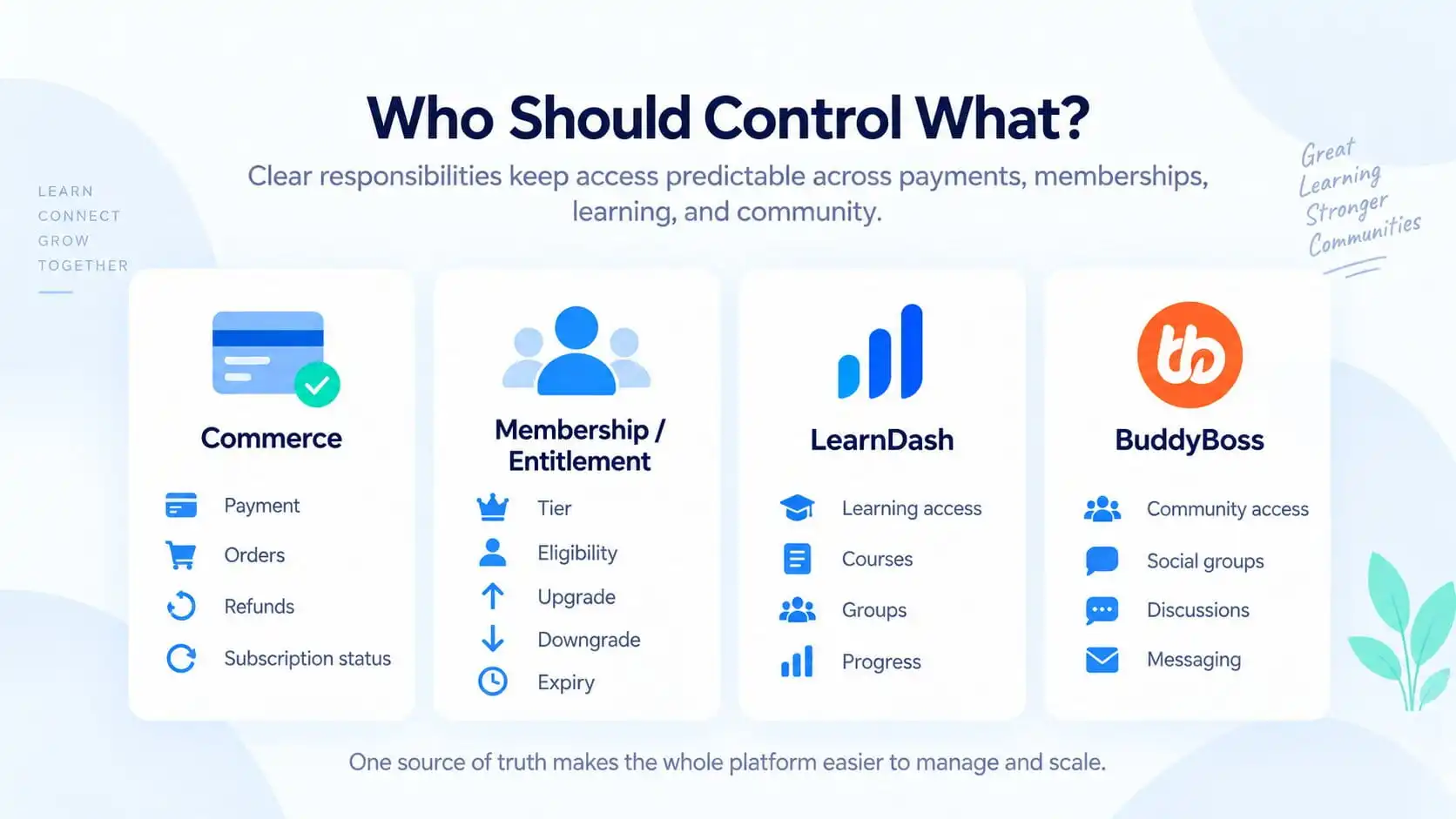
Who Should Control What?
The important part is not the specific plugin name in each box.
It is making sure every responsibility has one clear owner.
Commerce should confirm what happened financially.
The membership or entitlement layer should decide what the customer currently qualifies for.
LearnDash should handle the learning side of that entitlement.
BuddyBoss should handle the community side.
That separation gives administrators a much clearer answer when something goes wrong.
“What is this user entitled to right now, and which system should implement that access?”
That is the responsibility model I would preserve even if the actual stack uses different plugins.
Common Architecture Mistakes
1. Making every plugin an access authority
If five systems can independently grant access, five systems can also disagree.
2. Selling the same access in two places
LearnDash itself warns against using its paid Group access modes when an ecommerce or membership plugin is already responsible for that Group access.
3. No clear downgrade rule
Most teams think about purchase and cancellation.
Fewer think carefully about what remains after a downgrade.
4. Treating access removal as data deletion
A former member may lose access without losing historical progress, certificates, or records.
5. Synchronizing every LearnDash Group with BuddyBoss
Learning structure and community structure do not always match one-to-one.
6. Using WordPress roles as the entire business model
Roles are useful technical tools.
They are not always a good representation of subscriptions, contracts, plan expiry, company licences, and multiple entitlement states.
7. No documented source of truth
If an administrator cannot answer:
Why does this person have access?
without checking several plugins, the system is already too difficult to support.
How to Audit an Existing LMS
If the platform is already running, do not begin by adding another automation.
Map the current flow first.
For every paid plan or customer type, answer:
1. What event starts access?
2. Which system stores the active entitlement?
3. What LearnDash courses or Groups are granted?
4. What BuddyBoss areas are granted?
5. What happens on renewal?
6. What happens on upgrade?
7. What happens on downgrade?
8. What happens when payment fails?
9. What happens on cancellation?
10. Which system is allowed to revoke access?
This will usually reveal duplicated responsibilities quickly.
If the architecture involves LearnDash, memberships, WooCommerce, and custom access rules, this is exactly the kind of workflow I cover in my LMS, membership, and WooCommerce integration work.
Final Architecture Recommendation
Course, membership, and community access should not be three separate systems trying to guess what the customer owns.
They should form one chain.
Commercial event confirms what happened.
Membership or entitlement interprets what that means for the customer.
LearnDash delivers the learning access.
BuddyBoss delivers the community access.
Then:
renewal, upgrade, downgrade, cancellation, and expiry update the entitlement
and the rest of the platform follows.
That architecture is easier to explain.
It is easier to test.
It is easier to troubleshoot.
And it is much safer when the business later introduces new membership tiers, company accounts, course bundles, private communities, or custom workflows.