

LearnDash Groups vs BuddyBoss Groups is one of those comparisons that sounds simple until both systems are active on the same platform.
They both use the word “group.”
They can contain the same people.
And in a LearnDash + BuddyBoss setup, they can even be connected.
But they are not designed to do the same job.
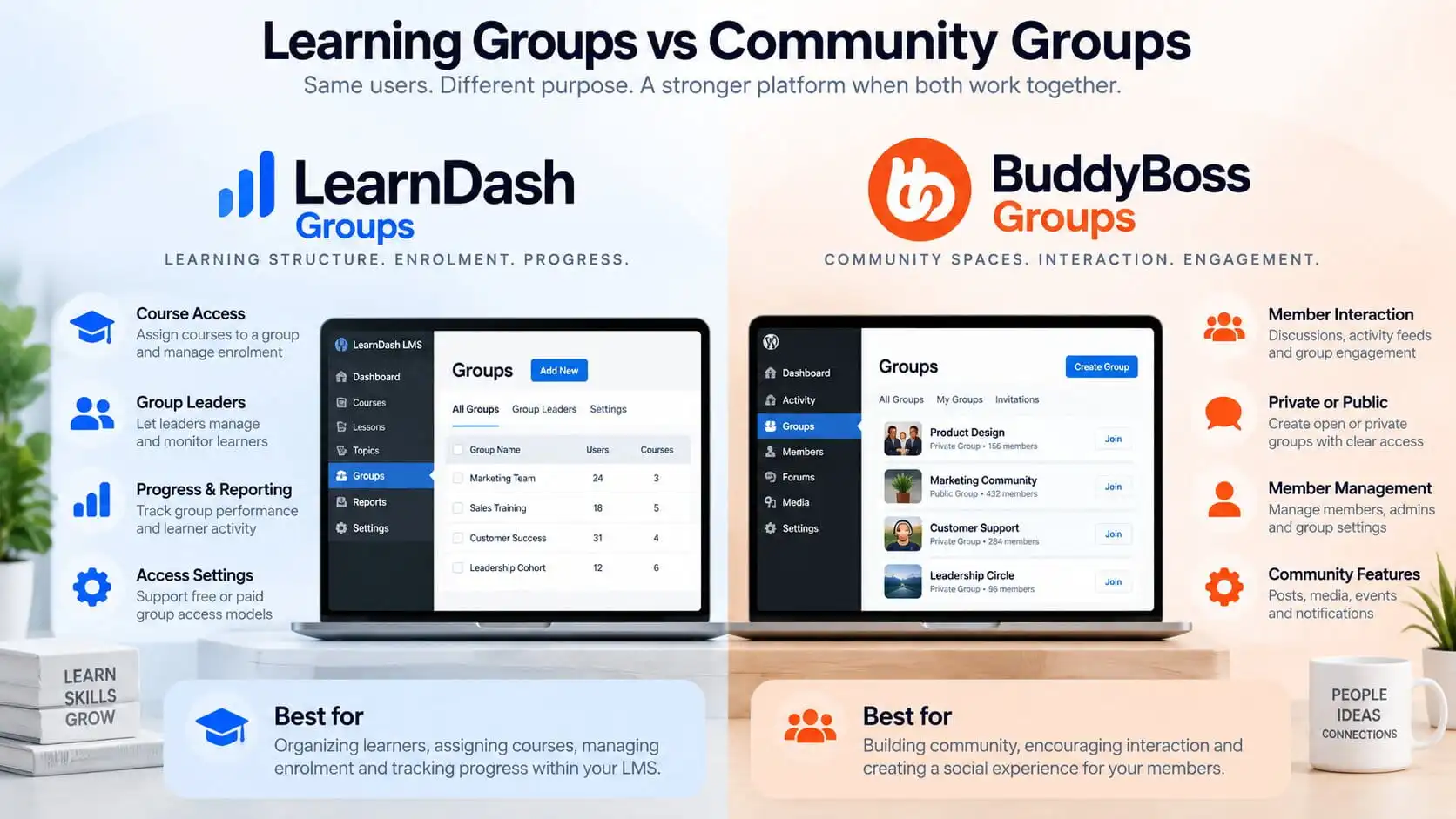
LearnDash Groups are primarily part of the learning structure. They organize learners, assign courses, support Group Leaders, and provide group-level reporting and management. BuddyBoss Groups are primarily part of the community structure. They give members a place to interact, discuss, share, message, and participate socially.
That distinction is the key to avoiding messy access rules.
If both systems start acting as the source of truth for the same thing, the platform becomes harder to manage.
My rule is:
LearnDash should control learning. BuddyBoss should control community. Membership or entitlement logic should decide who gets access in the first place.
LearnDash Groups vs BuddyBoss Groups: The Short Answer
The simplest way to think about the difference is this:
LearnDash Groups = learning structure
BuddyBoss Groups = community structure
LearnDash Groups are useful when you need to:
- enroll multiple learners into the same courses
- assign Group Leaders
- track learner progress by group
- organize cohorts, companies, classes, or locations
- manage group-level learning access
- sell or restrict access to collections of courses
LearnDash officially describes Groups as a way to organize users, assign courses, delegate Group Leaders, and track progress and performance. Users added to a LearnDash Group are automatically enrolled into the courses assigned to that group.
BuddyBoss Groups are useful when you need to:
- create spaces for member interaction
- organize discussions and activity
- support private or hidden communities
- allow group messaging
- manage social participation
- build a community experience around a shared interest, cohort, company, or course
BuddyBoss supports public, private, and hidden social groups, along with group messaging, subscriptions, activity, and other community features.
The mistake is assuming that because the same members may exist in both systems, both groups should control the same access decisions.
Usually they should not.
Why These Two Types of Groups Get Confused
The confusion makes sense.
Imagine a business has a cohort called:
Leadership Program – September
That cohort might need:
- access to three LearnDash courses
- a dedicated course schedule
- reporting for the training manager
- a private BuddyBoss discussion space
- direct interaction between participants
- access to that community only while the program is active
It is easy to look at that and say:
“Why not just use one group for everything?”
Because the learning requirements and the community requirements are different.
The LearnDash Group may need to know:
- which courses belong to the cohort
- which learners are enrolled
- who the Group Leader is
- what progress each learner has made
- what happens when courses are added or removed
The BuddyBoss Group may need to know:
- who can participate
- whether the group is public, private, or hidden
- who can post
- who can message
- how discussions and activity are organized
Those are separate responsibilities.
If you treat them as separate layers, the platform is easier to understand.
If you let both systems independently grant and remove access, troubleshooting becomes much harder.
If you are already using both platforms, I would first make sure the overall responsibilities are clear. I covered that wider structure in LearnDash + BuddyBoss: How the Architecture Should Actually Work.
What LearnDash Groups Are Actually For
LearnDash Groups are part of the LMS itself.
Their main job is to organize learners and learning access.
A LearnDash Group can have one or more courses assigned to it, and users added to that group receive access to those courses automatically. LearnDash also allows Group Leaders to manage or monitor the learners assigned to their groups.
That makes LearnDash Groups useful for scenarios such as:
- corporate training
- school classes
- cohort-based courses
- franchise locations
- certification programs
- departmental training
- paid bundles of courses
For example, imagine a company buys access for 50 employees.
You could create a LearnDash Group called:
Acme Leadership Training
Assign:
- Course 1: Management Fundamentals
- Course 2: Communication Skills
- Course 3: Leadership Assessment
Then add those 50 employees to the group.
The result is predictable:
Group membership → course access
LearnDash can also assign a Group Leader, allowing someone such as a training manager to monitor users, reports, assignments, quizzes, and learner activity without necessarily giving them full WordPress administrator access.
That is a learning-management responsibility.
What BuddyBoss Groups Are Actually For
BuddyBoss Groups are social spaces.
Their purpose is to organize people around interaction rather than around course enrolment.
A BuddyBoss Group can become a space where members:
- post updates
- participate in discussions
- interact through activity feeds
- receive group notifications
- send group messages
- share media
- connect around a shared program or interest
BuddyBoss supports social groups along with activity feeds, discussions, private messaging, notifications, and member interaction.
The privacy model is also community-oriented.
A BuddyBoss Group can be:
- Public
- Private
- Hidden
Public groups can be openly visible.
Private groups appear in directories but restrict content to members.
Hidden groups are not shown publicly and are typically accessed by invitation.
That is fundamentally different from assigning someone to an LMS learning group.
Learning Structure vs Community Structure
This distinction is the easiest way to keep the platform understandable.
LearnDash Group
Think:
Who is learning what?
The group exists to answer questions such as:
- Which courses should this user receive?
- Which company or cohort does this learner belong to?
- Who should report on their progress?
- Which curriculum applies to this group?
- What learning access should they have?
BuddyBoss Group
Think:
Who should interact with whom?
The group exists to answer questions such as:
- Which members should be in this private community?
- Who can participate in these discussions?
- Which members should see this activity?
- Who should be able to message each other?
- Which social space belongs to this cohort or organization?
The names may match.
The users may match.
The responsibilities should still remain separate.
Should LearnDash Groups Control Course Access?
In most LearnDash + BuddyBoss architectures, yes.
If course access depends on belonging to a cohort, company, class, or learning tier, LearnDash Groups are often the logical place to manage that structure.
LearnDash automatically enrolls users into courses associated with a group.
That makes the relationship clear:
LearnDash Group → LearnDash Courses
This is much cleaner than trying to make BuddyBoss social-group membership the primary learning rule.
For example:
If a learner joins a BuddyBoss Group because they were invited socially, that should not necessarily mean they automatically receive a paid course.
Likewise, if an administrator removes someone from a social discussion space, that should not necessarily erase their historical course access or learning records.
Learning access should be tied to the business rule that grants learning access.
Sometimes that is a LearnDash Group.
Sometimes it is a membership or purchase that then adds the user to a LearnDash Group.
But there should be a clear path.
Should BuddyBoss Groups Control Community Access?
Usually yes.
If the question is whether someone should participate in a particular community area, BuddyBoss is the right system to manage that community experience.
BuddyBoss also now provides access-control options that can restrict who can create or join groups based on things such as user roles, profile types, membership conditions, and other criteria.
That means BuddyBoss can enforce meaningful community rules.
For example:
A Professional Membership might allow someone to join a private Professional Community.
An Enterprise Membership might unlock a hidden company-only group.
A certain profile type might be allowed to create groups, while ordinary members cannot.
Those are valid BuddyBoss responsibilities.
The important distinction is that BuddyBoss should be enforcing the community entitlement, not becoming the master system for everything else.
What Should Control Membership and Paid Access?
This is where many platforms become unnecessarily complicated.
Imagine a business uses:
- LearnDash
- BuddyBoss
- MemberPress
- WooCommerce
Now there are potentially four systems involved in access.
If all four are independently deciding who gets what, problems are almost guaranteed.
You need one layer that answers:
What is this customer entitled to right now?
That entitlement may be determined by:
- an active membership
- a purchase
- a subscription
- a company licence
- a user role
- a manually assigned contract
- another business rule
Once the entitlement is known, the platform can grant the appropriate learning and community access.
A cleaner model looks like:
Payment / Membership → Entitlement → LearnDash Access + BuddyBoss Access
That is much easier to reason about than:
MemberPress grants one thing.
WooCommerce grants another.
LearnDash grants something independently.
BuddyBoss adds a group membership separately.
Then one of those subscriptions expires and nobody knows which system is supposed to remove access.
If MemberPress is involved, it is also worth deciding whether you need that additional membership layer at all. I covered that question in Do You Actually Need MemberPress With LearnDash?.
When LearnDash and BuddyBoss Groups Should Be Connected
There are situations where synchronizing the groups makes perfect sense.
BuddyBoss documents an integration where a LearnDash Group can be linked with a corresponding BuddyBoss Social Group. In supported setups, users can be enrolled into both the LearnDash learning group and its connected BuddyBoss community group.
That is useful when both groups represent the same business audience.
For example:
LearnDash Group: Leadership Cohort September
BuddyBoss Group: Leadership Cohort September Community
The LearnDash Group handles:
- course enrolment
- progress
- reporting
- Group Leader access
The BuddyBoss Group handles:
- discussion
- peer interaction
- announcements
- community engagement
The membership may be synchronized.
The responsibilities should not be confused.
When They Should Stay Separate
You should not automatically create a one-to-one relationship between every LearnDash Group and every BuddyBoss Group.
Sometimes the learning structure and community structure are intentionally different.
Imagine a membership business with:
LearnDash Groups
- Beginner Courses
- Advanced Courses
- Certification Program
But only two community spaces:
BuddyBoss Groups
- Member Community
- Certification Community
Creating a separate social group for every course group would add unnecessary complexity.
The same applies in corporate training.
A company might have multiple LearnDash learning groups for departments:
- Sales Training
- Management Training
- Compliance Training
But only one private BuddyBoss company community.
That is perfectly valid.
The architecture should follow the business structure, not an assumption that every group needs a matching group somewhere else.
Corporate Training Example
Consider a training provider selling learning access to companies. A client buys access for 100 employee seats.
|
Entitlement Layer
|
LearnDash Group
|
BuddyBoss Group
|
|---|---|---|
|
The company’s contract or purchase
determines that 100 users are eligible. |
Acme Corporation Training
|
Acme Corporation Community
|
|
Decides who should receive access.
|
Enroll employees
|
Employee discussions
|
|
Controls the business eligibility rule.
|
Assign required courses
|
Course questions
|
|
Can determine when access starts or ends.
|
Track learner progress
|
Announcements
|
|
|
Assign the company’s training
manager as Group Leader |
Peer support
|
|
|
Provide reporting
|
Social interaction
|
In this example, the company should not lose its training records just because the social group configuration changes.
The LearnDash Group remains the learning structure.
The BuddyBoss Group remains the social layer.
Cohort-Based Course Example
Now imagine a 12-week coaching program.
Twenty-five people enroll.
They need:
- the same curriculum
- the same release dates
- the same learning schedule
- one private community
- discussions between sessions
- access that ends after the program
A sensible architecture could be:
Payment → Cohort Entitlement → LearnDash Cohort Group + BuddyBoss Cohort Group
|
Entitlement Layer
|
LearnDash Cohort Group
|
BuddyBoss Cohort Group
|
|---|---|---|
|
Decides whether the learner is eligible
for the 12-week program |
Handles enrolment
|
Handles cohort discussion
|
|
Controls when access starts
|
Assigns courses
|
Supports peer interaction
|
|
Controls when access ends
|
Tracks learner progress
|
Handles group updates
|
|
Applies upgrade, expiry, or completion rules
|
Maintains learning records
|
Supports social participation
|
When the cohort ends, the entitlement rule decides what should happen next.
Maybe course access remains permanently.
Maybe the community becomes read-only.
Maybe both expire.
The business rule should decide.
Not whichever plugin happens to run its access-removal logic first.
Paid Membership Example
Now imagine three membership tiers:
- Starter
- Professional
- Enterprise
The business wants:
|
Starter
|
Professional
|
Enterprise
|
|---|---|---|
|
Courses 1 and 2
|
Courses 1 through 5
|
All courses
|
|
Starter community
|
Professional community
|
Company-specific learning group
|
|
|
|
Private company community
|
|
|
|
Manager reporting
|
This is where an entitlement layer becomes particularly useful.
The membership tier decides what the user is entitled to.
LearnDash then receives the learning access.
BuddyBoss receives the community access.
If the member upgrades, downgrades, cancels, or fails a renewal, the access change follows one predictable business rule.
That is much safer than manually maintaining separate membership conditions across multiple plugins.
Common Access-Control Mistakes
These are the mistakes I see as most likely to create problems.
1. Treating BuddyBoss Groups as the LMS
A social group should not become your main learning-management structure simply because the same learners use it.
2. Treating LearnDash Groups as community spaces
LearnDash Groups provide learning organization and administration, but they are not a replacement for a social community platform.
3. Letting multiple systems grant the same entitlement independently
If LearnDash, BuddyBoss, WooCommerce, and a membership plugin all independently decide access, debugging becomes difficult.
4. Synchronizing every group automatically
Only synchronize groups where the learning audience and community audience genuinely represent the same business unit.
5. No clear expiry rule
What happens when a membership ends?
Do courses disappear?
Does the community disappear?
Does historical progress remain?
Does a Group Leader retain reporting access?
Those answers should be designed before development.
6. Using the group name as the architecture
Two groups having the same name does not mean they have the same responsibility.
A Cleaner Access Architecture
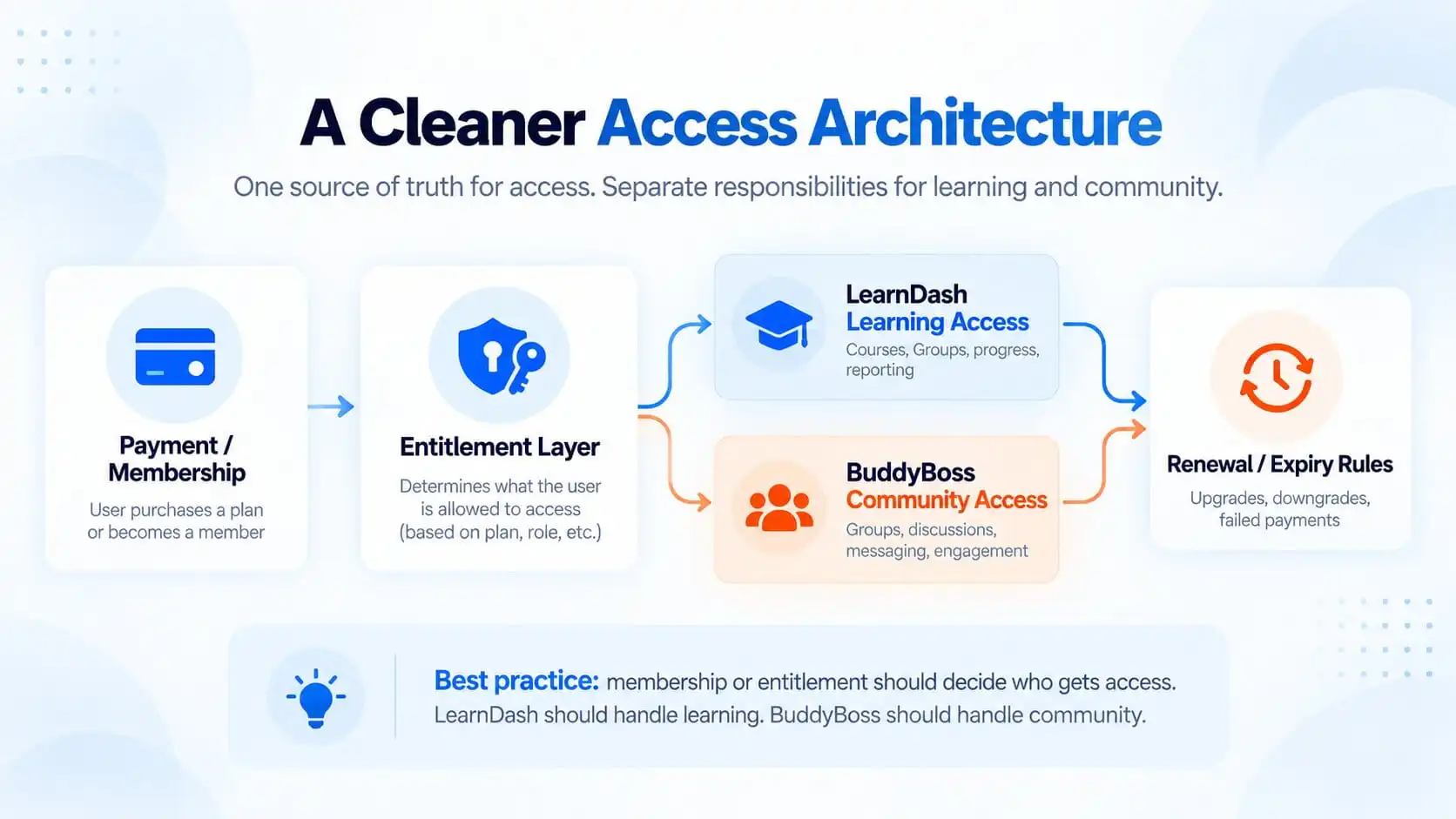
The cleanest architecture usually has one source of truth for entitlement.
For example:
Payment / Membership → Entitlement Layer
The entitlement layer then decides:
LearnDash Learning Access
and
BuddyBoss Community Access
LearnDash handles:
- courses
- groups
- enrolment
- progress
- reporting
BuddyBoss handles:
- social groups
- discussions
- messaging
- community interaction
- engagement
Then renewal, expiry, upgrade, downgrade, and failed-payment rules feed back through the same entitlement logic.
That gives the platform a predictable lifecycle.
BuddyBoss also supports app access-control groups that can use conditions including WordPress roles, BuddyBoss Social Groups, LearnDash Courses, LearnDash Groups, and supported membership systems. That can be useful for mobile access and personalized app experiences, but it is still important to define the underlying entitlement clearly before adding another access layer.
If your current site already has several overlapping access rules, this is the point where I would review the LMS and community architecture before adding more automation.
One Important LearnDash Detail
There is another reason to be deliberate about LearnDash Groups.
LearnDash Groups have their own access settings.
Depending on configuration, access can be free, paid, recurring, closed, or controlled in other ways, and group start dates can affect when users can begin working through associated courses.
That means the LearnDash Group itself can become a meaningful access object.
This is useful when the business is intentionally selling access to a group of courses.
But if you already have a separate membership system controlling the same entitlement, you need to decide which system owns that decision.
Otherwise you may end up selling or restricting the same access in two places.
Which Group Should Control Access?
The answer depends on what kind of access you mean.
Course access
Usually: LearnDash Groups
Community participation
Usually: BuddyBoss Groups
Paid membership entitlement
Usually: Membership, commerce, or entitlement layer
User lifecycle
Ideally: One source of truth
This distinction is more useful than asking which group system is “more powerful.”
They solve different problems.
Final Recommendation
LearnDash Groups and BuddyBoss Groups work well together when each system is allowed to do what it is good at.
Use LearnDash Groups to organize:
- learners
- courses
- cohorts
- Group Leaders
- progress
reporting
Use BuddyBoss Groups to organize:
- people
- conversations
- communities
- social interaction
- private spaces
- engagement
And when access depends on a paid membership, subscription, purchase, or company licence, place that entitlement decision above both systems whenever possible.
The architecture should look like this:
Entitlement decides who gets access.
LearnDash decides what they can learn.
BuddyBoss decides where they can participate socially.
That separation makes the system easier to manage, easier to troubleshoot, and much safer to expand as the business grows.
If you are planning a LearnDash + BuddyBoss build with memberships, paid access, corporate training, or synchronized groups, I can help map the learning, membership, and community architecture before development begins.
And if the platform requires deeper BuddyBoss customization or group-access integration, you can also review my BuddyBoss development services.