



If you are choosing between LearnDash and Tutor LMS by comparing feature lists, you are probably starting with the least important part of the decision.
Both can build courses, quizzes, certificates, paid learning experiences, and structured learning paths. The real differences become expensive later, when you add memberships, subscriptions, instructors, corporate clients, community features, reporting, WooCommerce, and custom access rules.
That is why I would not ask:
Which LMS has more features?
I would ask:
Which one fits the business model you are actually trying to build?
The Quick Answer
I would usually start with LearnDash when the platform needs complex WordPress integrations, corporate or group training, WooCommerce, sophisticated access rules, or a wider membership and community ecosystem.
I would take Tutor LMS very seriously when the business wants more of its course selling, subscriptions, memberships, instructor management, and checkout handled inside the LMS itself.
Neither is universally better.
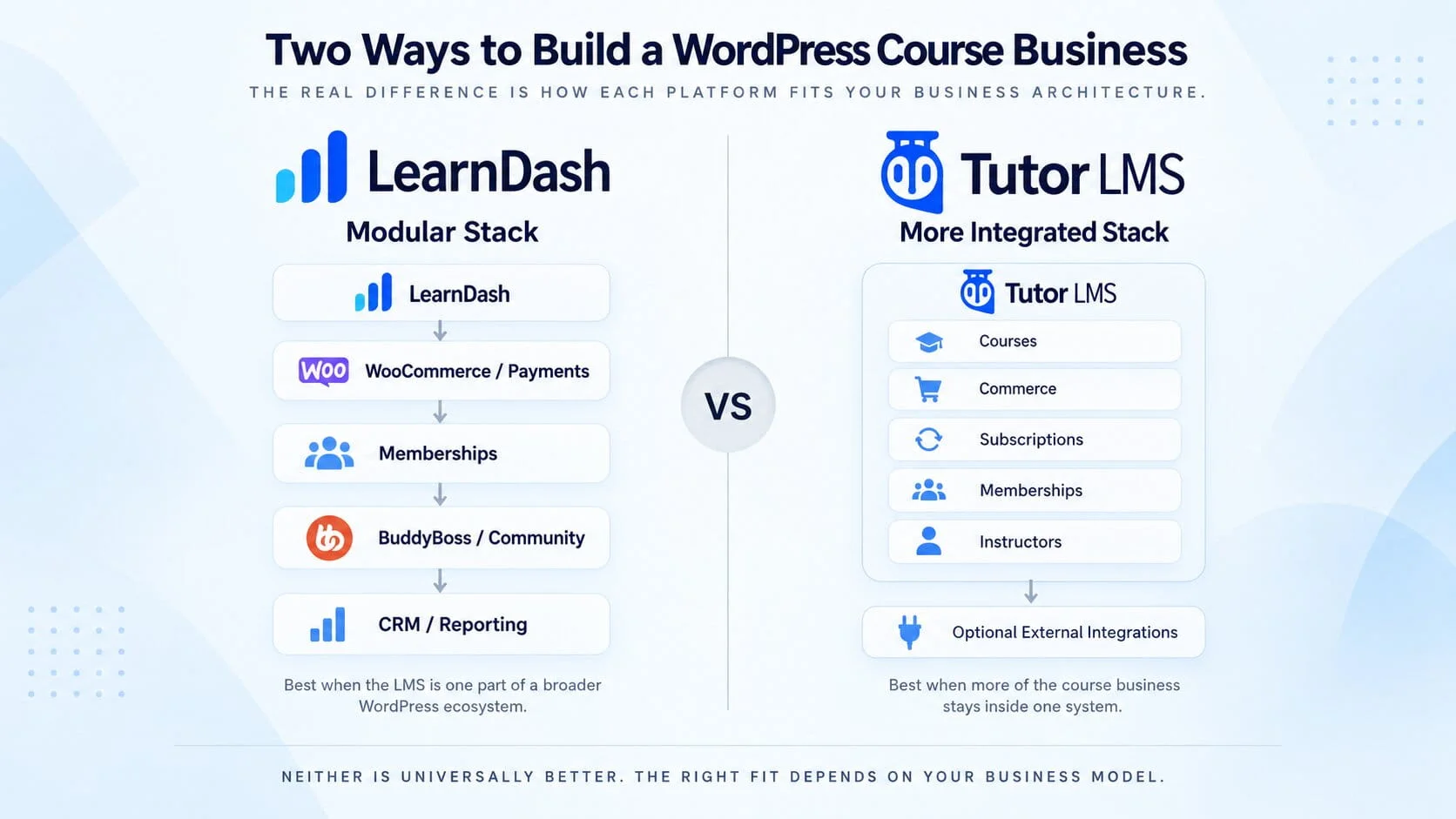
The more important difference is architectural:
LearnDash is naturally more modular.
Tutor LMS is becoming more consolidated.
That distinction matters much more than the number of quiz types either one offers.
LearnDash vs Tutor LMS at a Glance
|
Business need
|
Learndash
|
Tutor LMS
|
|---|---|---|
|
Simple paid courses
|
Strong
|
Strong
|
|
Native commerce
|
Capable, often extended with WooCommerce
|
Strong integrated direction
|
|
Memberships
|
Often combined with Groups or dedicated membership plugins
|
More functionality inside Tutor LMS
|
|
Multi-instructor business
|
Possible, usually with additional functionality
|
Strong fit
|
|
Corporate/B2B training
|
Strong
|
Capable
|
|
WooCommerce-heavy business
|
Very strong fit
|
Supported, but may not be necessary
|
|
BuddyBoss/community
|
Strong ecosystem
|
Also viable
|
|
Complex custom workflows
|
Strong
|
Improving
|
|
Simpler plugin stack
|
Can become modular/complex
|
Often easier to consolidate
|
|
Organizational/group structures
|
Major strength
|
Less central to the product
|
The important thing is not who wins the most rows.
It is which rows actually matter to your business.
The Biggest Difference Is the Architecture
With LearnDash, I tend to think in terms of separate responsibilities.
LearnDash handles learning.
WooCommerce may handle transactions.
MemberPress or Paid Memberships Pro may handle membership entitlement.
BuddyBoss may handle community.
A CRM may handle lifecycle automation.
LearnDash Groups may handle cohorts or organizations.
That creates more moving parts, but it also creates flexibility.
For example, imagine a training provider says:
A company should be able to buy 50 seats, assign employees, give its training manager reporting access, add more seats later, and remain completely separate from other client organizations.
That is no longer a simple course-selling problem.
It is an organizational access problem.
This is where LearnDash becomes particularly interesting.
Tutor LMS is moving in a different direction.
It increasingly tries to keep more course-business functionality inside Tutor itself, including commerce, subscriptions, memberships, instructor workflows, and reporting.
For a straightforward course business, that can produce a cleaner system.
If Tutor already covers:
- course sales
- subscriptions
- memberships
- instructors
- checkout
- learner management
then adding several separate plugins simply because “that is how WordPress LMS sites are built” may create complexity without creating value.
Neither philosophy is inherently better.
A consolidated stack can be easier to operate.
A modular stack can be easier to extend when requirements become unusual.
For businesses with memberships, commerce, community, reporting, or custom access rules working together, I prefer to map the LMS architecture before development starts rather than connect those systems one by one later.
Course Creation Is Not Where I Would Make the Decision
Both platforms are capable enough for serious course creation.
LearnDash has a mature structured course model and works particularly well when learning paths, prerequisites, reusable learning content, assessments, and controlled progression matter.
Tutor LMS has invested heavily in creator and instructor experience, which becomes important when multiple subject-matter experts need to manage their own courses.
But I would not choose between them based on the course builder alone.
The questions that usually matter more are:
- Who controls access?
- Who handles subscriptions?
- What happens when payment fails?
- Can companies buy seats?
- Can instructors manage only their own learners?
- Does community access follow membership status?
- Can several courses sit under one entitlement?
Those are the questions that determine whether the platform still feels manageable two years later.
Selling Courses: Native Simplicity vs Commerce Flexibility
Selling a single course for a fixed price is easy on either platform.
The challenge starts when the business model changes.
A course that begins as:
Sell as a one-time course purchase
may later become:
Include it in a membership, offer recurring access, sell corporate seats, support upgrades, issue coupons, and remove access automatically when billing changes.
LearnDash can handle direct paid access, but it also fits naturally into larger commerce stacks.
If WooCommerce already runs the business, LearnDash becomes an obvious candidate because the LMS can sit inside that existing commercial system.
When WooCommerce is already part of the platform, I prefer to design the course, membership, payment, and access flow as one connected system rather than treat checkout and enrollment as separate pieces.
That is useful when the site also sells:
- physical products
- events
- downloads
- subscriptions
- bundles
- non-course products
Tutor LMS makes a different argument.
If the business is mostly about selling learning products, keeping payments, checkout, subscriptions, refunds, and course access closer to the LMS can reduce the number of systems involved.
For a course-first business, I would seriously ask:
Do we actually gain anything by adding WooCommerce?
Sometimes yes.
Sometimes absolutely not.
Memberships: Decide Who Owns Access
A course and a membership are not automatically the same thing.
A course answers:
What learning content can this person access?
A membership may answer:
What does this customer receive across the entire business?
That could include courses, community groups, premium content, downloads, events, coaching, or member discounts.
This is where architecture matters.
LearnDash does not automatically need MemberPress
If the business simply needs to bundle several courses under one entitlement, LearnDash Groups may already cover the requirement.
A dedicated membership plugin becomes more useful when membership controls things outside LearnDash.
For example:
Gold Membership
- five LearnDash courses
- private BuddyBoss group
- premium articles
- member resources
- monthly webinar
In that case, I would often prefer the membership system to own the entitlement.
The logic becomes:
Membership active → courses + community + content granted
Membership inactive → everything removed
That is much cleaner than allowing several plugins to control access independently.
Tutor LMS can simplify this when the membership exists mainly around learning access because more subscription and membership functionality can stay inside Tutor.
The question is not:
Which LMS has memberships?
It is:
Which system should own entitlement for the entire business?
Multi-Instructor Businesses: Tutor LMS Deserves Attention
If the platform is run by one company publishing its own training, instructor management may not matter much.
If the business depends on multiple instructors, it becomes central.
Think:
- independent instructors
- subject-matter experts
- instructor dashboards
- earnings
- course ownership
- commissions
- instructor-specific reporting
Tutor LMS is especially attractive here because multi-instructor workflows are closer to the center of the product experience.
For a marketplace-style academy where instructors need to work independently without living inside the WordPress backend, I would investigate Tutor LMS early.
LearnDash can support instructor models too, but the setup is usually more deliberate and may involve additional role or instructor functionality.
If instructors are only one part of a more complex platform with corporate clients, memberships, and custom workflows, LearnDash may still be the better architectural fit.
Corporate and B2B Training: LearnDash Has a Strong Advantage
Corporate training is where this comparison starts separating more clearly.
A B2B platform may need:
- different client companies
- learner groups
- client managers
- seat allocation
- bulk enrollment
- group reporting
- separate access periods
- different course packages
That is where LearnDash Groups become particularly valuable.
The important distinction is that B2B training is not simply:
enroll 100 users at once.
The real questions are:
- Who manages those users?
- Can the client manager see only their employees?
- Can seats be reassigned?
- Can the company purchase additional seats?
- Can one organization have multiple teams?
- Can different clients have different access periods?
If those requirements are central, LearnDash would usually be the first platform I investigate.
BuddyBoss and Community: Both Can Work
If the business combines learning and community, BuddyBoss is often part of the discussion.
Both platforms can work in that environment.
So I would not choose based simply on whether an integration exists.
The important question is:
Who controls community access?
Suppose the Pro membership includes three courses and a private community.
When the subscription ends, both should disappear.
The architecture needs one clear source of truth.
When BuddyBoss is part of the platform, I prefer to design course, membership, and community access as one connected entitlement flow rather than manage them independently.
For example:
Membership → LearnDash courses → BuddyBoss community
or:
Tutor entitlement → courses → BuddyBoss community
Problems begin when course access, membership status, and community access are maintained separately.
That is how users end up retaining community access after cancellation or losing courses they should still have.
The integration is not the hard part.
The entitlement logic is.
Reporting: Define the Requirement Before Choosing
Almost every LMS can show basic enrollment and progress information.
Serious businesses usually need something more specific.
A corporate client may need:
Show me only my employees and their completion status.
An instructor may need:
Show me only the learners in my courses.
Finance may need:
Show subscriptions, refunds, and instructor commissions.
The best approach is to define these reports before selecting the LMS.
LearnDash becomes particularly useful when reporting needs to follow groups or organizational structures.
Tutor LMS has a strong integrated analytics direction for course, learner, instructor, and commercial reporting.
Neither should be selected because a comparison table says:
Advanced reports: Yes.
Write down the exact reports the business expects to use.
Then evaluate the platform.
Customization and Long-Term Maintenance
This is where LearnDash’s modularity can become either its biggest advantage or its biggest problem.
A real platform can easily become:
LearnDash + WooCommerce + Subscriptions + MemberPress + BuddyBoss + CRM + reporting + custom code
That can be extremely powerful.
It can also become difficult to maintain if several systems are allowed to control the same responsibility.
The problem is not simply having many plugins.
The problem is overlapping logic.
If LearnDash, WooCommerce, and MemberPress can all grant course access independently, troubleshooting becomes unnecessarily difficult.
Tutor LMS can reduce some of that integration surface because more commercial functionality may remain inside Tutor.
That can be simpler.
But the tradeoff is equally important:
If your business later needs functionality that the native system does not support, you may have fewer architectural options.
That is why I would always ask:
What is likely to change over the next three years?
Not just:
What do we need at launch?
Pricing: Compare the Stack, Not the Licence
One of the least useful ways to choose an LMS is by comparing licence prices alone.
The LMS licence is often one of the smaller costs in a serious platform.
A LearnDash build might eventually involve:
LearnDash + WooCommerce + memberships + subscriptions + BuddyBoss + reporting + email + hosting + custom development
A Tutor LMS build may consolidate more of those functions:
Tutor LMS Pro + community + hosting + email + selected integrations + custom development
Tutor may therefore produce a simpler stack for some businesses.
But simpler does not always mean cheaper over the long term.
If the native workflow later becomes limiting, custom development may become the largest cost.
Likewise, a business can easily overspend by building a complicated LearnDash stack for requirements Tutor LMS could have handled natively.
I would compare the three-year architecture cost, not just the first-year plugin price.
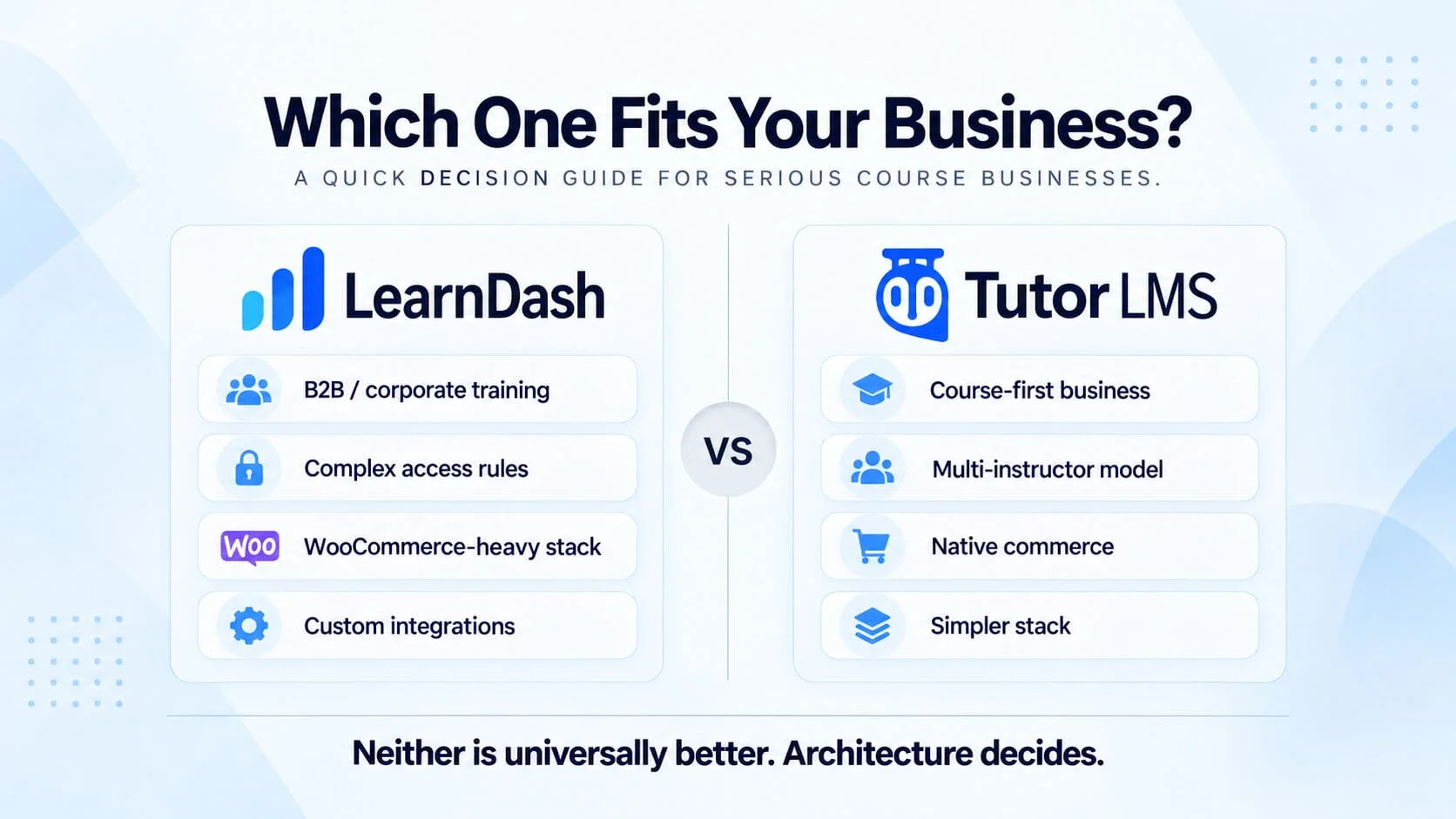
When I Would Choose LearnDash
I would lean toward LearnDash when:
- corporate or B2B training is important
- group structures and client managers matter
- WooCommerce already runs the business
- access rules are complex
- BuddyBoss and
- memberships are deeply connected
- the platform needs unusual integrations
- substantial custom development is expected
The more the LMS behaves like one component inside a custom business system, the stronger LearnDash becomes.
When I Would Choose Tutor LMS
I would lean toward Tutor LMS when:
- the business is primarily course-focused
- subscriptions and commerce should stay close to the LMS
- multiple instructors are central
- the team wants fewer separate plugins
- the platform should be easier to validate before heavy investment
- native functionality already covers most of the business model
The more the platform resembles an integrated online academy, the more attractive Tutor becomes.
When I Would Choose Neither
Sometimes neither is the right answer.
I would look elsewhere if the organization needs:
- a fully managed SaaS environment
- highly specialized enterprise LMS standards
- major HR or enterprise-system integration
- strict institutional procurement requirements
- infrastructure the business does not want to maintain itself
Likewise, a very simple creator business may not need a full WordPress LMS at all.
More flexibility is not automatically better.
Final Verdict
Tutor LMS is much harder to dismiss in 2026 than older comparisons suggest.
For a course-first business that benefits from native commerce, subscriptions, instructor workflows, and a more consolidated operating model, it can produce a cleaner platform with fewer moving parts.
For a highly customized LMS, especially one involving corporate groups, WooCommerce, memberships, BuddyBoss, organizational access, or unusual workflows, I would still often start with LearnDash.
Not because LearnDash wins a longer feature checklist.
Because its modular ecosystem can give the business more architectural freedom when the platform grows beyond simple course delivery.
My decision would usually come down to this:
Choose Tutor LMS when you want more of the course business handled inside one integrated system.
Choose LearnDash when the LMS needs to become one flexible component inside a broader WordPress business architecture.
Before choosing either one, map:
- who pays
- who gets access
- who loses access
- who manages learners
- who needs reporting
- whether companies buy seats
- whether community access is included
- which system owns memberships
- what needs to integrate later
Once those answers are clear, the right LMS usually becomes much easier to identify.
Planning a LearnDash or Tutor LMS Platform?
Choosing the LMS is usually the easy part.
The expensive mistakes happen when payments, memberships, course access, reporting, and community features are designed separately and forced to work together later.
If you are planning a LearnDash or Tutor LMS platform, I can help map the architecture before development starts, so the system is built around the business model rather than around whichever plugin happened to be installed first.