

How to Structure a Paid LearnDash + BuddyBoss Community Without Creating an Access-Control Mess
A paid LearnDash BuddyBoss community can work extremely well when payments, memberships, courses, and community access follow one clear business rule.
It can also become difficult to manage very quickly when LearnDash, BuddyBoss, WooCommerce, and a membership plugin all start granting or removing access independently.
The problem is usually not the number of plugins.
The problem is that nobody has decided which system is the source of truth for entitlement.
A cleaner structure is:
Payment / Subscription → Membership or Entitlement → LearnDash Learning Access + BuddyBoss Community Access
That gives every system a specific responsibility.
LearnDash handles learning.
BuddyBoss handles community.
The membership or entitlement layer decides what the customer has actually paid for and should currently be allowed to access.
That separation becomes especially important when subscriptions renew, payments fail, customers upgrade, or memberships expire.
Paid LearnDash BuddyBoss Community: The Short Answer
If you are building a paid community around LearnDash and BuddyBoss, I would not start by asking:
Which plugin should unlock which page?
I would start with:
What has this customer purchased, and what should that purchase entitle them to?
Once that answer is clear, the technical structure becomes much easier.
A typical paid community may involve:
- a payment or subscription
- a membership tier
- LearnDash courses
- LearnDash Groups
- BuddyBoss Groups
- community discussions
- private member areas
- renewal and expiry rules
The mistake is allowing each one to become its own separate access system.
One purchase should produce one predictable entitlement.
That entitlement can then grant several things.
Why Paid LMS Communities Become Messy
Imagine a site using:
- WooCommerce for checkout
- MemberPress for memberships
- LearnDash for courses
- BuddyBoss for community
- automation connecting all four
Now imagine a Professional member buys access.
WooCommerce completes the order.
MemberPress activates the membership.
LearnDash enrolls the user into courses.
BuddyBoss adds them to a private community.
So far, everything works.
The difficulty appears later.
What happens when:
- the renewal payment fails?
- the member upgrades?
- the member downgrades?
- the subscription is cancelled?
- the administrator manually
- changes a membership?
- someone removes the user from a BuddyBoss Group?
- a LearnDash Group changes?
- a refund is issued?
If every plugin maintains its own independent interpretation of access, users can easily end up with permissions they should no longer have or lose access they should still keep.
That is why the access architecture needs to be designed around the business entitlement, not around individual plugin settings.
Start With the Business Entitlement, Not the Plugins
The entitlement is simply the answer to:
What is this person allowed to receive right now?
That might come from:
- an active monthly membership
- an annual subscription
- a one-time purchase
- a company licence
- a manually assigned account
- a specific membership tier
- another business rule
The important thing is that the entitlement exists before you decide what LearnDash or BuddyBoss should do.
For example:
A customer purchases Professional Membership.
The business rule says Professional includes:
- Courses 1 through 5
- Professional LearnDash Group
- Professional BuddyBoss Community
- selected member resources
That is the entitlement.
LearnDash and BuddyBoss should implement that entitlement.
They should not redefine it independently.
If you are still deciding where the membership layer belongs, it is worth reading Do You Actually Need MemberPress With LearnDash? before adding another system to the stack.
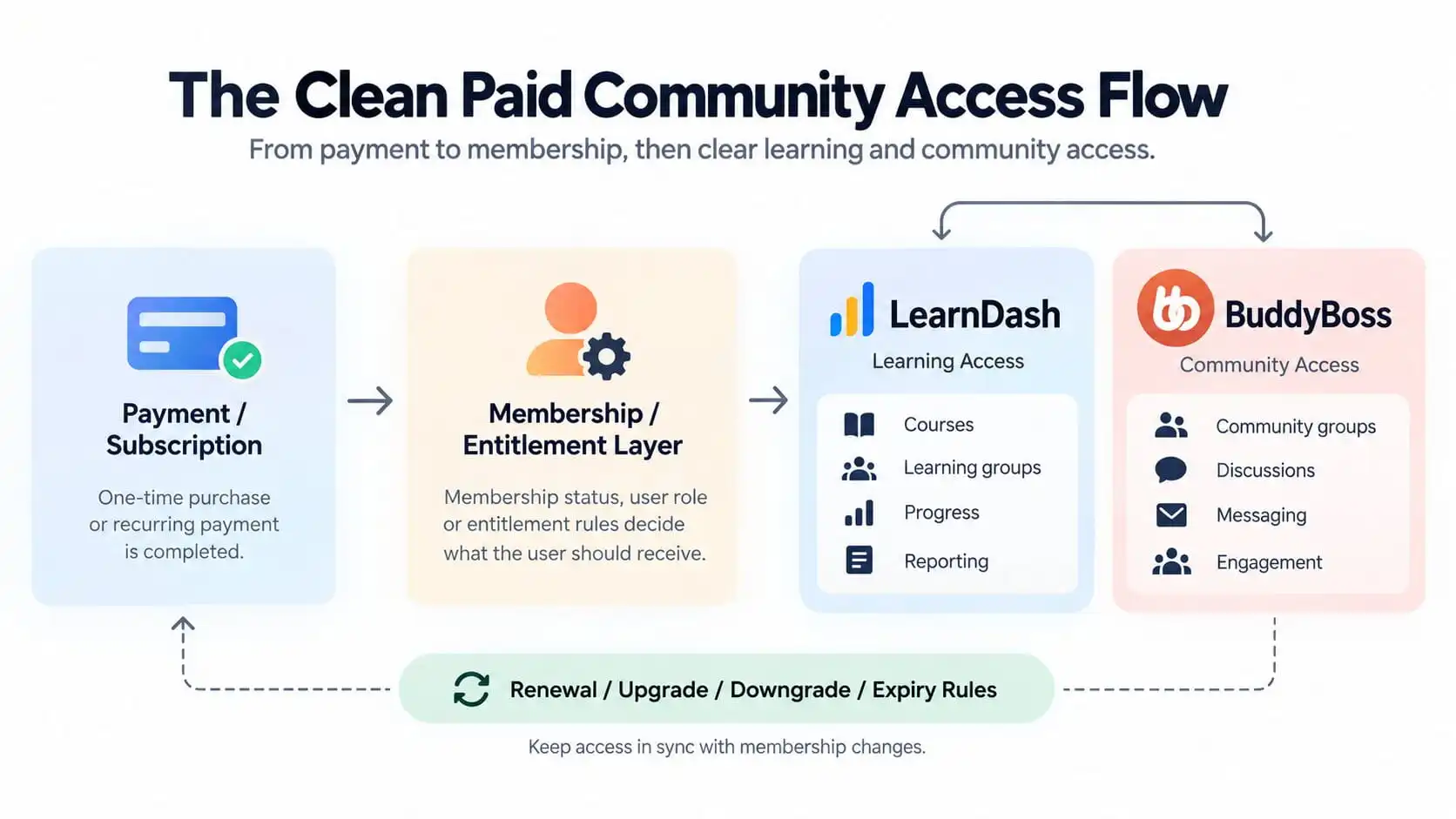
The Clean Paid Community Access Flow
A cleaner flow looks like this:
Payment / Subscription → Membership / Entitlement Layer → LearnDash Learning Access + BuddyBoss Community Access → Renewal / Upgrade / Downgrade / Expiry Rules
The crucial step is the middle one.
The entitlement layer answers:
- Which plan is active?
- What does that plan include?
- When does access begin?
- When should access change?
- When should access end?
Then LearnDash and BuddyBoss receive the result of that decision.
LearnDash supports Free, Buy Now, Recurring, and Closed access modes for Groups. Its own documentation specifically advises against using Buy Now or Recurring when group access is being sold through a shopping cart or membership plugin; Closed mode is designed for situations where an external ecommerce or membership system handles enrolment.
That is a useful principle well beyond that single setting:
Do not sell or govern the same entitlement independently in multiple places unless you have a deliberate reason.
What the Payment Layer Should Control
The payment system should primarily answer:
Did a valid financial event occur?
Depending on the platform, that may include:
- successful checkout
- successful recurring payment
- failed renewal
- refund
- cancellation
- charge reversal
- subscription change
The payment layer should not need to understand every LearnDash course or BuddyBoss Group directly.
Its job is to produce a reliable commercial state.
For example:
Subscription active
or:
Subscription expired
The entitlement layer then translates that commercial state into access.
This separation becomes valuable later when the business changes payment providers or introduces another way of granting access.
What the Membership Layer Should Control
If a membership system is being used, this is often the strongest candidate for the central entitlement layer.
It can answer questions such as:
- Is the membership active?
- Which tier does the member belong to?
- When does the membership expire?
- Has the member upgraded?
- Has the member downgraded?
- What wider site access does this membership unlock?
The membership should describe the business relationship.
For example:
|
Starter
|
Professional
|
Enterprise
|
|---|---|---|
|
Courses 1 - 2
|
Courses 1 - 5
|
All courses
|
|
Starter community
|
Professional community
|
Private company community
|
|
Basic member resources
|
Extended resources
|
Company-specific learning group
|
|
|
|
Manager reporting
|
The individual LMS and community systems then implement those rules.
That is much easier to maintain than recreating the same Starter, Professional, and Enterprise logic separately inside LearnDash, BuddyBoss, WooCommerce, and WordPress roles.
What LearnDash Should Control
LearnDash should own the learning experience.
That includes things such as:
- courses
- lessons and topics
- quizzes
- progression
- certificates
- learning Groups
- learner enrolment
- Group Leaders
- progress
- learning reporting
LearnDash Groups are particularly useful when the entitlement maps naturally to a cohort, company, membership tier, or collection of courses. Users assigned to a LearnDash Group receive access to the courses attached to that Group, and Groups support use cases such as classes, company training, locations, scheduled cohorts, and group-level tracking.
So a Professional membership might result in:
Professional entitlement → Professional LearnDash Group → Courses 1–5
That gives the LMS a clear job.
It does not need to decide whether the customer has paid.
It only needs to know whether the user should currently belong to the appropriate learning structure.
For a deeper breakdown of the group distinction, see LearnDash Groups vs BuddyBoss Groups: What’s the Difference and Which Should Control Access?.
What BuddyBoss Should Control
BuddyBoss should own the social and community experience.
That includes:
- social groups
- discussions
- activity
- member interaction
- messaging
- community visibility
- engagement
- other social permissions
BuddyBoss also supports access controls that can use criteria including WordPress roles, profile types, membership levels, and LearnDash Groups/Memberships. Supported membership conditions include systems such as MemberPress, Paid Memberships Pro, WooCommerce Memberships, and others.
That flexibility is useful.
But it does not mean BuddyBoss should become the source of truth for the commercial membership.
A better relationship is:
Entitlement says Professional access is active → BuddyBoss grants Professional Community access
Then, if the entitlement changes, the community access changes with it.
If your BuddyBoss setup requires custom synchronization, account logic, or more complex access rules, that is the type of work covered by my BuddyBoss development services.
Responsibility Map
|
Payment
|
Membership / Entitlement
|
LearnDash
|
BuddyBoss
|
|---|---|---|---|
|
Checkout
|
Membership status
|
Courses
|
Social groups
|
|
Transactions
|
Tier
|
Learning Groups
|
Discussions
|
|
Renewals
|
Eligibility
|
Enrolment
|
Messaging
|
|
Refunds
|
Upgrade / downgrade
|
Progress
|
Activity
|
|
Payment failures
|
Expiry rule
|
Reporting
|
Community engagement
|
The important thing is not the exact plugin used in each column.
The important thing is that each responsibility has one clear owner.
Why One Source of Truth Matters
Access systems become fragile when the same rule exists in multiple places.
Imagine the Professional plan is defined in:
- a WooCommerce product
- MemberPress membership rules
- a LearnDash Group
- three BuddyBoss Groups
- two WordPress roles
- a custom automation
Now change what Professional includes.
Which system do you update?
What happens if one is missed?
That is how stale access rules accumulate.
A single entitlement model gives you one question to answer:
What should Professional members currently receive?
Everything else should follow from that.
This is also why I recommend mapping the LMS and community architecture before implementing a large number of automation rules.
What Happens After a Successful Payment
A successful payment should trigger a predictable chain.
For example:
- Payment succeeds.
- Membership becomes active.
- Entitlement resolves to Professional.
- User receives the Professional
- LearnDash learning access.
- User receives the Professional BuddyBoss community access.
- Any required supporting access is applied.
The key is that steps 4 and 5 come from the same entitlement.
You do not want one automation granting LearnDash independently while another unrelated rule decides BuddyBoss access.
Those two workflows will eventually drift apart.
What Happens When a Renewal Succeeds
A successful renewal usually should not rebuild everything from scratch.
It confirms that the existing entitlement remains valid.
The lifecycle becomes:
Renewal succeeds → Membership remains active → Existing access remains valid
This sounds obvious, but defining it matters.
Otherwise unnecessary remove-and-readd operations can create side effects, duplicate notifications, or inconsistent group membership.
What Happens When a Payment Fails
This is where many access architectures reveal their weaknesses.
A failed renewal does not always mean access should disappear immediately.
The business might have:
- a grace period
- retry logic
- manual invoicing
- a past-due state
- temporary restricted access
So the rule should not simply be:
Payment failed → remove everything
It should be:
Payment state → entitlement state → access action
For example:
First failed renewal → Past Due → retain access during 5-day grace period
Then:
Final failure → Expired → remove paid learning and community access
The exact rule belongs to the business.
The plugins should execute it.
What Happens When Someone Upgrades
Suppose a Starter member upgrades to Professional.
Starter includes:
- Courses 1–2
- Starter Community
Professional includes:
- Courses 1–5
- Professional Community
A clean upgrade should produce:
Starter → Professional
Then:
- Courses 3–5 are added.
- Professional Community is added.
- Previous valid learning history remains intact.
- Any access that Professional still includes remains untouched.
You should not have to manually recreate the member.
You are changing their entitlement.
What Happens When Someone Downgrades
Downgrades need more thought than upgrades.
Suppose a Professional member moves to Starter.
The desired result might be:
- keep Courses 1–2
- remove Courses 3–5
- remove Professional Community
- grant or retain Starter Community
- preserve historical progress for removed courses
The last point is important.
Removing current access is not the same as deleting historical data.
Your architecture should distinguish between:
what the user can access now
and:
what the system should remember about their previous activity
What Happens When a Membership Expires
Expiry needs a written rule.
Not an assumption.
For each paid resource, decide:
- Does access disappear immediately?
- Is there a grace period?
- Does course access remain permanently?
- Does community access end?
- Does the user move to a free community?
- Is previous course progress preserved?
- Can expired users still see historical certificates?
- What happens to company managers?
This is where business decisions become technical requirements.
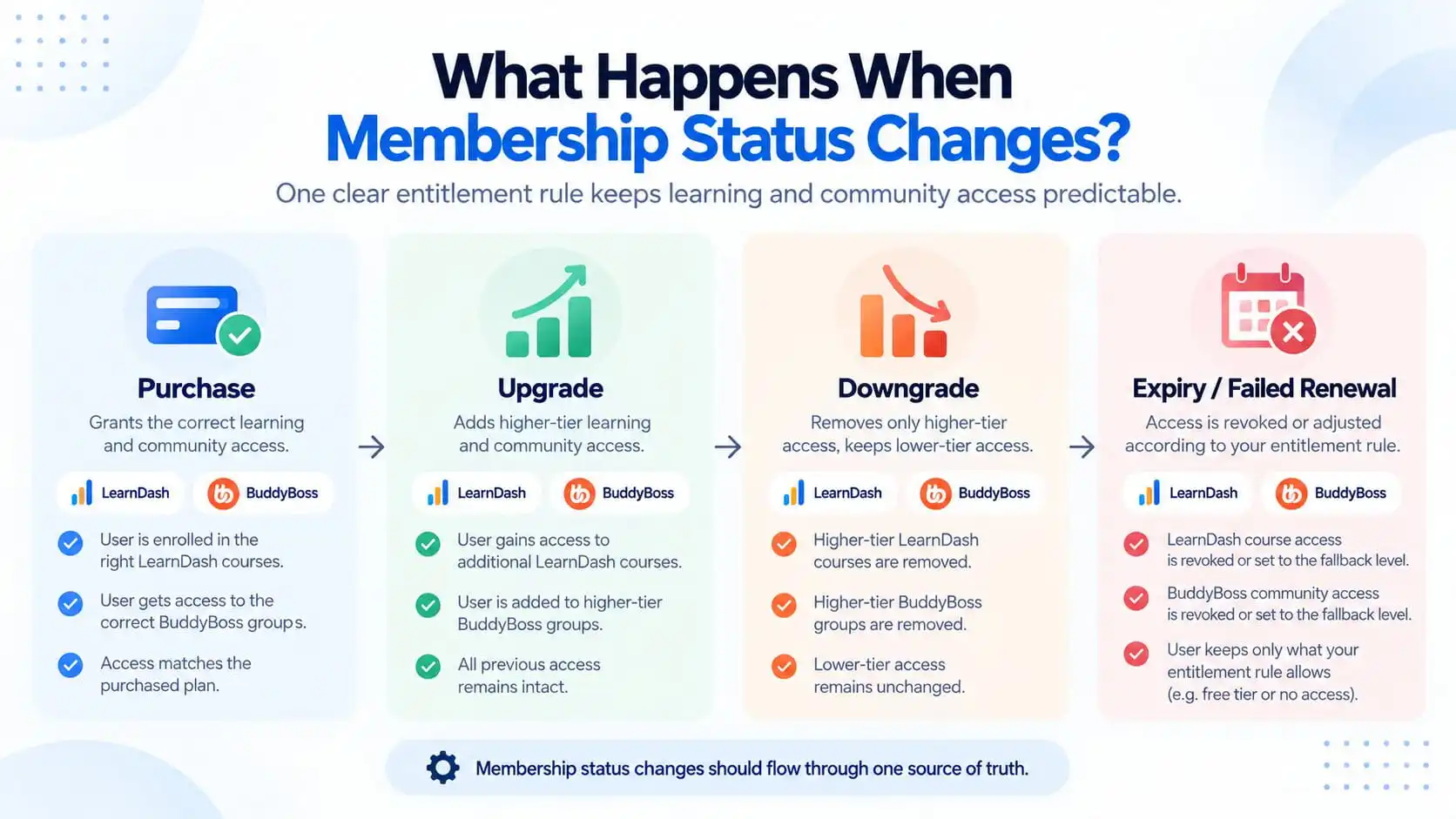
What Happens When Membership Status Changes?
The important part is not simply granting access after the first purchase.
The architecture also needs to know how access should change throughout the membership lifecycle.
A new purchase should grant the correct learning and community access for that tier.
An upgrade should add the higher-tier courses, groups, or community areas without disturbing access the user should still keep.
A downgrade should remove only the access that no longer belongs to the member, while preserving lower-tier access and relevant learning history.
If a membership expires or a renewal ultimately fails, the system should apply one defined expiry rule across both LearnDash and BuddyBoss.
That might mean removing all paid access, moving the member to a lower tier, preserving completed-course history, or keeping certain resources available permanently.
The key principle is:
Membership status changes should flow through one source of truth, rather than being handled independently by LearnDash and BuddyBoss.
When LearnDash Groups Should Be Used
LearnDash Groups are useful when the learning entitlement naturally represents a collection of learners and courses.
Common examples include:
- membership tiers
- corporate clients
- cohorts
- classes
- departments
- locations
- certification tracks
LearnDash Groups can also use start dates and end dates, which makes them useful for time-based cohorts and controlled learning windows. LearnDash notes that a Group end date ends access to the Group and its courses for enrolled users, while Group start dates can delay when users begin progressing through the assigned courses.
That can be useful when the learning schedule itself is part of the business rule.
But it is different from a recurring commercial membership that may continue indefinitely.
Do not use a LearnDash Group date to solve a membership lifecycle problem if the membership system already owns that lifecycle.
When BuddyBoss Groups Should Be Synchronized
There are cases where LearnDash and BuddyBoss Groups represent the same audience.
For example:
LearnDash Group: Professional Certification Cohort
BuddyBoss Group: Professional Certification Community
Then synchronization makes sense because the same entitlement should unlock both experiences.
But that does not mean every LearnDash Group needs a matching social group.
A company may have:
LearnDash Groups
- Management Training
- Sales Training
- Compliance Training
but only one:
BuddyBoss Group
- Acme Employee Community
That can be a perfectly clean architecture.
Synchronize where the business relationship matches.
Do not synchronize simply because both products have a feature called “Groups.”
A Three-Tier Membership Example
Imagine:
|
Starter
|
Professional
|
Enterprise
|
|---|---|---|
|
Courses 1 and 2
|
Courses 1 through 5
|
All courses
|
|
Starter community
|
Professional community
|
Company-specific learning group
|
|
|
member resources
|
Private company community
|
|
|
|
Manager reporting
|
Now the plugins do not need to understand the entire commercial model independently.
They only implement the result.
That makes future changes much safer.
Corporate Training Example
Paid communities are not limited to individual subscriptions.
Imagine a training company sells 100 seats to Acme Corporation.
The entitlement is:
Acme licence active for 100 users
A clean responsibility map might be:
|
Commercial / Entitlement
|
LearnDash
|
BuddyBoss
|
|---|---|---|
|
Company licence determines eligibility
|
Acme learning Group
|
Acme private community
|
|
Seat allocation
|
Required courses
|
Employee discussion
|
|
Contract start/end
|
Progress and reporting
|
Announcements
|
|
Renewal status
|
Training manager as Group Leader
|
Peer support
|
LearnDash also has functionality and add-ons designed around organizational/group licensing scenarios, including Group Registration and Groups Plus for selling group access and seats.
Again, the company contract should decide entitlement.
The LMS and community layers should implement it.
Common Access-Control Mistakes
1. Selling the same access twice
For example:
LearnDash Group set to Recurring and MemberPress independently selling the same learning access.
LearnDash explicitly advises using Closed mode when a shopping cart or membership plugin is responsible for group access.
2. Letting BuddyBoss membership decide course entitlement independently
BuddyBoss may use LearnDash or membership conditions for community controls, but your learning access should still follow the intended learning architecture.
3. Removing data instead of access
Cancelling a membership usually means the customer should lose current access.
It does not necessarily mean their learning history should be erased.
4. No downgrade logic
Teams often design purchase and cancellation flows but forget downgrades.
That becomes a problem as soon as there are multiple tiers.
5. No failed-payment state
A failed card charge is not always identical to a cancelled membership.
6. Synchronizing every possible group
More automation does not automatically produce cleaner architecture.
7. Using WordPress roles as the entire membership model
Roles can be useful technical conditions, but they are often too broad to represent a complex commercial entitlement by themselves.
8. No documentation
If nobody can explain:
why this user currently has access
without inspecting five plugins, the architecture is already too difficult to maintain.
How to Audit an Existing Access-Control Mess
If the site already exists, I would not start by adding another plugin or automation.
First map the current access paths.
For every paid plan, document:
1. What triggers access?
Purchase, subscription, membership, manual assignment, company licence?
2. Which system stores the active entitlement?
3. What LearnDash access is granted?
4. What BuddyBoss access is granted?
5. What happens on renewal?
6. What happens on upgrade?
7. What happens on downgrade?
8. What happens on failed payment?
9. What happens on cancellation or expiry?
10. Which system is allowed to revoke access?
You will usually find that the mess comes from duplicated responsibility rather than from one technically broken plugin.
This is also where reviewing the real cost of a LearnDash platform becomes useful. More plugins, integrations, and custom automation do not just affect licensing. They increase the maintenance and testing surface of the platform.
The Architecture I Would Aim For
For most paid LearnDash + BuddyBoss builds, I would aim for this:
Commercial layer
Handles:
- checkout
- subscriptions
- renewals
- refunds
- financial status
Entitlement layer
Handles:
- active membership
- tier
- eligibility
- upgrades
- downgrades
- expiry rules
LearnDash
Handles:
- course enrolment
- learning Groups
- progression
- completion
- reporting
BuddyBoss
Handles:
- social Groups
- community visibility
- discussions
- messaging
- engagement
Then all membership lifecycle changes pass through the same entitlement logic.
That structure is much easier to reason about.
Final Recommendation
A paid LearnDash BuddyBoss community does not become reliable because every plugin is connected to every other plugin.
It becomes reliable when every system has a clear responsibility.
The pattern I would use is:
Payment confirms the commercial event.
Membership or entitlement determines what the customer currently owns.
LearnDash delivers the learning access.
BuddyBoss delivers the community access.
Renewal, upgrade, downgrade, and expiry rules update both through the same source of truth.
That is what prevents the access-control mess.
It also makes the platform easier to explain to administrators, easier to support when something goes wrong, and safer to expand when the business introduces new membership tiers, cohorts, corporate clients, or community areas.
If you are planning this type of platform, or already have overlapping LearnDash, BuddyBoss, WooCommerce, and membership rules that are becoming difficult to maintain, I can help map the LMS, membership, payment, and community architecture before more complexity is added.