


A lot of businesses add MemberPress with LearnDash almost automatically, but that does not mean every LearnDash site actually needs a separate membership layer.
This is one of the first architecture decisions I would make before development starts, because the wrong choice can leave you with two or three different systems all trying to control the same thing: access.
LearnDash already protects course content, supports paid access, and includes Groups for bundling courses and organizing learners. LearnDash itself states that MemberPress is optional, not required, for selling and protecting course content.
MemberPress becomes useful when the business needs something broader than course enrollment.
The real question is:
Are you selling courses, or are you selling a membership that happens to include courses?
That distinction usually tells me whether MemberPress belongs in the stack.
The Short Answer
You probably do not need MemberPress if customers simply buy courses, course bundles, or training access that can be managed inside LearnDash.
You should start considering MemberPress when membership status needs to control several benefits together, such as:
- LearnDash courses
- recurring subscriptions
- protected WordPress content
- private BuddyBoss groups
- downloadable resources
- different membership tiers
- access that must change automatically when a subscription changes
In that situation, MemberPress can become the membership layer while LearnDash remains responsible for the learning experience.
That separation can work very well.
But only when the responsibilities are clear.
Start With the Offer, Not the Plugins
Before deciding whether you need MemberPress, I would write down exactly what the customer is buying.
There is a major difference between these two offers.
Offer A
Buy the Advanced Training Course with a one-time payment.
The customer pays once and receives one course.
Offer B
Join the Pro Membership with recurring monthly access.
The membership includes:
- five courses
- a private community
- premium resources
- member-only content
- monthly events
Offer A is primarily a course-access problem.
Offer B is a membership-entitlement problem.
I would not build those two businesses with the same architecture just because both happen to use LearnDash.
If your platform needs courses, memberships, payments, and community access to work as one system, it is worth mapping the LMS and membership architecture before deciding which plugin owns each responsibility.
That planning step usually prevents much more expensive fixes later.
LearnDash Can Already Handle a Lot of Access Logic
LearnDash is not just a course builder.
Its Groups system can place users into groups, assign courses to those groups, give Group Leaders visibility into learner progress, sell group access, and organize learners into memberships, cohorts, departments, or client accounts.
That means a business model like this:
Buy the Professional Training Package and receive Courses A, B, C, and D.
does not automatically need MemberPress.
You may be able to model that cleanly using LearnDash Groups.
LearnDash Group access can also support one-time or recurring paid access, depending on the setup.
So if the customer’s entitlement starts and ends with learning content, my first question would be:
Can LearnDash already handle this cleanly?
If the answer is yes, I would be cautious about introducing another membership layer.
When LearnDash Alone Is Usually Enough
I would usually keep the architecture primarily inside LearnDash when:
- customers buy individual courses
- customers buy simple course bundles
- users only need access to learning content
- there is no wider premium-content library
- community access is not tied to a membership
- recurring membership tiers are not central to the offer
- the main business rule is simply which courses a learner should have
For this type of business, simplicity is valuable.
Every extra system creates more configuration, more updates, more testing, and another place to look when access goes wrong.
The best architecture is not the one with the most premium plugins.
It is the one where every plugin has a clear reason to exist.
Where MemberPress Starts Earning Its Place
Now consider a different business model.
A customer joins:
Gold Membership
They receive:
- five LearnDash courses
- a private BuddyBoss group
- premium WordPress articles
- downloadable templates
- member-only events
- discounts on other products
Now LearnDash is only one part of what the customer is buying.
The more important question becomes:
Is the Gold Membership active?
If it is active, the customer should receive several benefits.
If it expires, those benefits should change together.
This is where a dedicated membership platform becomes much more useful.
The LearnDash MemberPress integration can associate MemberPress membership levels with one or more LearnDash courses, automatically enroll members, and remove course enrollment when the membership is cancelled.
That gives each system a clearer role:
MemberPress owns membership status.
LearnDash owns learning.
That is a much cleaner reason to use both.
Who Should Own Access?
This is the part I would decide before building anything else.
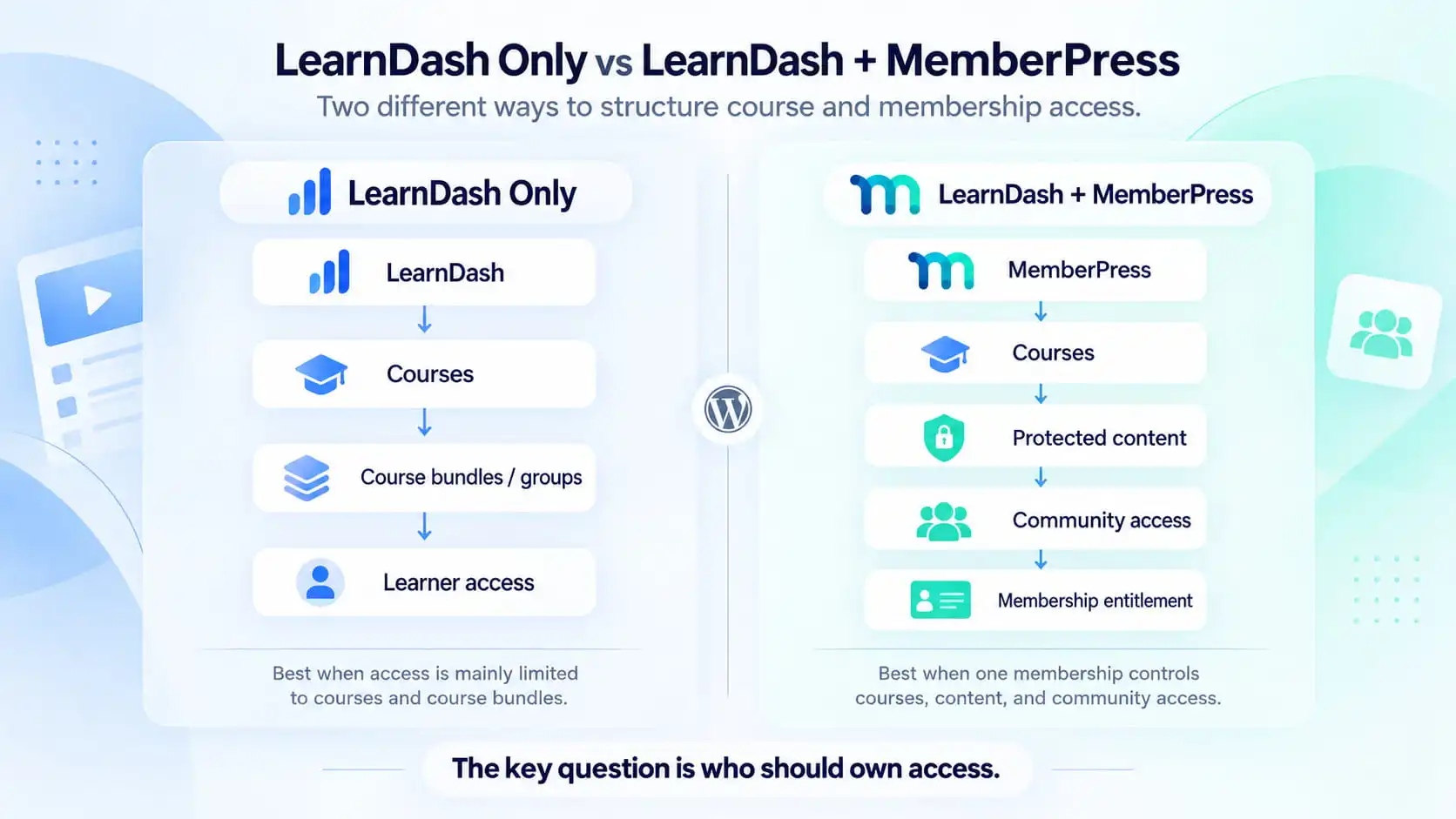
A LearnDash-only setup might look like:
Payment → LearnDash course or group → learner access
A membership-led setup might look like:
MemberPress membership → LearnDash courses + protected content + community benefits
Both can be correct.
The problem appears when several systems are allowed to grant the same access independently.
For example:
- MemberPress grants Course A
- WooCommerce also grants Course A
- an admin manually enrolls the same user
- custom code adds them to a community group
Now the customer’s payment fails.
Which system should remove access?
If nobody can answer that clearly, support problems are almost guaranteed.
This is why I care more about ownership of access than the number of integrations a plugin supports.
Recurring Memberships Make the Decision More Important
One-time access is relatively simple.
Recurring memberships introduce states such as:
- trial
- active
- cancelled
- expired
- renewed
- upgraded
- downgraded
- payment failed
Each one can have a different business consequence.
Suppose someone cancels a monthly membership halfway through the billing period.
Do they lose course access immediately?
Or at the end of the period?
If they downgrade, which courses remain?
What happens to private community access?
Should protected resources disappear at the same time?
These are not course-builder questions.
They are entitlement questions.
When one membership status needs to coordinate several benefits, a dedicated membership layer usually starts making much more sense.
BuddyBoss Is a Good Example
This is where the value becomes very obvious.
Suppose your Pro Membership includes:
Courses 1–5
plus
a private BuddyBoss community
The customer cancels.
You do not want one system removing course access while the customer remains inside the private community for another six months.
MemberPress has a BuddyBoss integration that can tie membership status to community access, including automatically adding or removing users from groups depending on their subscription status.
For this type of platform, I would design course, membership, and community access as one connected entitlement flow.
Conceptually:
Membership active
- courses available
- community available
- premium content available
Then, when the membership changes, the connected benefits change predictably.
That is much easier to operate than maintaining separate access rules manually.
MemberPress Is More Useful When Content Exists Outside the LMS
Another common reason to use MemberPress is when the paid experience extends beyond LearnDash.
For example:
- private articles
- downloadable resources
- templates
- event recordings
- coaching libraries
- member-only pages
- discounts
- premium tools
If the same membership should control all of those benefits, it may be cleaner to let the membership system control the entitlement rather than forcing LearnDash to become responsible for areas outside the LMS.
Again, the decision is not:
Does MemberPress have more features?
It is:
What does the membership need to control?
When MemberPress Creates More Complexity Than Value
Now take the opposite case.
The business sells:
- one course
- one price
- no community
- no premium content
- no membership levels
- no recurring relationship
Adding MemberPress here gives you:
- another plugin
- another settings area
- another access model
- another checkout configuration
- another email system
- another dependency to test after updates
But the customer experience may not improve at all.
That is where I would skip it.
Over-engineering is still bad architecture, even when the plugins involved are excellent.
What If WooCommerce Already Runs the Business?
This is another scenario where I would not automatically add MemberPress.
If the site already relies heavily on WooCommerce for:
- physical products
- subscriptions
- downloads
- events
- coupons
- taxes
- bundles
- customer accounts
then WooCommerce may already be the logical commercial layer.
In that case, the bigger question becomes whether introducing MemberPress improves the model or creates a second commercial system.
For businesses already using WooCommerce, I prefer to look at the course, membership, payment, and access flow as a whole before adding another plugin.
Sometimes MemberPress still makes sense.
Sometimes WooCommerce plus LearnDash is cleaner.
The answer depends on which system should own the customer relationship.
LearnDash Groups and MemberPress Are Not the Same Thing
This distinction is important.
LearnDash Groups are usually about learners and training structure
They can represent:
- cohorts
- departments
- corporate clients
- course bundles
- classrooms
- membership-style learning access
They are particularly useful when you need Group Leaders, group reporting, or multiple courses assigned to a defined learner population.
MemberPress memberships are usually about commercial entitlement
They are better suited to questions like:
- which membership level did the customer buy?
- is that membership active?
- what site-wide benefits does it unlock?
- what happens when the subscription changes?
Sometimes you need one.
Sometimes both.
What you should avoid is using both for the same job without a clear reason.
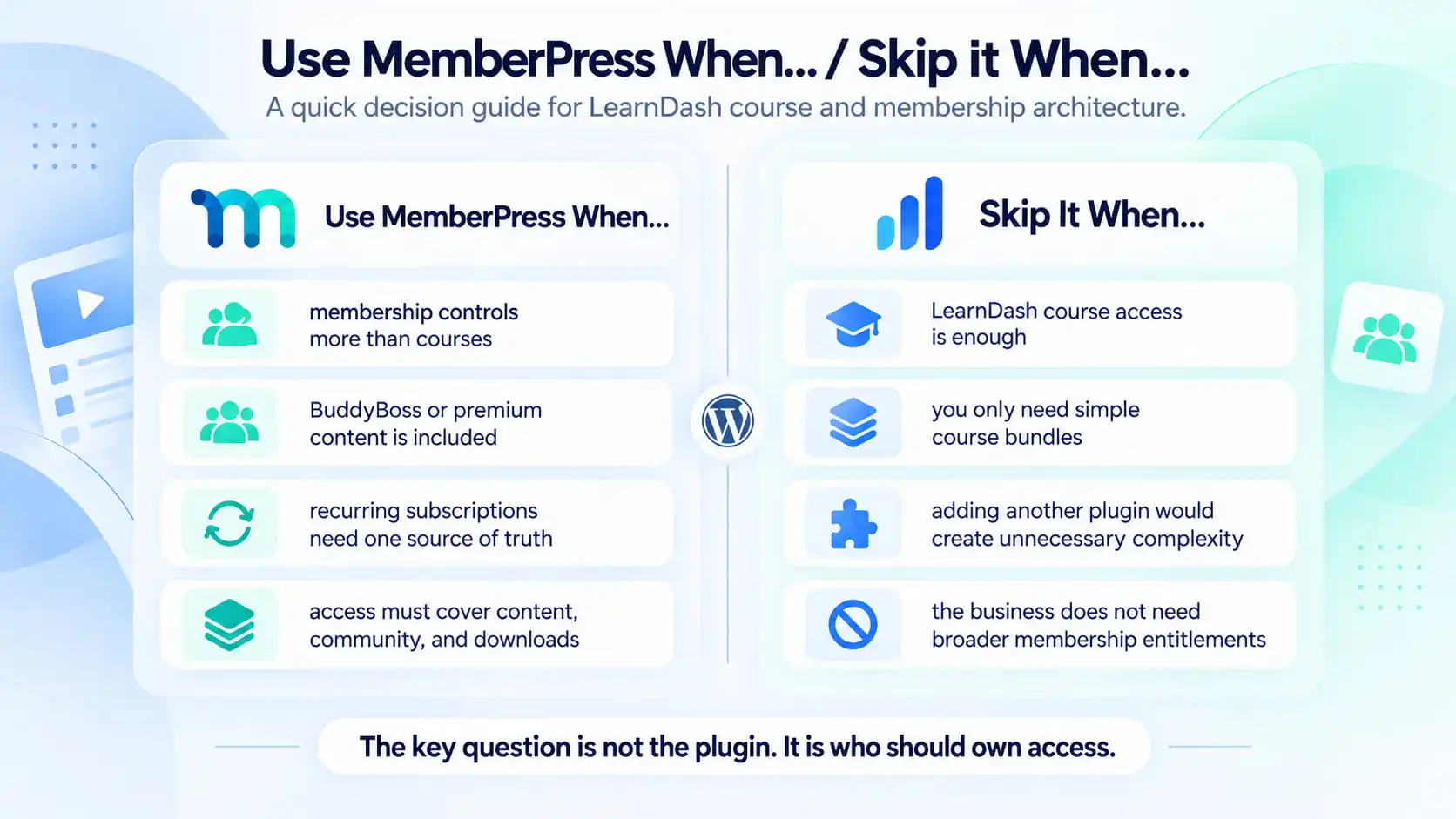
Use MemberPress When… / Skip It When…
I would lean toward using MemberPress when:
- membership controls more than LearnDash courses
- recurring membership status drives access
- BuddyBoss access should follow membership status
- protected WordPress content is part of the offer
- several benefits need to activate and expire together
- the membership should be the source of truth
I would usually skip MemberPress initially when:
- LearnDash access already solves the problem
- the business only sells simple courses or bundles
- there is no wider membership experience
- another platform already owns entitlement
- MemberPress would duplicate existing access rules
That is the decision I would make before comparing plugin features.
What About Paid Memberships Pro?
MemberPress is not the only valid membership option.
LearnDash also supports other membership platforms, including Paid Memberships Pro.
So if the business genuinely needs a dedicated membership system, I would compare the available options based on the actual requirements:
- membership levels
- recurring billing
- content protection
- checkout
- community integration
- WooCommerce relationship
- reporting
- administration
- custom workflows
But I would not start there.
The first question is still:
Do we need a separate membership layer at all?
That decision has a much bigger effect on the platform than the choice between two membership plugins.
My Recommendation
If the product is fundamentally the course, I would first try to keep the access model inside LearnDash.
If LearnDash course access or Groups can represent the offer cleanly, I would not add MemberPress simply because it is a common combination.
I would add MemberPress when the business is actually selling a broader membership and LearnDash courses are only one part of what that membership unlocks.
The distinction I use is simple:
If the product is the course, LearnDash may be enough.
If the product is the membership and courses are one of its benefits, MemberPress becomes much more valuable.
And before development starts, I would make one thing explicit:
Which system owns access?
That decision affects cancellations, renewals, upgrades, community access, content protection, and support later.
Getting it right early is much cheaper than untangling it after the platform has hundreds or thousands of members.
Planning a LearnDash Membership Platform?
If course access, memberships, payments, protected content, or BuddyBoss all need to work together, I can map the LMS and membership architecture before development starts so each system has a clear job and the access logic remains maintainable as the platform grows.