


A LearnDash BuddyBoss platform can work extremely well when learning and community have clearly separated responsibilities.
It can also become unnecessarily complicated very quickly when access, groups, memberships, and payments start overlapping.
The problem usually is not the integration itself.
It is that course access, community access, memberships, payments, and groups are allowed to overlap until nobody is completely sure which system is responsible for what.
That is when you start seeing issues such as:
- a learner can access the course but not the community
- a cancelled member still remains inside a private group
- WooCommerce grants one type of access while LearnDash grants another
- LearnDash Groups and BuddyBoss Groups are treated as if they are the same thing
- administrators have to manually repair user access
- reporting becomes difficult because the platform has no clear source of truth
So the real question is not:
Can LearnDash integrate with BuddyBoss?
It can.
The better question is:
What should LearnDash control, what should BuddyBoss control, and which system should decide who gets access?
That is the architecture decision that matters.
The Short Answer
I would normally give each platform a very clear role.
LearnDash should own the learning experience.
That includes:
- courses
- lessons and topics
- quizzes and assessments
- learning progress
- certificates
- course enrollment
- LearnDash Groups
- Group Leaders
- training-related reporting
BuddyBoss should own the community experience.
That includes:
- member profiles
- social groups
- activity feeds
- member directories
- messaging
- connections
- community interaction
Then I would place payments and membership entitlement above both systems when the business model requires it.
Conceptually:
Payment → Membership / entitlement → LearnDash → BuddyBoss
The exact plugins can change.
The important part is that one clear business rule decides whether the user should have access.
LearnDash and BuddyBoss Solve Different Problems
A lot of architecture mistakes begin because the two platforms both contain something called a “group.”
That makes them look more interchangeable than they really are.
They are not.
LearnDash itself describes its Groups functionality around organizing learners, assigning courses, managing Group Leaders, and reporting on learner progress. Group users automatically receive access to courses assigned to their LearnDash Group.
BuddyBoss is solving a different problem.
Its social groups are about community participation: discussions, activity, relationships, communication, and member interaction.
That means I would think about them like this:
LearnDash Group
Answers:
What training should this learner receive?
BuddyBoss Group
Answers:
Which community should this member participate in?
Sometimes those two things should be connected.
But I would not assume they always should be.
What LearnDash Should Control
LearnDash should remain the authority for learning.
If somebody asks:
- Which courses is this learner enrolled in?
- Has the learner completed Course A?
- Which quizzes have they passed?
- Which courses belong to this training group?
- Which manager should see this learner’s progress?
- Has a certificate been earned?
I want LearnDash answering those questions.
LearnDash Groups are particularly useful here.
A Group can contain learners and one or more courses, and Group Leaders can be given visibility into learner progress, assignments, quiz performance, and group-level activity without being given full WordPress administrator access.
That becomes especially important for:
- corporate training
- departments
- cohorts
- schools
- certification programs
- client-specific training
- organizations selling seats
For businesses where LearnDash, community, memberships, and reporting need to work together, I prefer to map the LMS architecture before development starts instead of letting each plugin independently define access later.
What BuddyBoss Should Control
BuddyBoss should focus on the social layer.
If somebody asks:
- What does this member’s profile show?
- Which community groups can they join?
- Who can message whom?
- Which discussions can they see?
- What appears in the activity feed?
- Which members can interact with each other?
that belongs much more naturally to BuddyBoss.
BuddyBoss also supports surfacing LearnDash learning information inside the social experience. For example, its current LearnDash integration can display enrolled courses, progress, and certificates in member profiles.
That is useful.
But I would still distinguish between:
displaying LearnDash information inside BuddyBoss
and:
making BuddyBoss the system that owns learning entitlement.
Those are not the same thing.
BuddyBoss can present and extend the learning experience socially.
LearnDash should still remain the learning system.
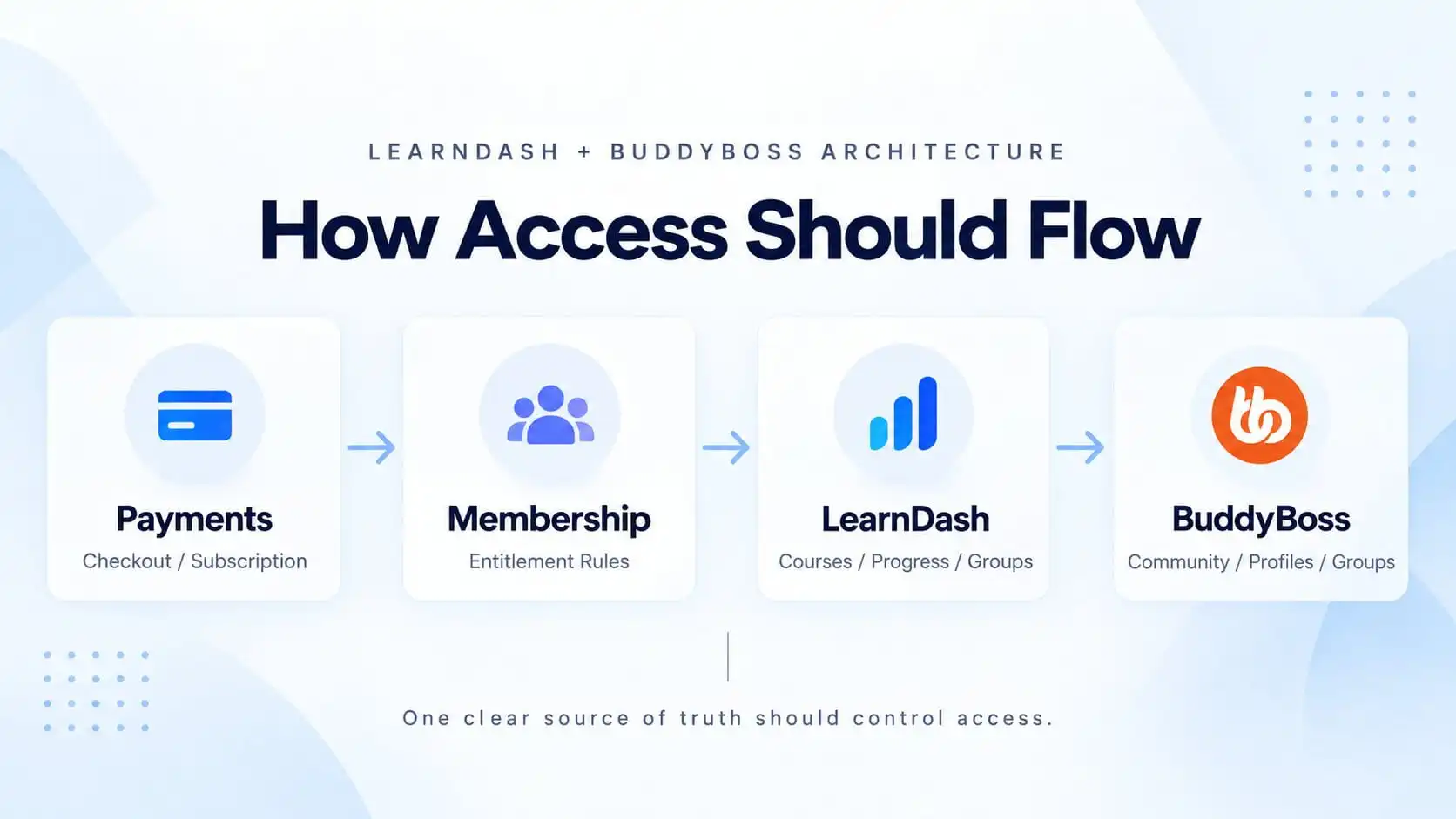
How Access Should Flow
This is where I would spend the most planning time.
A clean platform should have one predictable access flow.
For a membership-driven platform, that might look like:
Checkout / subscription → Membership entitlement → LearnDash course or group access → BuddyBoss community access
The point is not that every platform must use a membership plugin.
The point is that the business needs one source of truth.
Suppose the customer purchases a Pro membership.
That membership includes:
- Courses A, B, and C
- LearnDash Group: Pro Learners
- BuddyBoss Group: Pro Community
The business rule should be:
Pro membership active = grant all three.
And when the membership expires:
Pro membership inactive = update all three according to the same rule.
That is much safer than maintaining three unrelated user lists.
Where WooCommerce Fits
WooCommerce is often involved when the business sells more than simple LMS access.
For example:
- courses
- seat packages
- subscriptions
- events
- physical products
- downloads
- bundles
In that case, WooCommerce may own the transaction.
But I still would not automatically let WooCommerce become the long-term authority for every access decision.
Think of the difference:
WooCommerce answers:
Did this customer successfully purchase Product X?
LearnDash answers:
Which learning content should this user have?
BuddyBoss answers:
Which social/community experience should this user have?
If there is also a membership platform, it may answer:
Is the customer’s entitlement still active?
Those responsibilities need to be decided before connecting the plugins.
If WooCommerce is already central to the business, I prefer to design the course, membership, payment, and access flow as one system rather than connect checkout to LearnDash and BuddyBoss separately.
LearnDash Groups vs BuddyBoss Groups
This is one of the most important distinctions in a LearnDash BuddyBoss build.
|
LearnDash Groups
|
BuddyBoss Groups
|
|---|---|
|
Use for learning structure
|
Use for community structure
|
|
Example: Company A Training
|
Example: Company A Private Community
|
|
Course 1
|
Discuss course material
|
|
Course 2
|
Ask questions
|
|
Course 3
|
Interact with trainers
|
|
50 employees
|
Share resources
|
|
Training Manager as Group Leader
|
Receive community updates
|
|
Example: September Certification Cohort
|
Example: September Cohort Community
|
|
25 learners
|
Introduce themselves
|
|
Required curriculum
|
Discuss lessons
|
|
Shared progress reporting
|
Support each other
|
|
Fixed access dates
|
Interact after class
|
The two groups may represent the same business audience, but they still have different responsibilities.
LearnDash Groups are built around training structure, course access, learner management, and reporting. BuddyBoss Groups are built around community participation, discussion, and engagement.
Should LearnDash Groups and BuddyBoss Groups Be Synced?
Sometimes, yes.
BuddyBoss supports connecting LearnDash Groups with BuddyBoss Social Groups, including workflows where users buying access to a LearnDash Group can also be enrolled into the corresponding social group.
That can work very well for an offer like:
Buy Advanced Training Program → receive courses + private student community.
But I would only sync them when the business rules actually match.
Imagine:
LearnDash Group: Corporate Compliance Training
and:
BuddyBoss Group: Compliance Alumni Network
You may want learners removed from course access after 12 months but allow them to remain in the alumni community indefinitely.
In that situation, automatic one-to-one synchronization would be the wrong architecture.
This is why “can we sync them?” is not enough.
The important question is:
Should the access lifecycle actually be the same?
Memberships Should Sit Above the Platforms When Membership Is the Product
Suppose the business sells:
|
Professional Membership
|
What the Membership Unlocks
|
|---|---|
|
LearnDash Courses 1–5
|
LearnDash learning benefits
|
|
Private BuddyBoss community
|
BuddyBoss community benefits
|
|
Premium articles
|
Protected content
|
|
Downloadable resources
|
Downloadable resources
|
|
|
Other member benefits
|
The customer is not buying a LearnDash Group. They are buying a membership.
I would usually want the membership layer to own the entitlement, while LearnDash and BuddyBoss deliver their respective parts.
|
Starter
|
Professional
|
Enterprise
|
|---|---|---|
|
Courses 1–2
|
Courses 1–5
|
All courses
|
|
Starter Community
|
Professional Community
|
Company-specific learning group
|
|
|
|
Private company community
|
|
|
|
Manager reporting
|
The membership tier should decide what is unlocked. LearnDash and BuddyBoss should then deliver their respective parts.
This follows the same principle from our previous article on whether you actually need MemberPress with LearnDash: decide who owns entitlement first, then connect the systems.
What Happens When a Payment Fails?
This is the test I use to expose weak architecture.
Imagine a monthly subscription fails tonight.
Tomorrow morning:
- should the learner still access courses?
- should they remain in the BuddyBoss community?
- should their LearnDash Group enrollment remain?
- should their manager still see them in reports?
- should access disappear immediately or after a grace period?
If the answer requires checking four different plugin settings, the architecture is probably too fragmented.
The business should define one lifecycle:
Active → Grace period → Cancelled → Expired
Then each system should respond to those states predictably.
That is much easier to test and support.
Avoid Letting Every Plugin Grant Access
One of the most common mistakes I see in complex WordPress platforms is redundant enrollment logic.
For example:
WooCommerce purchase → enrolls user
while:
MemberPress membership → also enrolls user
while:
LearnDash Group → also grants the course
while:
custom code → adds community access
This may appear to work initially.
Until somebody:
- upgrades
- receives a refund
- changes membership
- is manually removed
- renews late
- has a failed payment
Then different systems begin disagreeing about what the user’s account should look like.
I would rather have one path with fewer integrations than four paths that all appear convenient individually.
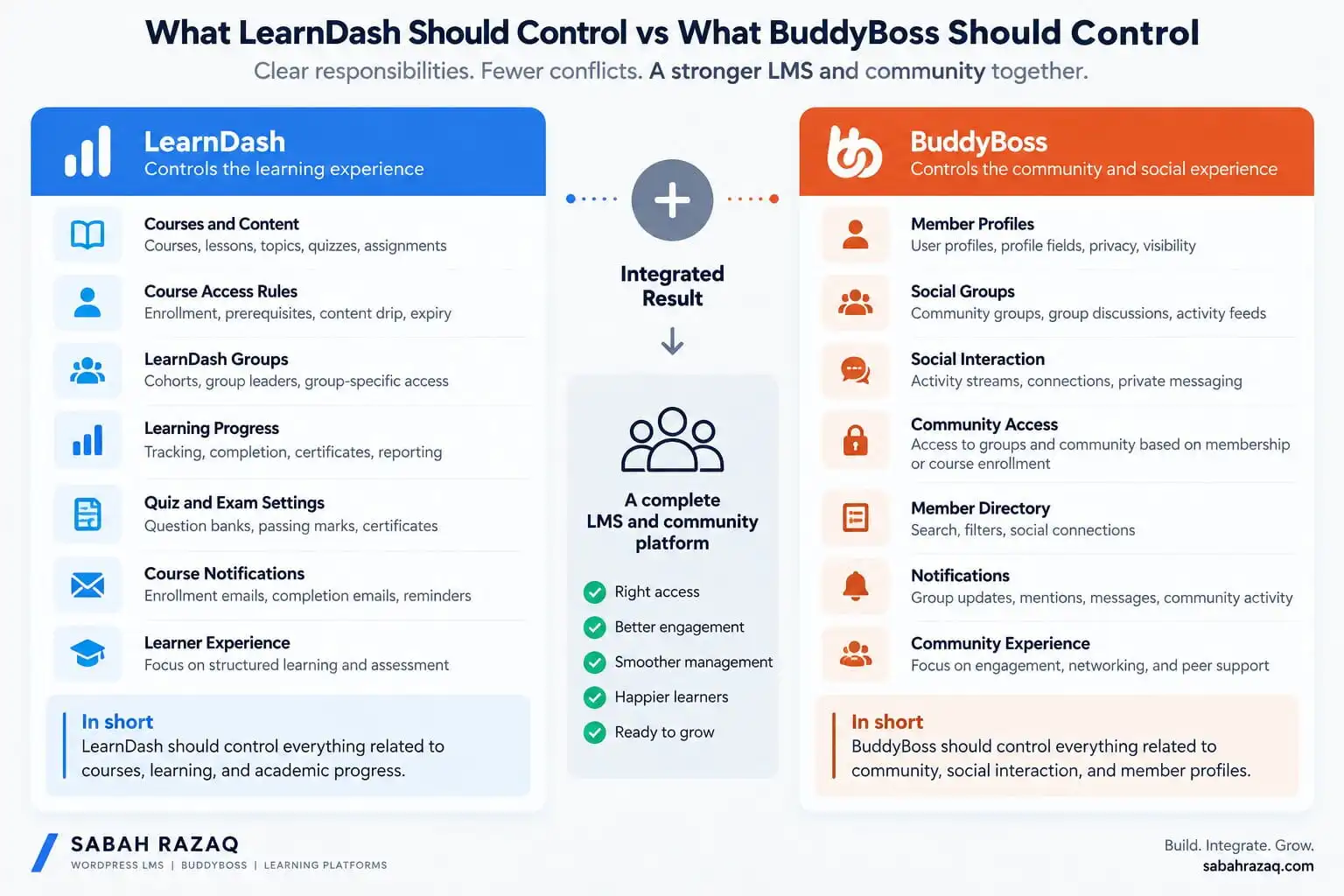
What LearnDash Should Control vs What BuddyBoss Should Control
My default responsibility map looks like this:
|
LearnDash
|
BuddyBoss
|
Membership / Entitlement
|
Commerce
|
|---|---|---|---|
|
Courses
|
Profiles
|
Membership tier
|
Checkout
|
|
Lessons / topics
|
Social groups
|
Recurring access status
|
Transactions
|
|
Quizzes / assignments
|
Activity feeds
|
Upgrades / downgrades
|
Coupons
|
|
Certificates
|
Messaging
|
Wider site entitlement
|
Tax
|
|
Course progress
|
Social directories
|
Access expiry rules
|
Orders
|
|
LearnDash Groups
|
Community experience
|
Membership lifecycle
|
Refunds
|
|
Group Leaders
|
|
|
|
|
Learning reports
|
|
|
|
The platform becomes easier to maintain when each layer has one clear job.
This separation makes debugging much easier.
When someone says, “The learner cannot see Course A,” you investigate the learning entitlement.
When someone says, “The member cannot access the private community,” you investigate the community entitlement.
When someone says, “Their subscription expired but they still have everything,” you investigate the membership/access lifecycle.
You investigate the membership/access lifecycle.
Each problem has an owner.
When I Would Keep the Architecture Simpler
Not every LearnDash BuddyBoss website needs:
LearnDash + BuddyBoss + MemberPress + WooCommerce + subscriptions + automation + custom code.
If the offer is simply:
Buy this course and join its student community.
then the simplest architecture that reliably connects course access with community access may be enough.
BuddyBoss already supports LearnDash integration and group-based learning/community workflows.
Do not add another membership platform unless you actually need membership functionality.
Do not add WooCommerce unless its commerce capabilities solve a real requirement.
The stack should grow because the business model requires it, not because a plugin appears in somebody else’s tutorial.
When This Stack Makes the Most Sense
I particularly like LearnDash + BuddyBoss for businesses where learning and community genuinely reinforce each other.
Examples include:
- professional academies
- certification communities
- coaching programs
- membership academies
- cohort-based programs
- professional development communities
- corporate learning communities
In these models, LearnDash provides structured progression while BuddyBoss provides interaction around that progression.
That is a much stronger use case than simply adding a social feed to an LMS because the feature exists.
If community is a meaningful part of the product, the BuddyBoss development architecture should be planned alongside the LMS rather than added as a visual layer at the end.
My Recommendation
LearnDash and BuddyBoss should not compete for control.
They should complement each other.
I would let:
LearnDash own learning.
BuddyBoss own community.
Then I would deliberately choose one system above them to control entitlement when the business needs memberships, subscriptions, or broader access rules.
The cleanest architecture is usually not the one with the most integrations.
It is the one where every system has a clearly defined responsibility.
Before development starts, I would answer these questions:
- What exactly is the customer buying?
- Which system records that entitlement?
- Which courses should it unlock?
- Which community should it unlock?
- Should LearnDash Groups and BuddyBoss Groups share the same lifecycle?
- What happens after cancellation?
- What happens after a failed renewal?
- What changes during an upgrade or downgrade?
- Who needs reporting access?
If those answers are clear, the technology becomes much easier to configure.
If they are unclear, installing more plugins will not solve the problem.
Planning a LearnDash + BuddyBoss Platform?
The expensive problems usually appear when courses, groups, memberships, payments, and community access are configured independently and expected to stay synchronized later.
If you are planning or rebuilding a LearnDash BuddyBoss platform, I can map the LMS and community architecture before development starts so access rules, group relationships, payments, and reporting have one predictable structure.