


WooCommerce vs MemberPress is not really a question of which plugin is better at selling.
The more useful question is:
Is your LearnDash business commerce-first or membership-first?
That difference affects checkout, subscriptions, course bundles, refunds, access rules, reporting, and how much complexity the site carries over time.
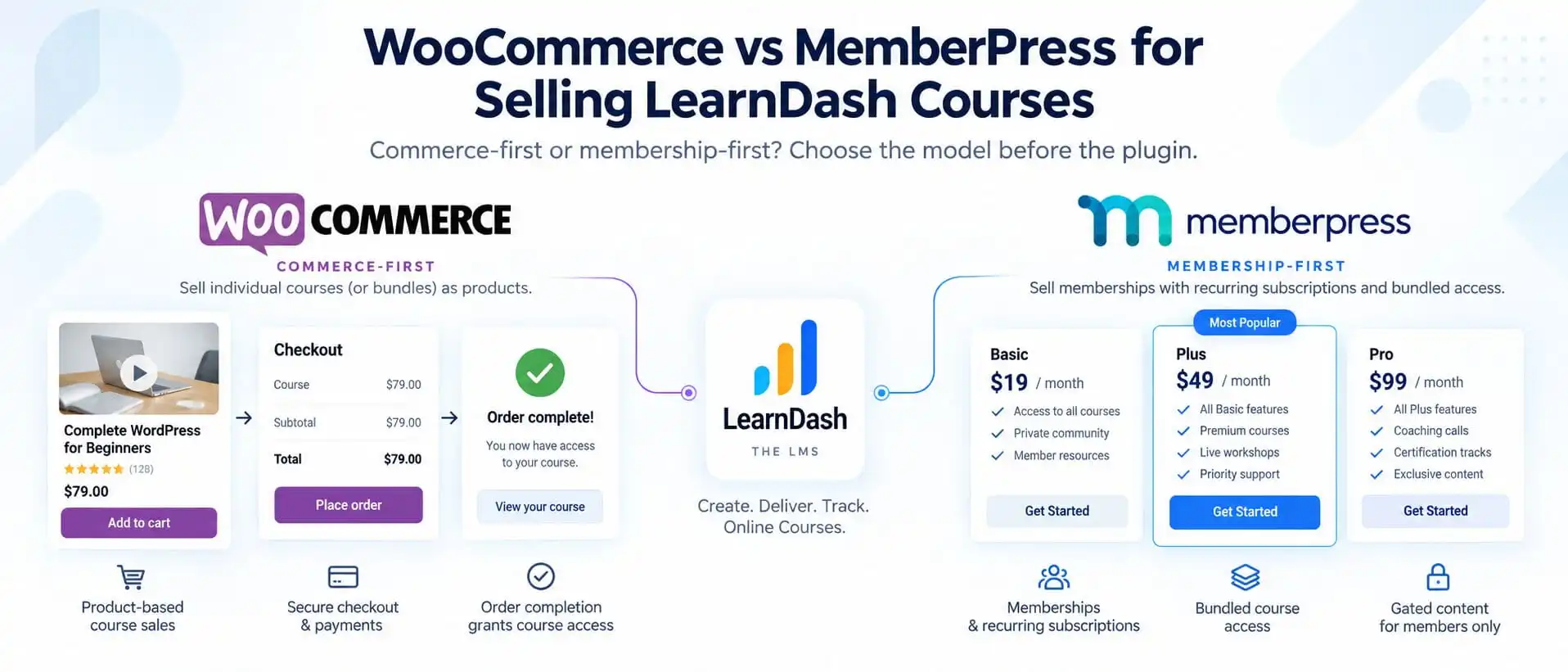
WooCommerce makes sense when courses behave like products inside a broader ecommerce system.
MemberPress makes sense when courses are primarily benefits inside a membership model.
Both can work with LearnDash. The right choice depends on what the customer is actually buying.
WooCommerce vs MemberPress: The Short Answer
I would think about the decision like this:
Use WooCommerce when the business is primarily selling products.
That can mean:
- individual courses
- course bundles
- subscriptions
- physical products
- downloads
- coaching products
- mixed catalogs
- variable products
- broader ecommerce workflows
LearnDash’s official WooCommerce integration can associate courses or Groups with WooCommerce products, and enrollment can be granted or denied based on order or subscription status. It supports simple products, variable products, simple subscriptions, variable subscriptions, and Course products.
Use MemberPress when the business is primarily selling membership entitlement.
That can mean:
- recurring memberships
- tiered access
- bundled courses
- protected resources
- wider member-only content
- trials
- membership lifecycle rules
LearnDash’s MemberPress integration can connect one membership to one or more courses and automatically grant or remove course access as membership status changes.
The distinction is not:
ecommerce vs subscriptions
because both models can involve recurring payments.
The distinction is:
product purchase vs membership entitlement.
First Decide What You Are Actually Selling
Before choosing a plugin, define the commercial product.
Is the customer buying:
- one course?
- several courses as a bundle?
- monthly access to a course library?
- a professional membership that includes courses?
- a certification package?
- coaching plus courses?
- company seats?
- physical products and training together?
That answer should guide the architecture.
If the customer is buying a specific product and that transaction should unlock a course, WooCommerce often fits naturally.
If the customer is joining an ongoing membership and courses are one of several benefits, MemberPress often fits more naturally.
That sounds simple, but this one decision can prevent a lot of unnecessary complexity later.
When LearnDash Alone Is Enough
Not every LearnDash business needs WooCommerce or MemberPress.
LearnDash already has built-in content protection, and its own documentation explicitly states that membership plugins are optional.
A separate commercial layer becomes more useful when the business needs more than straightforward course access.
For example:
- a full ecommerce store
- advanced checkout
- subscriptions
- membership tiers
- wider site protection
- mixed products
- corporate seats
- more complex refund or order workflows
If none of that is required, adding more plugins simply because they are popular can create work the business does not need.
How WooCommerce Works With LearnDash
WooCommerce treats the sale as a product transaction.
The flow is usually:
Product → Checkout → Order → Course or Group Access
With the official LearnDash integration, a WooCommerce product can be linked to one or more LearnDash courses or Groups. Once the purchase reaches a qualifying order status, LearnDash can enroll the customer into that learning content.
That makes WooCommerce particularly useful when you want to sell:
- individual courses
- course bundles
- different course variations
- subscription-based products
- courses alongside physical products
- courses alongside coaching or downloads
The integration also allows enrollment behavior to respond to WooCommerce order and subscription statuses, including custom statuses.
That gives you a strong transactional model.
How MemberPress Works With LearnDash
MemberPress starts from a different idea.
Instead of asking:
Which product was purchased?
it usually asks:
Which membership does this person belong to?
The flow is more like:
Membership → Subscription / Access Rule → Course Bundle
The official LearnDash integration lets you create a MemberPress membership and associate one or more LearnDash courses with it. When the membership becomes active, the user receives course access. If the membership is cancelled, LearnDash can remove that access automatically.
That works well when the membership itself is the commercial product.
For example:
Professional Membership
includes:
- Course 1
- Course 2
- Course 3
- private resources
- community access
- monthly workshops
In that model, the courses are benefits of membership rather than independent ecommerce products.
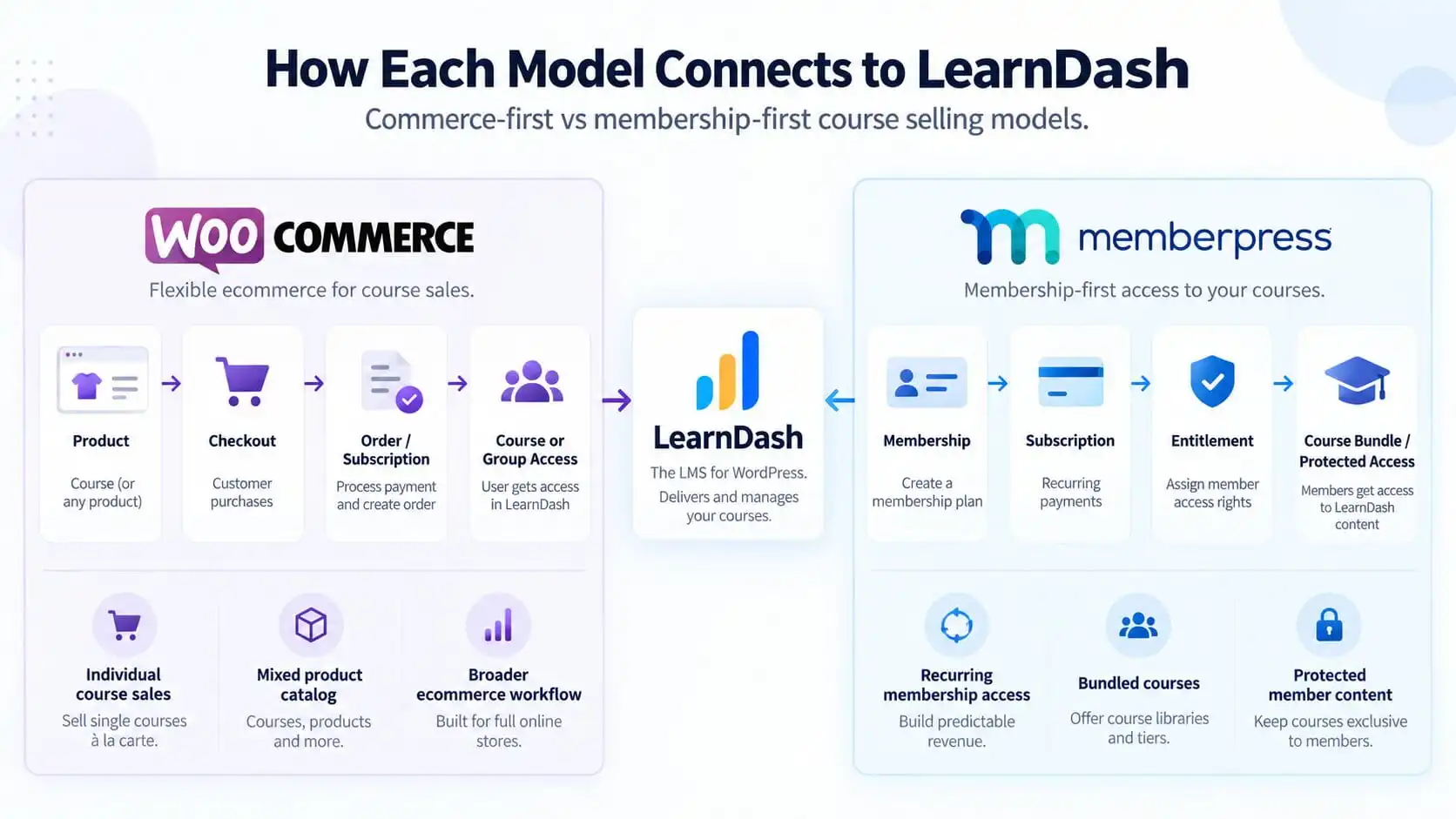
Product-Based Selling vs Membership-Based Selling
This is the core difference.
WooCommerce model
The customer buys a product.
The product determines what LearnDash access is granted.
MemberPress model
The customer gains a membership.
The membership determines what LearnDash access is granted.
Neither is inherently better.
The issue is whether the commercial structure matches the business.
A site becomes harder to maintain when it uses WooCommerce like a membership system while also using MemberPress to recreate the same entitlement logic.
That is where duplicated rules begin.
Individual Course Sales
If most customers buy courses individually, WooCommerce often makes more sense.
Imagine the catalog contains:
- Leadership Fundamentals
- Sales Training
- Project Management
- Excel for Business
- Compliance Essentials
Each course is purchased separately.
WooCommerce naturally supports that model because each course can behave as a product.
The order becomes the commercial record.
LearnDash then receives the enrollment.
This can also work well when pricing, coupons, cart behavior, product pages, or multiple payment gateways matter.
Course Bundles
Both approaches can sell bundles.
With WooCommerce, one product can be linked to multiple LearnDash courses or Groups.
With MemberPress, one membership can likewise be associated with multiple LearnDash courses.
The difference is what the bundle represents.
|
WooCommerce bundle
|
MemberPress bundle
|
|---|---|
|
Buy this package and receive
|
Join this membership and receive
|
|
Course A
|
Course A
|
|
Course B
|
Course B
|
|
Course C
|
Course C
|
|
|
protected resources
|
|
|
other member benefits
|
That distinction matters when the business starts expanding beyond courses.
Recurring Subscriptions
Both architectures can support recurring access, but they handle it differently.
WooCommerce requires a subscription-capable setup such as WooCommerce Subscriptions if you want subscription products tied to LearnDash. LearnDash can then grant or deny enrollment based on the WooCommerce subscription status, and by default course or Group access can be removed when the subscription expires.
MemberPress is membership-first, so recurring access sits more naturally inside the membership lifecycle.
The important question is:
What should the subscription represent?
If the subscription is essentially:
Monthly Course Product
WooCommerce may fit.
If the subscription is:
Professional Membership
with courses, resources, community, and wider access, MemberPress may fit better.
Physical Products or Mixed Catalogs
This is one of the clearest WooCommerce use cases.
Imagine a training company sells:
- online courses
- printed workbooks
- physical certification materials
- coaching packages
- downloadable templates
- event tickets
WooCommerce gives you one commerce layer for the full catalog.
LearnDash’s integration is designed specifically around that product-based relationship, and LearnDash even documents considerations for sites selling courses alongside physical products.
Using MemberPress as the primary commercial engine for that type of store would usually be less natural.
Coupons, Orders, Refunds, and Tax
WooCommerce becomes especially valuable when ecommerce operations matter beyond simple access.
For example:
- order history
- refunds
- product-level coupons
- tax handling
- cart behavior
- checkout customization
- product variations
- order statuses
- physical fulfillment
- broader store reporting
That does not automatically mean every LearnDash site should use WooCommerce.
But if the business already behaves like an ecommerce operation, WooCommerce gives you infrastructure that is built around those workflows.
MemberPress is stronger when the commercial model is primarily about memberships rather than orders.
What Happens When Access Changes
The initial purchase is only half the architecture.
You also need to decide what happens when:
- an order is refunded
- a subscription expires
- a payment fails
- a customer upgrades
- a membership is cancelled
- a customer changes tiers
WooCommerce can control LearnDash enrollment based on order and subscription statuses. LearnDash provides a configurable Enrollment Status system and a retroactive access tool for correcting existing enrollment based on WooCommerce status.
MemberPress can automatically remove course access when membership is cancelled, and the LearnDash integration also includes a retroactive tool to repair access for existing users after membership or course mappings change.
This is why the source of truth needs to be clear.
If WooCommerce is the source of commercial entitlement, let WooCommerce status drive access.
If MemberPress is the source of membership entitlement, let the membership status drive access.
Do not let both independently control the same entitlement unless the relationship is intentionally designed.
WooCommerce + MemberPress Together: When It Makes Sense
There are businesses where using both is reasonable.
For example:
|
WooCommerce handles
|
MemberPress handles
|
|---|---|
|
physical products
|
recurring memberships
|
|
one-time course products
|
protected resources
|
|
merchandise
|
member tiers
|
|
broader ecommerce
|
wider site entitlement
|
That can work.
The important thing is that their responsibilities do not overlap unnecessarily.
For example:
WooCommerce sells individual courses.
MemberPress sells the recurring professional membership.
That is understandable.
What becomes dangerous is:
WooCommerce sells the Professional Membership product
while:
MemberPress also controls the same Professional Membership
and both independently grant LearnDash access.
Now you have duplicated entitlement logic.
If a project genuinely needs both systems, I would map the course, membership, payment, and access flow before connecting everything.
When WooCommerce + MemberPress Creates Unnecessary Complexity
Using both becomes questionable when they are solving the same business problem.
For example:
WooCommerce creates:
Gold Course Subscription
MemberPress creates:
Gold Membership
Both unlock the same courses.
Both have their own status.
Both can expire.
Both can be cancelled.
Which one owns access?
That is the question.
If there is no clear answer, the architecture needs to be simplified.
The goal is not to use the maximum number of capable plugins.
The goal is to make access predictable.
Corporate and Seat-Based Selling
WooCommerce becomes particularly useful in some B2B training scenarios.
LearnDash supports Group Registration where WooCommerce can sell seats for courses. A purchase can create a LearnDash Group, make the buyer a Group Leader, and allow seats to be distributed to learners. LearnDash also supports options such as unlimited seats, bulk discounts, and subscription-based group products depending on the setup.
That can be valuable for:
- corporate training
- team licences
- schools
- franchises
- departmental learning
A company might buy:
50 Training Seats
rather than:
50 individual memberships
That is a very different commercial model.
In those situations, WooCommerce may fit naturally because the commercial object is the seat package or Group product.
Which System Should Be the Source of Truth?
This is the most important question in the article.
For every paid LearnDash build, decide:
Which system owns the commercial entitlement?
If WooCommerce is primary:
Order / Subscription Status → LearnDash Access
If MemberPress is primary:
Membership Status → LearnDash Access
If BuddyBoss is also involved:
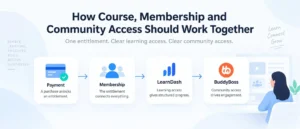
Commercial Entitlement → LearnDash Learning Access + BuddyBoss Community Access
That is the same principle covered in How to Structure a Paid LearnDash + BuddyBoss Community Without Creating an Access-Control Mess.
One source of truth is easier to support than several competing access rules.
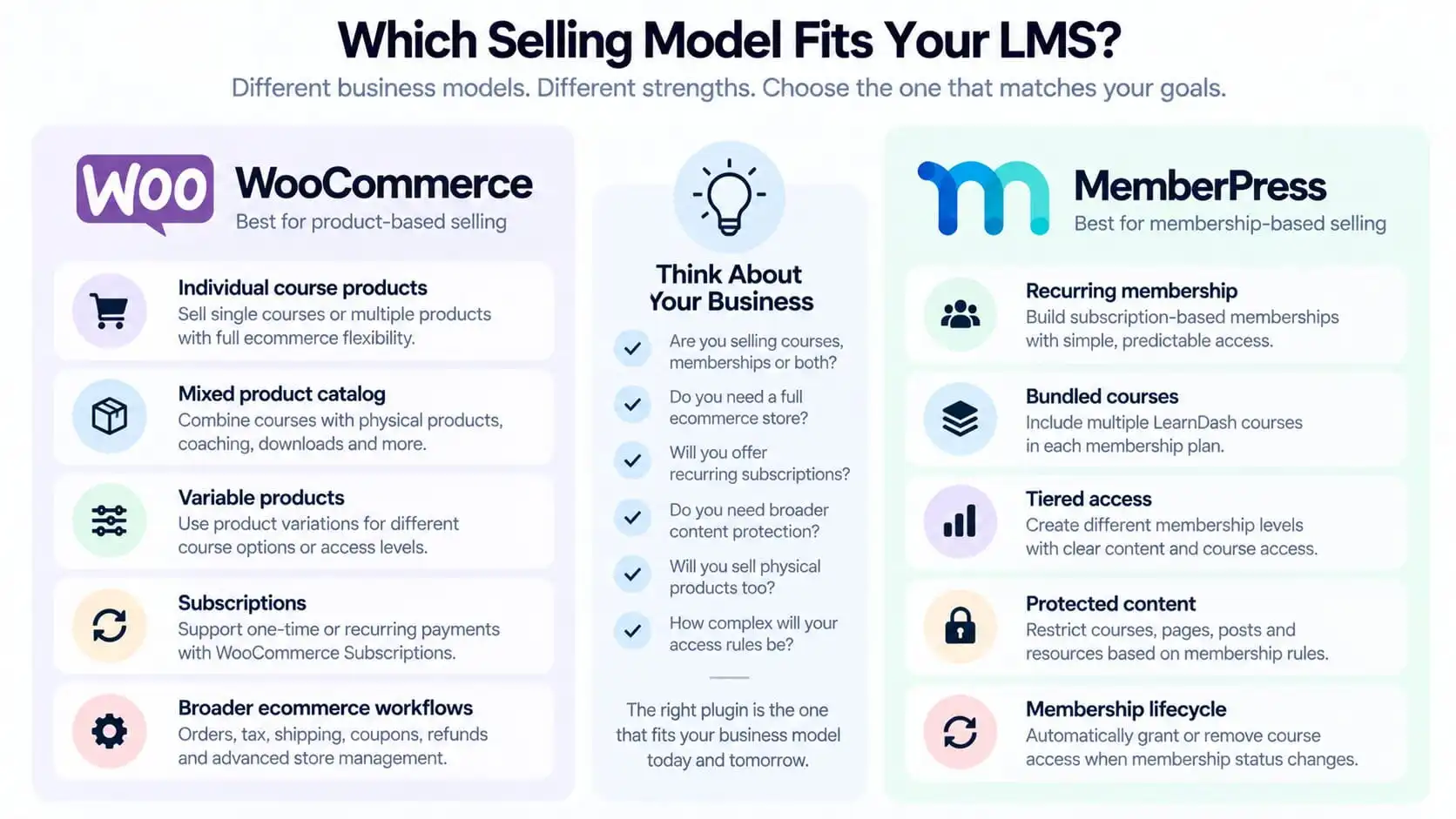
Which Selling Model Fits Your LMS?
The decision becomes easier when you look at the business instead of the plugins.
WooCommerce tends to fit when:
- courses are sold individually
- the business has a mixed product catalog
- physical products are involved
- variable products matter
- full ecommerce workflows are required
- subscriptions behave more like products
- company seats or course packages are being sold
MemberPress tends to fit when:
- recurring membership is the main product
- several courses belong to one membership tier
- the business needs wider protected content
- access is organized around membership levels
- upgrades and downgrades matter
- the course library is one benefit of membership
- the business wants a membership-first operating model
The goal is not to force every LMS into one architecture.
It is to choose the commercial model that fits what the business actually sells.
When I Would Choose WooCommerce
I would lean toward WooCommerce when the website is clearly an ecommerce business.
For example:
The customer can buy:
- individual courses
- course bundles
- books
- coaching
- downloads
- physical products
There may be coupons, refunds, tax rules, cart logic, multiple product types, and subscription products.
In that situation, WooCommerce should probably be allowed to do what it is good at:
commerce.
LearnDash then handles the learning experience after the commercial transaction is complete.
When I Would Choose MemberPress
I would lean toward MemberPress when the customer is primarily joining an ongoing membership.
For example:
|
Starter Membership
|
Professional Membership
|
Enterprise Membership
|
|---|---|---|
|
Courses 1 - 2
|
Courses 1 - 5
|
All courses
|
|
member resources
|
premium resources
|
private company access
|
|
|
private community
|
additional benefits
|
That is membership architecture.
MemberPress can then own the membership lifecycle while LearnDash receives the learning-access result.
If you are still deciding whether that membership layer is necessary in the first place, see Do You Actually Need MemberPress With LearnDash?.
And if you are comparing membership plugins specifically, see MemberPress vs Paid Memberships Pro for a WordPress LMS.
When I Would Use Neither
There are LearnDash businesses where neither plugin is necessary.
For example:
- one course
- one price
- no membership tiers
- no mixed ecommerce
- no subscriptions
- no physical products
- no broader protected content
- no company seats
LearnDash already protects enrolled course content, and membership plugins are optional.
A simpler stack is usually easier to maintain.
Do not add WooCommerce or MemberPress just because you expect a “serious LMS” to have one of them.
Use them when the business model requires them.
Final Decision: Commerce Model First, Plugin Second
WooCommerce vs MemberPress should ultimately be decided by what the customer is buying.
If customers primarily buy products, WooCommerce usually provides the more natural commercial model.
If customers primarily buy membership entitlement, MemberPress often provides the cleaner model.
And if LearnDash alone already handles the requirement, using neither can be the right architecture.
The order should be:
Define the product.
Then:
Define the entitlement.
Then:
Define what LearnDash should unlock.
Only after that should you decide which plugin belongs in the stack.