


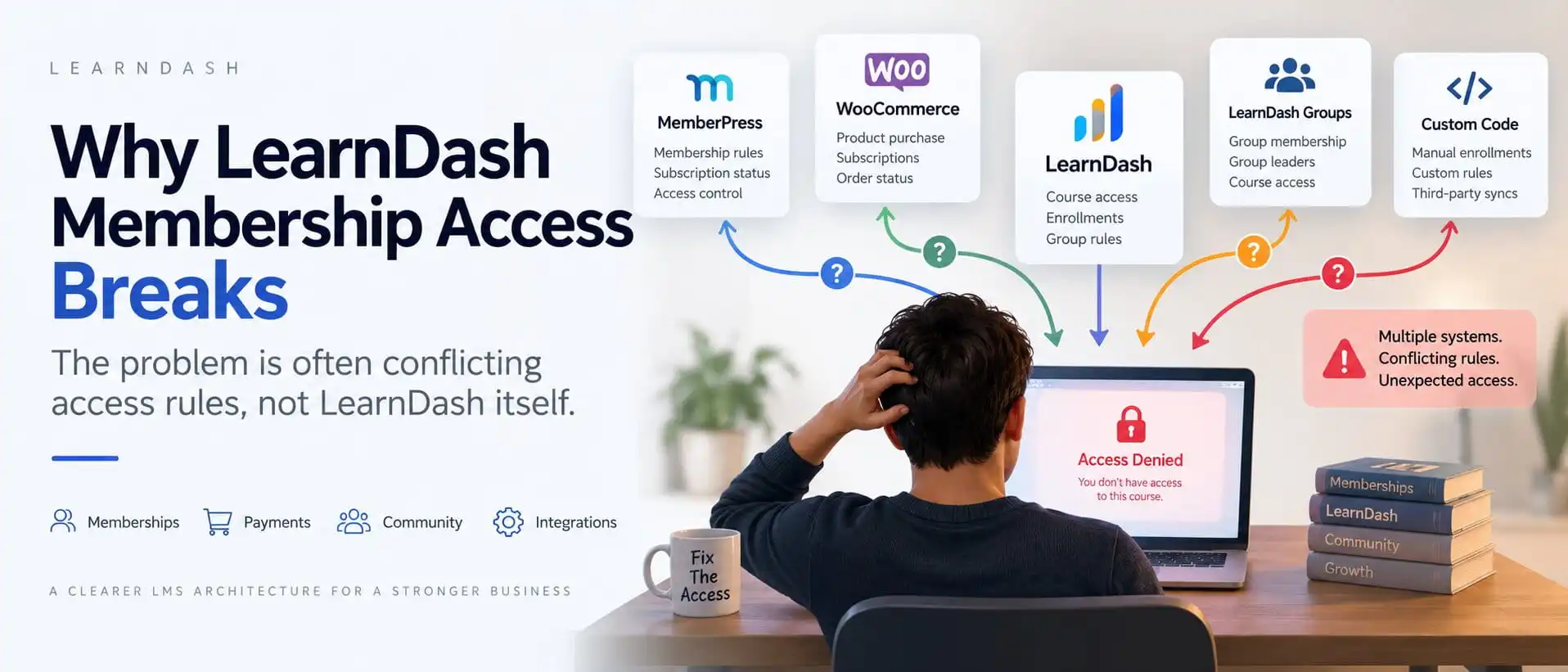
If your LearnDash membership access is inconsistent, the problem is often not LearnDash itself.
The problem is usually that several systems are trying to decide access at the same time.
That can include:
- LearnDash course enrollment
- LearnDash Groups
- MemberPress
- Paid Memberships Pro
- WooCommerce
- subscriptions
- manual enrollment
- custom code
- BuddyBoss access rules
Each of those can be valid on its own.
The trouble starts when two or three of them are allowed to grant or remove the same access without one clear source of truth.
That is when you start seeing issues like:
- a paid member losing a course
- an expired member keeping access
- a failed payment not removing enrollment
- an upgrade adding the right courses but a downgrade not removing the old ones
- one system saying the user is active while another says they are not
The fix is usually not another patch.
It is a cleaner access architecture.
LearnDash Membership Access: The Short Answer
A stable LearnDash membership setup should answer one question very clearly:
Which system decides what the user is entitled to?
Everything else should follow that decision.
A clean model looks like this:
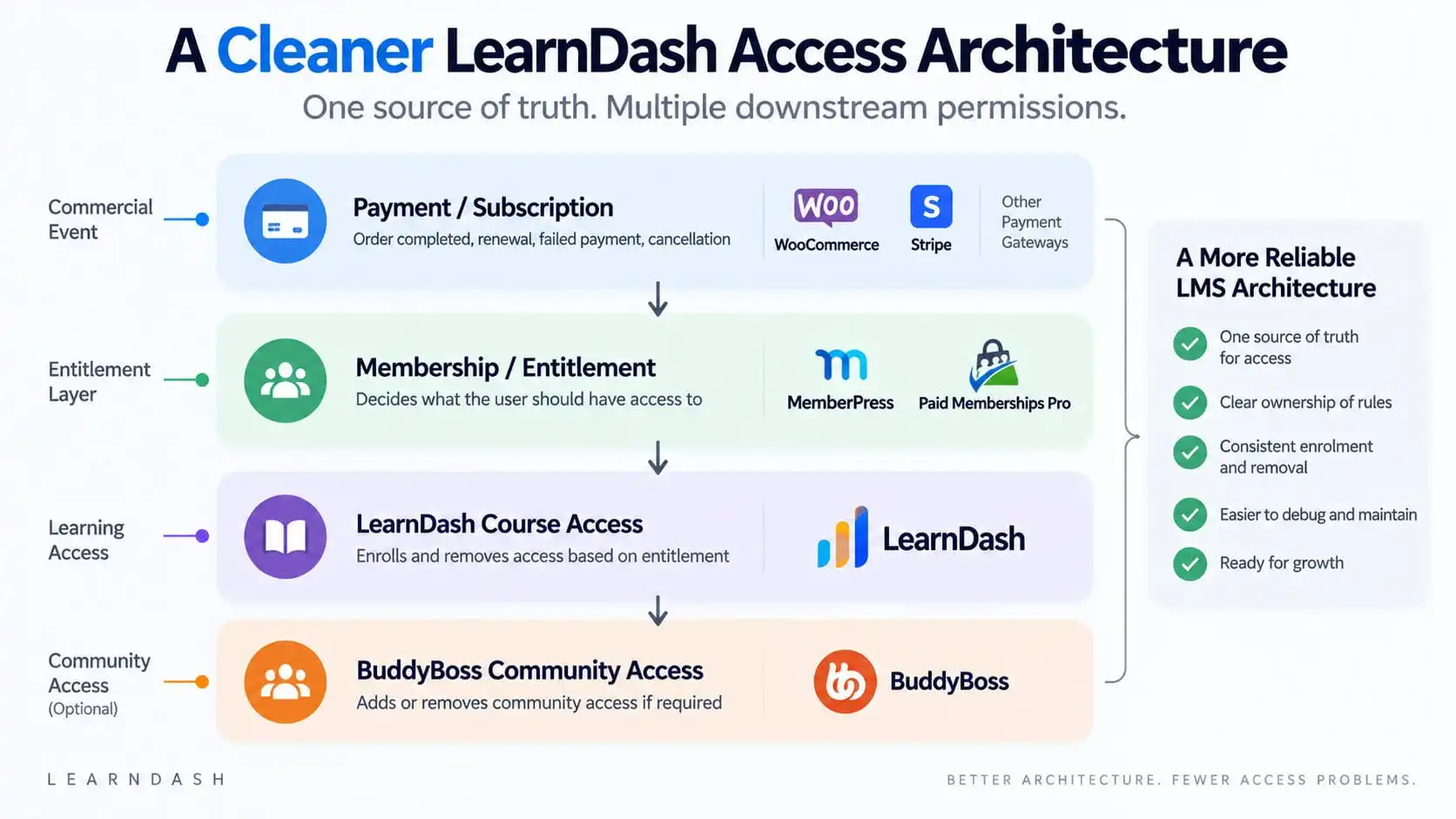
Payment or subscription status → Membership / entitlement → LearnDash course access → BuddyBoss community access, if required
LearnDash itself supports several enrollment modes, including Open, Free, Buy Now, Recurring, and Closed. Closed mode is especially relevant when access is being managed externally by an ecommerce or membership system.
That flexibility is useful.
It is also exactly why architecture matters.
If LearnDash is controlling access directly while MemberPress, WooCommerce, Groups, and custom code are also controlling it, the system becomes difficult to reason about.
The Real Problem Is Usually Not LearnDash
LearnDash can grant access through several paths.
A user might receive course access because they:
- bought the course directly
- joined a LearnDash Group
- were manually enrolled
- purchased a WooCommerce product
- gained a membership level
- were enrolled by custom code
LearnDash Groups, for example, can automatically enroll users into every course attached to the Group.
Paid Memberships Pro can also automatically enroll users into LearnDash courses when a qualifying membership level is assigned.
WooCommerce can grant or deny LearnDash enrollment based on order or subscription status through the official integration.
All of that is legitimate.
The problem is when several of those systems manage the same entitlement.
That is when the business loses clarity around a very basic question:
Why does this user have access right now?
If your current LMS has multiple systems granting the same courses, I can review which layer should actually own the entitlement before more access rules are added.
What Should Actually Control Access?
For a paid LMS, I usually separate the platform into responsibilities.
Commerce layer
This answers:
- Did the user pay?
- Did the subscription renew?
- Did the payment fail?
- Was the order refunded?
- Was the subscription cancelled?
That might be:
- WooCommerce
- Stripe
- another payment system
Entitlement layer
This answers:
- What should this user have access to right now?
- Which membership tier are they in?
- Which products or benefits belong to that tier?
That might be:
- MemberPress
- Paid Memberships Pro
- another membership system
Learning layer
LearnDash should then answer:
- Which courses should this entitled user be enrolled in?
- Which learning Groups should they belong to?
- What is their progress?
Community layer
If BuddyBoss is involved:
- which social Groups should they see?
- which community areas should they access?
That separation is much easier to maintain than allowing every plugin to make independent access decisions.
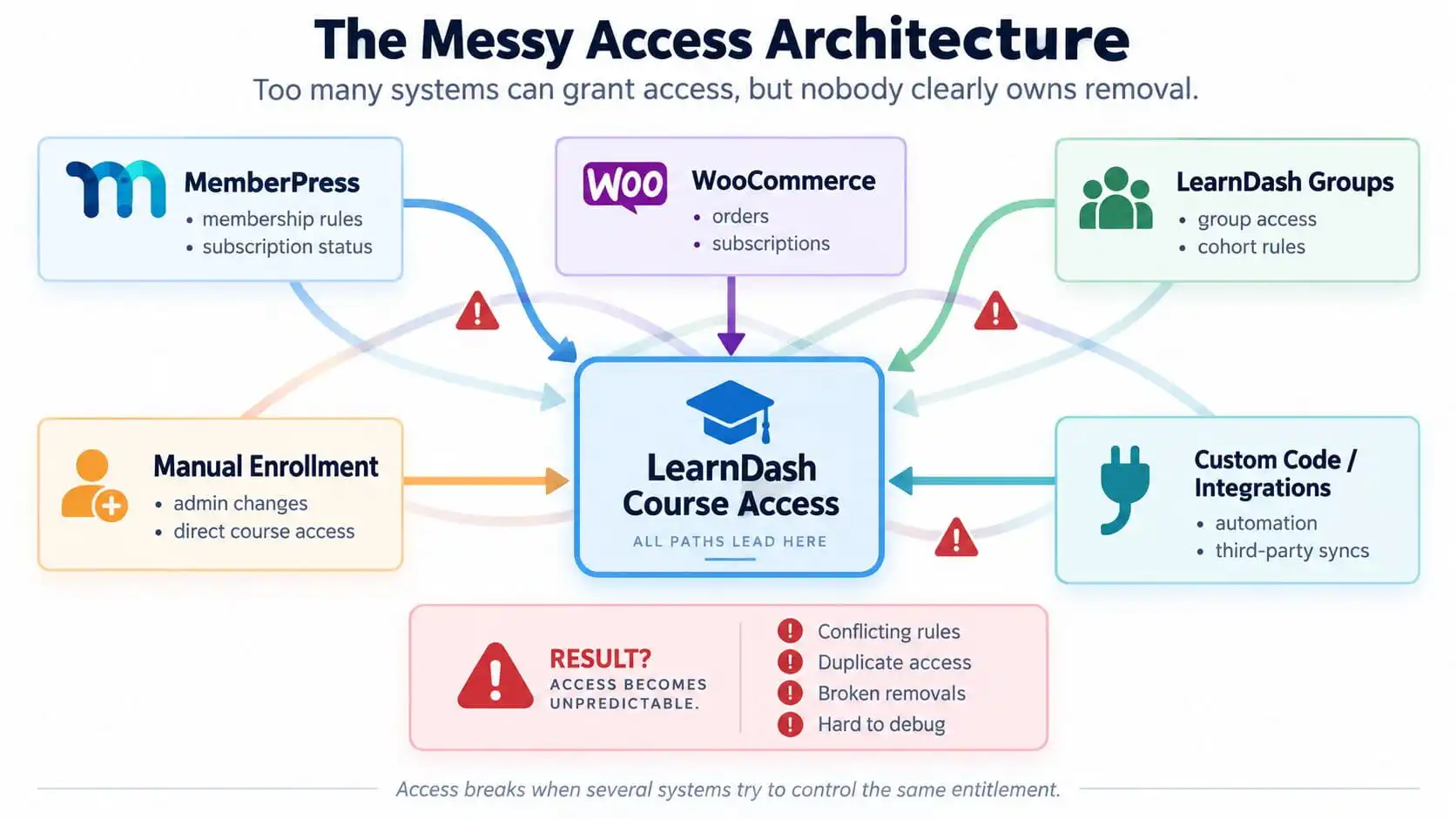
Why Multiple Access Sources Create Problems
Imagine one LearnDash course can be granted by:
- MemberPress
- WooCommerce
- a LearnDash Group
- manual enrollment
- custom code
Now a user cancels their membership.
Which system removes them?
MemberPress may correctly remove the membership entitlement.
But if the same user was manually enrolled into the course, that direct enrollment may still exist.
Or perhaps WooCommerce also granted the same course from an old purchase.
Or a LearnDash Group still includes the user.
The user keeps access.
The natural reaction is:
“The membership plugin failed to remove the course.”
But the membership plugin may have done exactly what it was supposed to do.
Another access path is still active.
That is why access bugs are often architectural rather than plugin bugs.
Manual Enrollment vs Membership Enrollment
Manual enrollment is useful.
It is also one of the easiest ways to create exceptions that become difficult to track later.
Suppose a member contacts support because they cannot see a course.
An administrator fixes the immediate problem by manually enrolling them in LearnDash.
The member is happy.
Six months later their membership expires.
The membership system removes its own access relationship.
But the manual LearnDash enrollment still exists.
Now the former member continues to see the course.
The original support fix has become an access-control bug.
Manual enrollment should therefore be treated as an exception with a clear reason, not as the default troubleshooting method for membership problems.
Membership Active but Course Access Is Missing
This is one of the most common symptoms.
A membership can be active while LearnDash enrollment is missing for several reasons.
Possible causes include:
- the course is not mapped to the membership level
- the user already existed before the course-to-membership rule was added
- the membership integration event never ran
- the LearnDash course is configured incorrectly
- custom code interrupted enrollment
- the membership changed without recalculating access
Paid Memberships Pro documents an important example of this.
Its LearnDash integration enrolls users when a membership checkout or level-change event occurs. But existing members are not automatically enrolled simply because a course is later added to an existing membership level. Those users may need to be updated manually.
That is a good reminder that:
membership status and course enrollment are related, but they are not automatically the same record.
Membership Expired but LearnDash Access Remains
Now consider the opposite problem.
The membership is expired.
The course is still available.
The first thing I would check is whether the user has another valid access path.
For example:
- direct course enrollment
- LearnDash Group membership
- WooCommerce purchase
- another membership tier
- custom enrollment logic
LearnDash Groups automatically enroll Group users into the courses assigned to those Groups.
That means removing a membership level may not remove course access if the user still belongs to a Group that grants the same course.
This is why I do not like debugging access by looking at one plugin in isolation.
I want to know every reason the user could currently have access.
Failed Payment but the Student Still Has Access
This is where the distinction between payment state and course enrollment becomes very important.
A subscription payment fails.
The business expects course access to change.
But does the system actually listen to that status?
The current LearnDash WooCommerce integration includes an Enrollment Status feature that can map WooCommerce order and subscription statuses to Grant or Deny enrollment.
That is exactly the kind of lifecycle connection a subscription-based LMS needs.
Without it, you can easily end up with this:
Purchase completed → course granted permanently
Then later:
Subscription fails → nothing happens to LearnDash
The payment system knows the subscription is inactive.
The LMS does not.
That is not a payment issue.
It is a missing lifecycle rule.
If failed payments, cancellations, and renewals are not consistently updating course access, I can review the payment-to-membership-to-LearnDash flow and identify where the lifecycle is breaking.
Upgrades and Downgrades Are More Difficult Than Initial Enrollment
Initial access is usually easy.
A user buys something.
You add courses.
Done.
The harder question is:
What happens later?
Consider this membership structure.
Starter
- Course A
- Course B
Professional
- Course A
- Course B
- Course C
- Course D
The user upgrades from Starter to Professional.
The platform grants C and D.
Everything looks correct.
Later they downgrade.
The system needs to remove:
- Course C
- Course D
while keeping:
- Course A
- Course B
If the implementation only ever thinks in terms of:
“When membership changes, add these courses”
then stale access accumulates.
A better system recalculates what the user should currently have.
Paid Memberships Pro’s LearnDash integration explicitly states that when members change levels, they can be unenrolled from courses not offered under the new level.
That is the behavior you want conceptually, regardless of which membership tool you use.
LearnDash Groups and Membership Access
LearnDash Groups are powerful because they can organize:
- cohorts
- companies
- classes
- membership-like bundles
- Group Leaders
- reporting
A Group can contain multiple courses, and users added to the Group receive those courses automatically.
That can simplify architecture.
It can also complicate access if you use Groups without deciding whether they are:
- the entitlement itself
- only an organizational layer
- a downstream result of membership
Those are different models.
For example, if MemberPress says:
Gold member
and the Gold membership automatically adds the user to:
Gold LearnDash Group
then the Group can become the learning-access layer.
That can be clean.
But if MemberPress also directly grants the individual courses while the Group grants those same courses, you have duplicated access.
I covered the broader distinction between learning Groups and community Groups in LearnDash Groups vs BuddyBoss Groups.
WooCommerce and Subscription-Based Access
WooCommerce is often used when the course business needs stronger commerce functionality.
That can include:
- products
- checkout
- taxes
- coupons
- subscriptions
- invoices
- multiple payment gateways
The official LearnDash WooCommerce integration can connect products to courses and Groups, and its current enrollment-status settings allow access to be granted or denied based on WooCommerce order and subscription statuses.
This is much better than simply granting access once and forgetting about the subscription lifecycle.
But the architecture still needs one rule:
Is WooCommerce the entitlement source, or is WooCommerce only creating/updating a membership entitlement elsewhere?
Either model can work.
The dangerous model is letting both independently manage the same access.
MemberPress + LearnDash
MemberPress is useful when the business model revolves around membership entitlement.
For example:
Gold Membership
might include:
- five courses
- premium resources
- a private community
- monthly events
In that setup, I would think of the membership as the product.
The courses are benefits of the membership.
That is very different from simply selling Course A for $99.
This is why I previously argued that you should not automatically add MemberPress to every LearnDash site. It is valuable when the membership lifecycle itself is important.
See Do You Actually Need MemberPress With LearnDash?.
Paid Memberships Pro + LearnDash
Paid Memberships Pro offers a similar architectural option.
Its Courses for Membership Add On can map membership levels to LearnDash courses or Groups, automatically enrolling members when they gain the correct level and removing courses when they change to a level that no longer includes them.
But PMPro’s own documentation also highlights a useful edge case:
Existing members are not automatically updated when you later add new course protection to their already-existing membership level.
This is exactly the kind of situation that creates support tickets such as:
“Everyone on Gold should have this course, but half of them do not.”
The integration is not necessarily broken.
The historical data simply never passed through the event that performs enrollment.
That is why migrations, architecture changes, and new membership mappings often need a deliberate reconciliation step.
BuddyBoss Adds Another Access Layer
Now add BuddyBoss.
A paid membership might need to grant:
- LearnDash courses
- LearnDash Groups
- BuddyBoss social Groups
- private community areas
If each system has its own independent rule set, the platform can drift out of sync.
You might end up with:
- course access but no community
- community access but no course
- cancelled users still in private Groups
- upgraded users missing premium community areas
I prefer the same entitlement event to drive both the learning and community sides.
For example:
Professional membership active → LearnDash access: Professional course set → BuddyBoss access: Professional community Group
That keeps the business rule in one place.
If your course and community permissions need to move together, I can structure the BuddyBoss and LearnDash access flow around the same entitlement model.
Why Access Rules Become Hard to Debug
The hardest access problems are often not technically complex.
They are hard because there is no clear explanation for the current state.
You look at a user and ask:
Why does this person have Course C?
Possible answers:
- MemberPress
- WooCommerce
- LearnDash Group
- manual enrollment
- old custom code
- migration
- API
- another plugin
That is not sustainable.
A good architecture should make the answer obvious.
Ideally, you can trace:
User → entitlement → resulting permissions
without checking six different plugins.
The Source-of-Truth Problem
This is the central issue.
Every access-controlled platform needs one reliable source that answers:
What should this user have right now?
Not:
What did we give them six months ago?
Not:
What did WooCommerce once grant?
Not:
What is still sitting in their enrollment record?
The platform needs to know the user’s current entitlement.
That entitlement may be based on:
- active membership
- active subscription
- paid product
- corporate seat
- admin-defined status
Once that answer is known, downstream access can be synchronized.
A Cleaner LearnDash Access Architecture
The cleaner model looks like this:
Payment / Subscription
This layer reports commercial events:
- purchase completed
- renewal succeeded
- payment failed
- subscription cancelled
- refund processed
Membership / Entitlement
This layer decides:
What should this user currently receive?
For example:
Professional
might mean:
- Course A
- Course B
- Course C
- Professional community
LearnDash Course Access
LearnDash receives the resulting learning permissions.
It should not need to independently decide whether the customer has paid.
BuddyBoss Community Access
If the membership includes community benefits, the same entitlement can control those too.
This creates:
one source of truth with several downstream permissions.
If your current platform has grown into overlapping membership, ecommerce, LearnDash, and BuddyBoss rules, I can review the wider LMS architecture and reduce those responsibilities to a clearer model.
What Should Happen on Purchase
When a purchase or membership starts successfully:
- create or identify the user
- confirm the entitlement
- assign the correct courses
- assign required LearnDash Groups
- assign required BuddyBoss access
- store or log the resulting state where appropriate
The important part is that those actions come from the entitlement.
Not from several unrelated rules that happen to run at checkout.
What Should Happen on Renewal
For a successful renewal, the system should normally:
- maintain the existing entitlement
- preserve course progress
- keep access active
- update expiration dates if required
- retain Group/community membership
A renewal should not unnecessarily remove and re-add users if the entitlement has not actually changed.
The commercial event changed.
The access state did not.
What Should Happen on Failed Payment
This depends on the business rules.
You might:
- remove access immediately
- suspend access
- allow a grace period
- keep access while retry attempts continue
There is no universal answer.
But the rule should be explicit.
The important part is that the payment state changes the entitlement, and the entitlement changes downstream access.
Not that each course independently tries to interpret a Stripe or WooCommerce status.
What Should Happen on Cancellation or Expiration
When a membership genuinely ends, the platform should know which permissions are derived from that membership.
Then it can remove:
- relevant course access
- LearnDash Group membership
- community access
- other membership-only benefits
while preserving:
- user account
- learning history
- progress data
- records you need to retain
Removing access should not mean deleting the learner’s history.
Those are separate decisions.
What Should Happen on Upgrade or Downgrade
This is where entitlement-based architecture becomes especially useful.
Instead of asking:
What should we add?
ask:
What should this user’s complete access set be after the change?
Then compare the desired state with the current state.
For example:
Before
Starter:
- A
- B
After upgrade
Professional:
- A
- B
- C
- D
Add C and D.
After downgrade
Starter:
- A
- B
Remove C and D.
The system stays aligned with the membership rather than accumulating historical access.
What Should Happen When Membership Status Changes
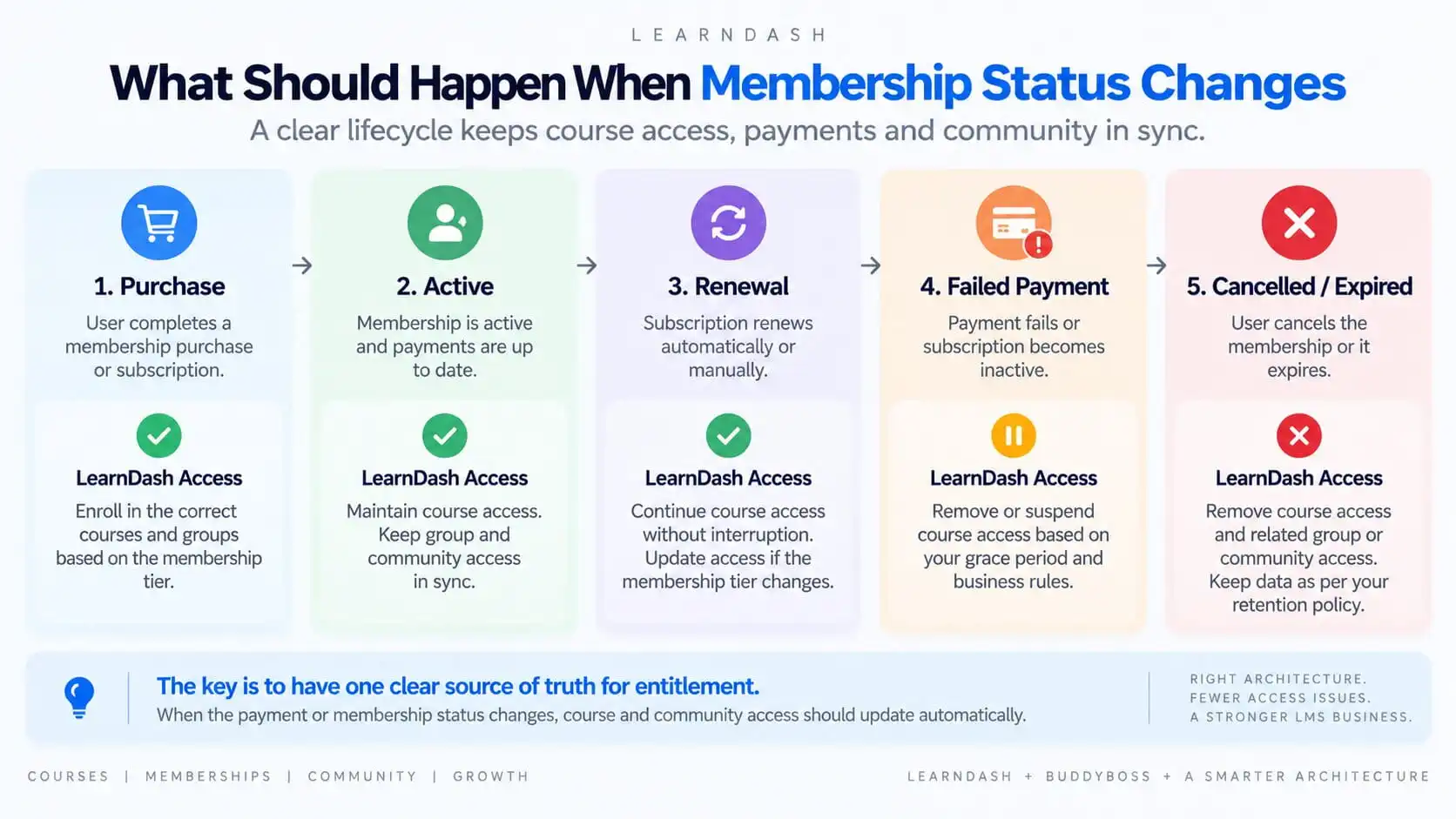
The lifecycle should be predictable.
Purchase
Grant the correct entitlement.
Enroll the user in the relevant courses and Groups.
Active
Maintain course and community access.
Renewal
Continue access without disruption.
Update timing if the membership tier or expiration period changes.
Failed payment
Apply the defined business rule:
- grace period
- suspension
- removal
Cancelled / expired
Remove entitlement-derived access.
Keep historical learning data unless the business has a separate reason to remove it.
The key is consistency.
The same status should produce the same result every time.
What I Would Audit on a Broken LearnDash Membership Site
When I investigate an access problem, I would map every way users can enter and leave the system.
|
Course Settings
|
LearnDash Groups
|
|---|---|
|
Enrollment mode
|
User Group membership
|
|
Direct payment settings
|
Courses assigned to Groups
|
|
Access expiration
|
Automatic enrollment behavior
|
|
Prerequisites
|
|
|
External enrollment
|
|
|
Membership Plugin
|
WooCommerce
|
|---|---|
|
Membership level
|
Associated products
|
|
Mapped courses
|
Order status
|
|
Cancellation behavior
|
Subscription status
|
|
Upgrade/downgrade logic
|
LearnDash enrollment-status mapping
|
|
User Account
|
Custom Code & Automation
|
|---|---|
|
Direct course enrollments
|
Hooks
|
|
Group enrollments
|
Webhooks
|
|
Membership history
|
API integrations
|
|
Old manual exceptions
|
Automation tools
|
|
|
Scheduled tasks
|
Once those paths are mapped, I ask one question: Which system is supposed to be authoritative for access?
That usually reveals the problem quickly.
Common LearnDash Membership Access Mistakes
Letting multiple plugins control the same courses
This creates duplicate entitlements and difficult removals.
Fixing access problems with manual enrollment
Useful for emergencies.
Dangerous as permanent architecture.
Granting access without defining removal
Every access rule needs an exit rule.
Thinking only about purchase
Most bugs happen later:
- renewal
- cancellation
- failed payment
- downgrade
Using LearnDash Groups and direct enrollment for the same entitlement
This makes it harder to know which relationship is keeping the course active.
Adding custom code before understanding the existing integrations
Custom code can fix a symptom while making the architecture harder to maintain.
When Custom Development Is Actually Necessary
Sometimes the standard integrations are enough.
Sometimes the business model genuinely needs custom logic.
For example:
- complex corporate accounts
- seat allocation
- multiple subscription products
- grace periods
- staged access
- cross-platform SSO
- CRM-controlled entitlements
- external billing systems
- advanced upgrade/downgrade rules
In those cases, custom development can make sense.
But I would still keep the same principle:
custom code should implement one clear entitlement model, not add yet another independent access source.
That distinction matters.
Final Recommendation
LearnDash membership access becomes unreliable when the platform loses track of why a user has access.
The solution is not necessarily:
- switch membership plugins
- reinstall LearnDash
- add another automation
- manually enroll the user again
The first step is to map the architecture.
Identify:
- what creates entitlement
- what changes entitlement
- which system owns that decision
- how LearnDash receives the result
- how BuddyBoss or other downstream systems follow it
Then make access predictable across the full lifecycle:
purchase → active → renewal → failed payment → cancellation → upgrade → downgrade
The goal is simple:
One source of truth for entitlement, with course and community access following automatically.