


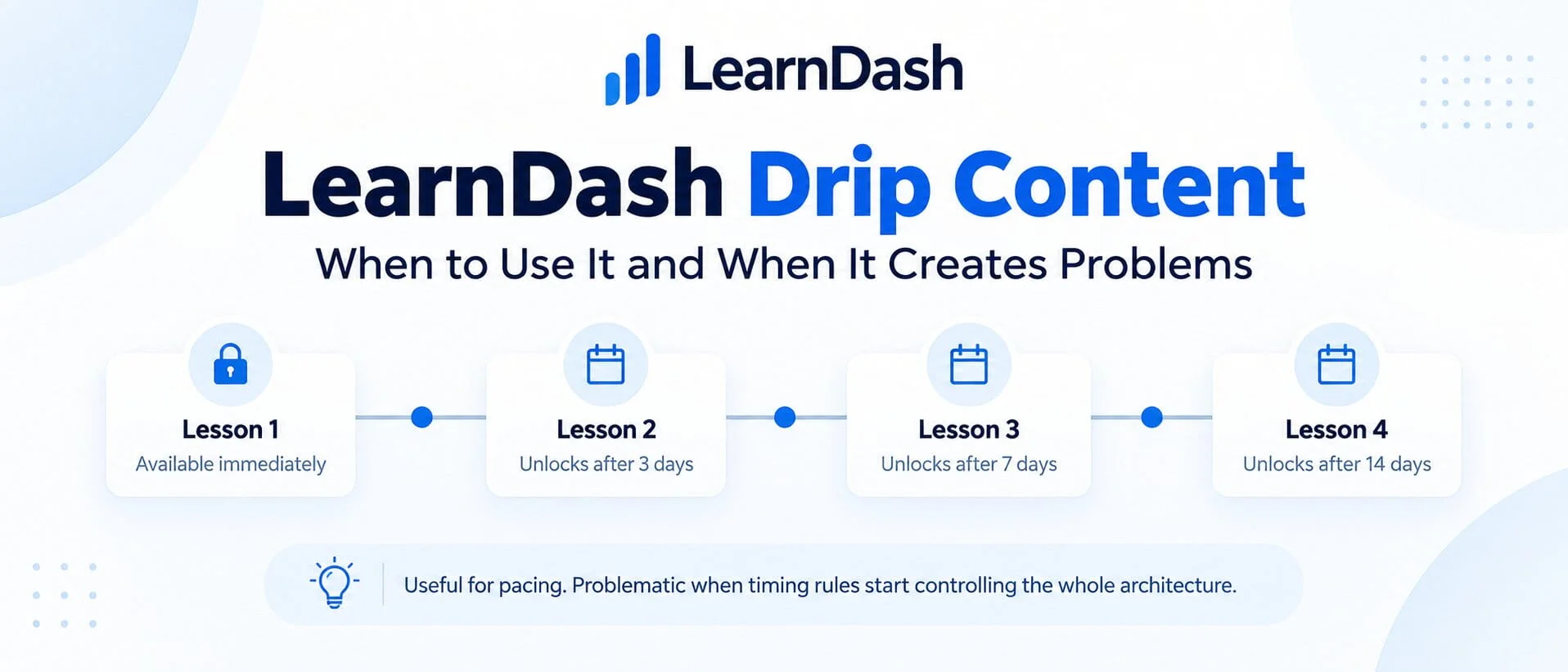
LearnDash drip content can be useful when a course genuinely needs pacing.
It can also become one of the easiest ways to create confusing access rules.
The feature itself is straightforward. LearnDash lets you release lessons immediately, after a set number of days from enrollment, or on a specific calendar date. Topics linked to a scheduled lesson inherit that schedule, while unlinked topics can have their own release rules.
The problems usually begin when drip timing is expected to solve something it was never designed to control.
For example:
- who is entitled to the course
- what happens when a membership expires
- whether a learner must complete one lesson before another
- when a corporate seat starts
- how long access should remain active
Those are different problems.
The most reliable setup is to use drip content for pacing, while enrollment, memberships, progression, and expiration handle their own responsibilities.
LearnDash Drip Content: The Short Answer
I would use LearnDash drip content when the learning experience benefits from controlled release over time.
Good examples include:
- weekly coaching programs
- structured cohorts
- certification programs
- staged onboarding
- time-based training
- courses where learners should not receive everything at once
I would be much more cautious when drip timing is being used to control:
- membership entitlement
- upgrades and downgrades
- subscription cancellations
- corporate seat access
- complicated Group enrollment
- access expiration
That is where a simple scheduling feature can become part of a much larger architecture problem.
How LearnDash Drip Content Actually Works
LearnDash includes drip feeding directly in the LMS. You do not need an additional plugin just to schedule lesson releases.
For a lesson, LearnDash currently provides three release options:
Immediately
The lesson becomes available as soon as the learner is enrolled.
Enrollment-based
The lesson becomes available a set number of days after that learner’s enrollment date.
Specific date
The lesson becomes available on a fixed calendar date.
That is simple enough.
But the choice between enrollment-based and specific-date scheduling can completely change the learner experience.
Enrollment-Based Drip vs Specific-Date Drip
For an evergreen course, enrollment-based drip often makes sense.
Imagine:
- Lesson 1: immediately
- Lesson 2: after 7 days
- Lesson 3: after 14 days
- Lesson 4: after 21 days
Every learner gets their own timeline.
Someone who joins on Monday follows one schedule.
Someone who joins two weeks later follows the same pattern from their own enrollment date.
That is useful when people can start whenever they want.
Specific-date drip solves a different problem.
Imagine a live cohort where everyone should receive Module 2 next Monday regardless of when they purchased.
In that case:
specific date is more appropriate than:
7 days after enrollment
because the business wants everyone moving together.
The choice should come from the delivery model, not convenience.
One Day Means 24 Hours, Not Tomorrow
This is a small detail that causes a surprising amount of confusion.
LearnDash explicitly documents that an enrollment-based delay of 1 day means 24 hours after enrollment, not the next calendar day at midnight. Two days means 48 hours, and so on.
Suppose a learner enrolls:
Monday at 6:30 PM
and Lesson 2 is scheduled:
1 day after enrollment
The lesson does not unlock Tuesday morning.
It should unlock around:
Tuesday at 6:30 PM
That difference matters when students contact support saying:
“The lesson says one day, but it is already Tuesday.”
The system may be working correctly.
The expectation is wrong.
Drip Content Is Not the Same as Course Progression
This distinction is important.
Drip content controls:
when something becomes available.
Course progression controls:
what the learner must complete before moving forward.
LearnDash currently supports two progression modes:
- Linear
- Free form
With Linear progression, learners must complete course steps in order. They cannot simply jump ahead to later lessons or topics. Free Form allows them to move through course content more freely.
So consider this requirement:
“Learners should not open Lesson 3 until they finish Lesson 2.”
That may not require drip content at all.
That is a progression rule.
Now consider:
“Lesson 3 should not be available until two weeks after enrollment, even if the learner finishes Lesson 2 immediately.”
That is a drip rule.
Those are different learning decisions.
Drip Content Is Also Not Course Expiration
Course expiration solves another separate problem.
LearnDash can limit course access based on the learner’s enrollment date and a defined access period.
For example:
Drip schedule
- Lesson 1: immediately
- Lesson 2: day 7
- Lesson 3: day 14
Course expiration
- access ends after 90 days
The first controls release timing.
The second controls how long the learner retains access.
Mixing those ideas creates confusing setups.
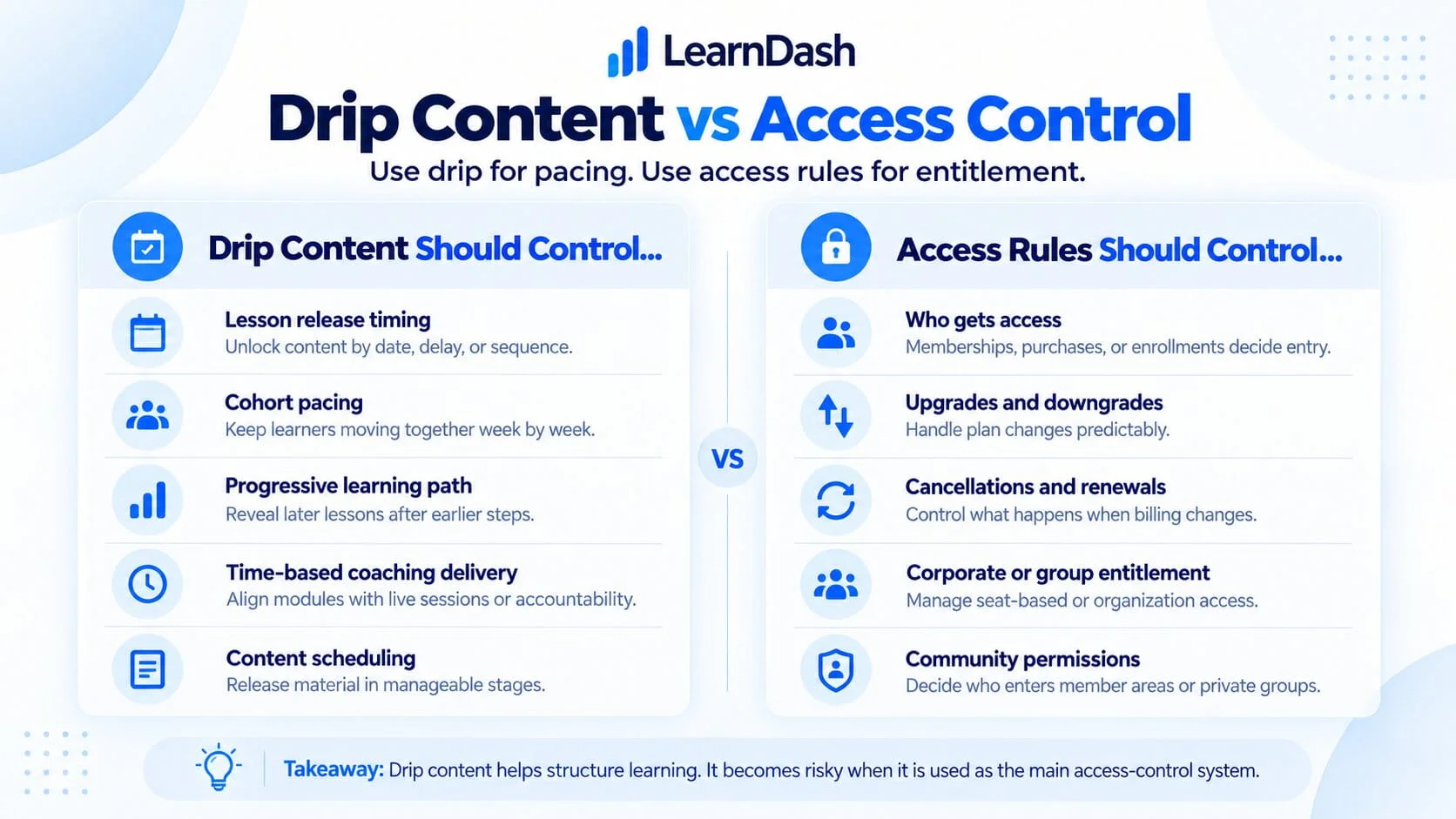
Use Drip for Pacing, Not Entitlement
This is the rule I would keep throughout the platform:
Drip content should control pacing.
Access rules should control:
- who gets the course
- when they become entitled
- what happens after cancellation
- what happens after downgrade
- whether a corporate learner still has a valid seat
If a membership expires, I do not want the business relying on lesson drip settings to decide whether the user should still be inside the course.
That should be handled by the entitlement layer.
If your course timing already depends on memberships, WooCommerce, subscriptions, or several enrollment sources, I can help map the course, membership, payment, and access flow before more timing rules are layered on top.
When LearnDash Drip Content Makes Sense
There are several situations where drip scheduling is a very good fit.
Cohort-Based Learning
A cohort might receive one module each week.
That prevents learners from racing too far ahead and makes group discussion easier to coordinate.
If everyone needs the same dates, use fixed calendar dates.
If each learner begins on their own timeline, enrollment-based drip may fit better.
Coaching Programs
Suppose a 12-week coaching program includes:
- Monday lesson
- Wednesday exercise
- Friday reflection
Timed content release can align the learning platform with the real coaching schedule.
Certification Programs
Some training programs work better when learners receive material in controlled stages.
That can create more deliberate pacing and reduce content overload.
Onboarding
A customer or employee onboarding sequence might release:
- orientation immediately
- systems training after 2 days
- advanced workflows after 7 days
- final assessment after 14 days
That can work well when the timeline itself is part of the training design.
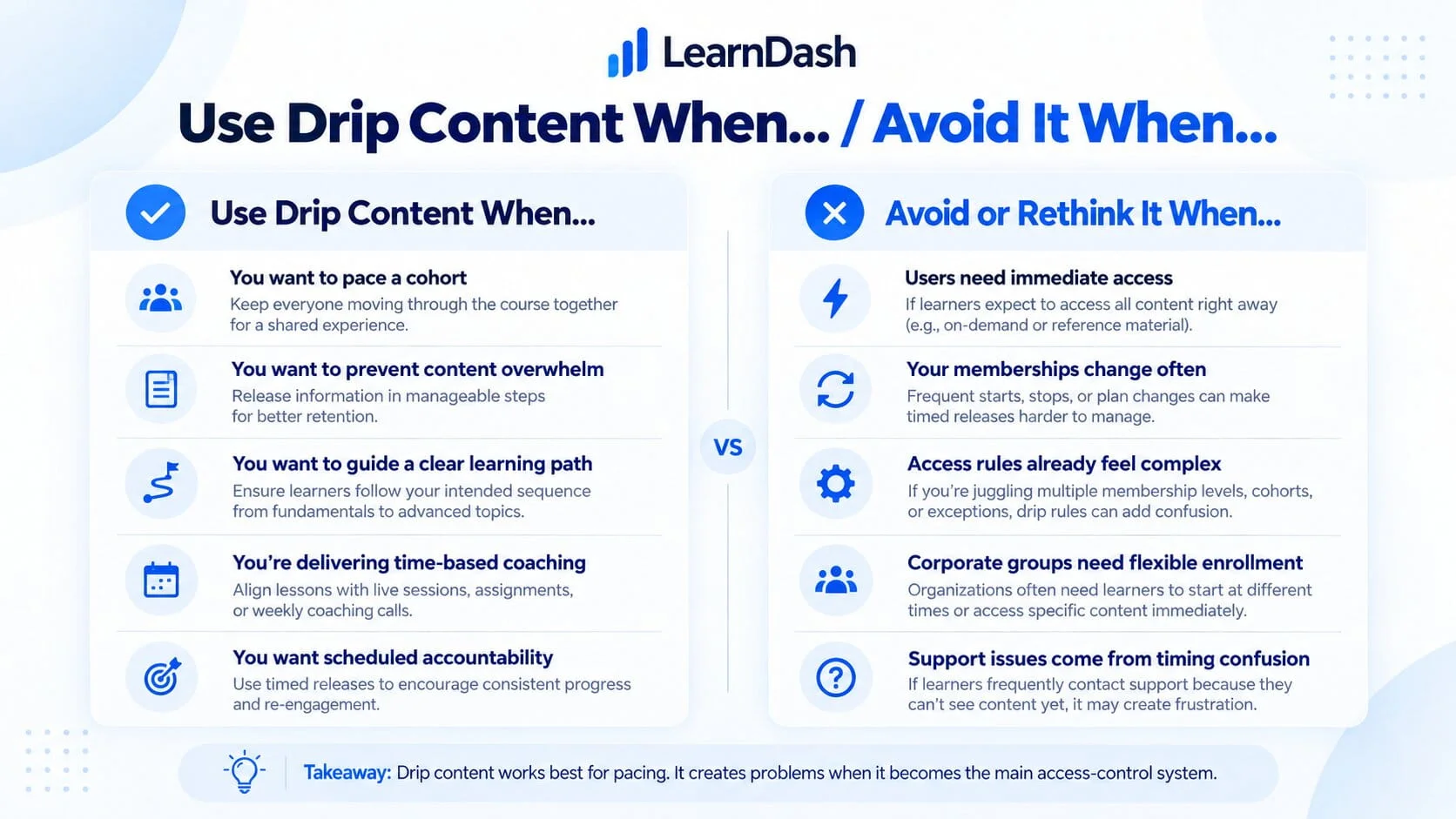
When Drip Content Creates Problems
Drip becomes less useful when it is being used to compensate for complicated access architecture.
Common warning signs include:
- several membership tiers
- repeated upgrades and downgrades
- different enrollment sources
- learners moving between Groups
- corporate users joining at different times
- manual enrollment exceptions
- course expiration overlapping with drip rules
At that point, the question is no longer:
When should Lesson 4 unlock?
It becomes:
Which date should LearnDash even use as the starting point?
That is where problems begin.
Changing Enrollment Dates Can Change the Schedule
LearnDash records the user’s enrollment date, and that date is used for drip-feed scheduling as well as course expiration. Administrators can update a user’s enrollment date for individually enrolled courses.
That means changing the date is not just administrative cleanup.
It can change when future lessons unlock.
For example:
Original enrollment:
September 1
Lesson scheduled:
30 days after enrollment
Expected release:
October 1
If an administrator changes the enrollment date to:
September 15
the timing can shift accordingly.
So if drip content suddenly looks wrong after a migration, manual enrollment change, or account correction, the enrollment date deserves attention.
Group Enrollment Changes the Logic
This is one of the most important LearnDash drip-content edge cases.
LearnDash currently documents different enrollment-date logic for individual course enrollment and Group enrollment.
For a direct course enrollment, the relevant date is when the individual learner enrolled.
For a Group course, LearnDash says the timing can be based on when the course was added to the Group, not when the individual learner later joined the Group.
That affects:
- course expiration
- lesson release schedules
This can produce surprising behavior.
A Group Example
Suppose:
January 1
A course is added to a LearnDash Group.
The course has:
- Lesson 1: immediate
- Lesson 2: after 7 days
- Lesson 3: after 14 days
- Lesson 4: after 30 days
Now a new employee joins that Group on:
January 25
You might expect the employee’s personal 30-day drip schedule to begin on January 25.
But LearnDash’s Group logic can base the schedule on when the course was added to the Group.
That means Group-based training needs to be designed deliberately.
This behavior can be useful when everyone in the Group should follow the same schedule.
It can be problematic when employees join continuously and each learner is supposed to receive a fresh 30-day sequence.
If your Group structure is already becoming complicated, it is worth reviewing LearnDash Groups vs BuddyBoss Groups: What’s the Difference and Which Should Control Access? before adding more scheduling rules.
Late Group Members Can Get a Different Experience
The Group example above creates another business question.
What should happen when someone joins late?
Should they:
- immediately see everything already released?
- start from Lesson 1 on their own timeline?
- wait for the next cohort?
- receive a manually adjusted start date?
There is no universal answer.
But the business needs to choose.
If learners join Groups throughout the year, a single Group-level drip schedule may not match the intended training model.
Sometimes the cleaner answer is:
- separate cohorts
- separate Groups
- individual enrollment
- a different course structure
rather than more exceptions.
Membership Timing Can Conflict With Drip Timing
Membership programs add another timing layer.
Suppose the membership is monthly.
The learner gets access on:
September 10
LearnDash begins a 30-day drip sequence.
Then the member upgrades on:
September 20
or cancels on:
September 25
or changes membership level.
Now the platform has at least two timelines:
learning schedule
and:
commercial entitlement
Those timelines need different owners.
LearnDash drip should answer:
When should this lesson become available to an entitled learner?
The membership system should answer:
Is this learner still entitled to the course at all?
Trying to make drip content solve both questions makes cancellation and upgrade logic much harder.
I covered that broader issue in Why LearnDash Membership Access Breaks and How to Fix the Architecture.
Why a Lesson May Not Unlock When Expected
When someone says:
“My LearnDash drip content is not working.”
I would not immediately assume a bug.
I would check the schedule from the beginning.
Check the enrollment date
Is LearnDash using the date you think it is?
Check the enrollment source
Did the learner enroll:
- directly?
- through a Group?
- through a membership?
- manually?
- through an integration?
Check the release rule
Is the lesson:
- immediate?
- enrollment-based?
- fixed date?
Check the actual time
Remember:
1 day = 24 hours.
Check the user’s current entitlement
Does the learner still have course access?
Check Group behavior
Is Group-based timing changing the expected schedule?
That sequence is more useful than repeatedly resaving the lesson.

Topics Can Follow the Lesson Schedule
There is another detail worth understanding.
LearnDash states that topics attached to a scheduled lesson follow that lesson’s availability. Unlinked topics can instead have their own release schedule.
That means a learner may think:
“This topic should already be available.”
But if it belongs to a lesson that has not been released yet, the parent lesson schedule matters.
This can become confusing when course structures are changed after the original scheduling rules were created.
Whenever I troubleshoot drip content, I check the course hierarchy as well as the dates.
Quizzes Can Also Be Drip-Fed
LearnDash also supports release scheduling for quizzes.
The options include:
- immediately
- enrollment-based
- specific date
and the same 24-hour interpretation applies to enrollment-based day counts.
That gives course creators more flexibility.
It also gives them another opportunity to overcomplicate the timeline.
If a quiz is supposed to follow completion of a lesson, a progression rule may make more sense than an arbitrary time delay.
Again, choose the rule that matches the learning requirement.
Start Dates Can Be Better Than Drip for Cohorts
LearnDash now also supports course and Group start dates.
A start date lets users enroll or purchase first while preventing course access until the defined date.
This is useful for cohort programs.
Imagine enrollment opens on September 1.
The cohort starts October 1.
You do not necessarily need to construct a complicated lesson schedule just to prevent everyone from starting early.
The course or Group start date can solve the cohort-entry problem.
Then drip scheduling can control what happens after the program begins.
That is a cleaner separation.
Do Not Use Drip Content to Hide Weak Course Structure
Sometimes drip content is added because the course feels overwhelming.
The thinking is:
“If we hide most of it, the course will feel simpler.”
That may help.
But it is worth asking whether the actual problem is:
- too many lessons
- weak module structure
- unclear navigation
- duplicated content
- poor prioritization
Scheduling does not automatically fix course design.
If a learner needs a clear sequence, improve the learning path first.
Then use drip only if the timeline adds value.
Drip Content Can Increase Support Work
Every timing rule creates another question support may eventually receive.
Examples:
“Why can my colleague see Lesson 5 but I cannot?”
“Why did this unlock at 4 PM instead of this morning?”
“Why did the new employee immediately receive Module 4?”
“Why did my lesson disappear after my membership changed?”
If the support team cannot quickly explain the release logic, the architecture is probably too complicated.
Good drip design should be easy to describe.
For example:
“Every lesson unlocks seven days after the previous stage of your program.”
or:
“Everyone in the October cohort gets Module 2 on October 8.”
That is much better than a chain of exceptions.
What I Would Check When LearnDash Drip Content Is Wrong
I would audit five things.
1. Enrollment Date
Check:
- actual enrollment date
- manual changes
- imported users
- migration dates
2. Enrollment Source
Check:
- direct course enrollment
- Group enrollment
- membership integration
- ecommerce integration
- custom enrollment logic
3. Release Rules
Check:
- immediate
- enrollment-based
- specific date
- topic inheritance
- quiz scheduling
4. Entitlement
Check:
- membership active?
- subscription active?
- course still assigned?
- Group membership still valid?
5. Expected Time
Check:
- actual 24-hour timing
- site timezone
- calendar date
- caching or integration conflicts
That usually tells you where the discrepancy comes from.
A Cleaner Drip-Content Architecture
The cleanest setup separates each responsibility.
Enrollment
Answers:
When did this learner enter the course?
Entitlement
Answers:
Should this learner currently have access?
Drip
Answers:
Which content should be available at this point in time?
Progression
Answers:
What must the learner complete before moving forward?
Expiration
Answers:
When should course access end?
Each system has one job.
That makes the learning experience much easier to predict.
It also makes support easier.
When Custom Development Is Necessary
Standard LearnDash scheduling is enough for many programs.
Custom development becomes more reasonable when the release logic depends on business conditions such as:
- membership tier
- company contract date
- learner role
- custom milestone
- external CRM event
- assessment score
- manager approval
- completion of activity outside LearnDash
At that point, the requirement is no longer simply:
drip Lesson 5 after 14 days.
It is custom learning logic.
That should be designed as such rather than forced into dozens of unrelated lesson schedules.
Final Recommendation
LearnDash drip content is valuable when timing improves the learning experience.
Use it for:
- pacing
- cohorts
- structured releases
- coaching programs
- scheduled learning
Be more cautious when it starts controlling:
- memberships
- subscription lifecycle
- corporate entitlement
- upgrades and downgrades
- complicated Group access
The distinction I would keep is:
Use drip content to decide when an entitled learner receives content. Use the access architecture to decide whether that learner is entitled in the first place.
That separation prevents a lot of the problems that otherwise look like LearnDash scheduling bugs.
If you are building a LearnDash platform where drip content needs to work alongside memberships, Groups, WooCommerce, BuddyBoss, or custom access rules, I can review the LMS architecture and structure the timing and entitlement rules so they remain predictable as the platform grows.