


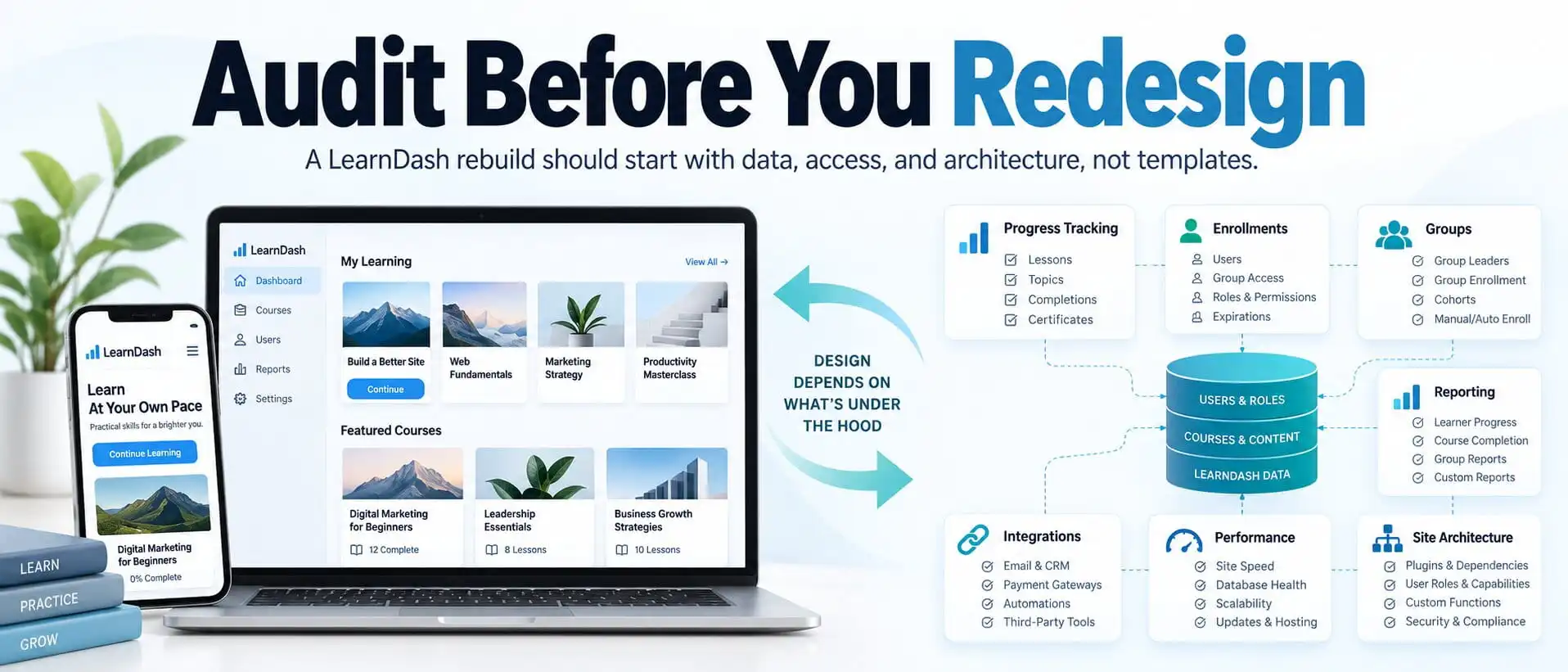
A LearnDash website audit should happen before anyone starts rebuilding templates, changing themes, or moving course pages into a new design system.
That is because a LearnDash site is not only a website.
It may also contain:
- learner progress
- quiz history
- course enrollments
- Groups and Group Leaders
- memberships
- recurring payments
- access rules
- reporting workflows
- BuddyBoss connections
- automation
- custom code
- third-party integrations
A redesign can improve the visible experience without touching most of that.
A rebuild can accidentally break it.
The safest approach is to understand what the current platform is doing first, identify what needs to be preserved, and only then decide what should be redesigned, migrated, replaced, or retired.
LearnDash Website Audit: The Short Answer
Before redesigning or rebuilding a LearnDash site, I would audit six areas:
1. Courses and learning structure
2. Learners and historical progress
3. Enrollment, Groups, memberships, and access
4. Payments, integrations, and automation
5. Reporting and operational workflows
6. Design, performance, and technical debt
The audit is not meant to preserve everything.
It is meant to answer three questions:
What already works and should stay?
What is creating problems and should change?
What cannot be changed casually because the business depends on it?
That distinction is much more useful than starting with:
“Which new WordPress theme should we use?”
Why a LearnDash Redesign Is Not Just a Front-End Project
A normal marketing-site redesign can often focus mainly on:
- branding
- page structure
- navigation
- conversion
- mobile responsiveness
A LearnDash platform has another layer underneath.
A learner may log in and expect the platform to know:
- which courses they purchased
- where they stopped
- which lessons are complete
- which quizzes they passed
- which certificate they earned
- which Group they belong to
- when their access expires
LearnDash stores user data inside WordPress user profiles and uses that data to manage enrollment, progress, and roles.
That means the redesign needs to respect existing learner state.
A new dashboard that looks better but loses those relationships is not an improvement.
Start With the Business Model
Before auditing plugins, I would first document what the platform is actually selling.
For example:
Course business
Customers buy individual courses.
Membership academy
Customers pay recurring fees for access to a library.
Corporate training platform
Companies buy access for groups of employees.
Community-led learning platform
Members receive courses plus BuddyBoss community access.
Certification platform
Learners progress through assessments, certificates, and structured learning paths.
Those models create very different technical requirements.
The audit should therefore begin with questions like:
- What does the customer buy?
- Is access one-time or recurring?
- Do organizations buy seats?
- Are there multiple learner types?
- Do Group Leaders manage learners?
- Does community access depend on course or membership status?
- Which reports matter to the business?
- What happens when access expires?
If the site has grown through years of plugin additions and custom rules, I can map the existing LearnDash architecture before the redesign scope is finalized.
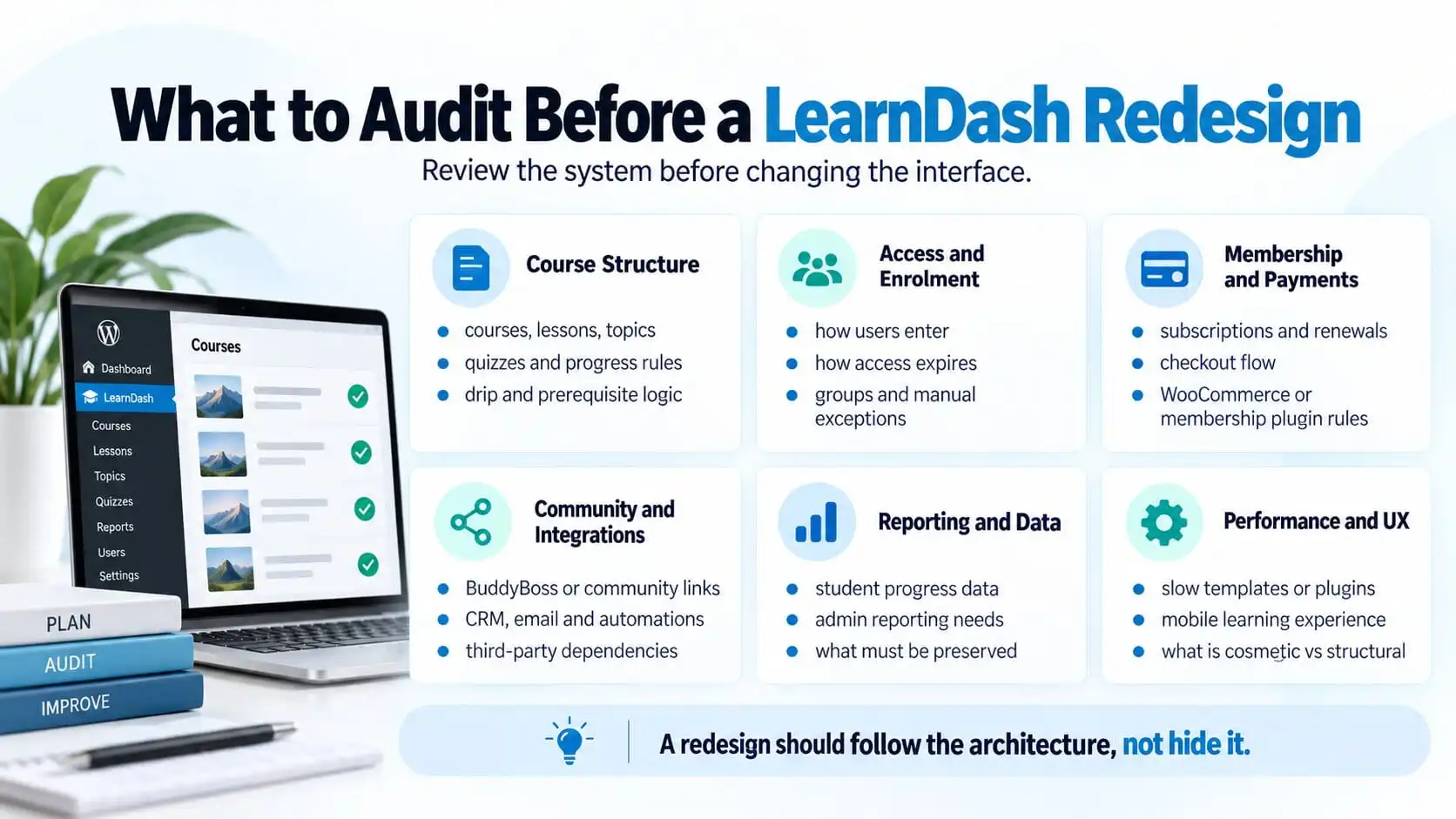
Audit the Course Structure
I would then inventory the learning structure itself.
That includes:
- courses
- lessons
- topics
- quizzes
- assignments
- certificates
- prerequisites
- progression rules
- drip schedules
- course categories
- tags
The goal is not only to count them.
I want to understand relationships.
For example:
Course A
→ Lesson 1
→ Lesson 2
→ Quiz
→ Certificate
or:
Corporate Program
→ Group
→ Course A
→ Course B
→ Group Leader reporting
Those structures matter when rebuilding templates or migrating content.
Audit Progression Before Rearranging Courses
LearnDash currently supports Linear and Free Form course progression.
With Linear progression, learners need to complete steps in sequence. Free Form allows more flexible navigation.
That matters during a rebuild.
A designer may look at a course and think:
“Let’s simplify this by moving lessons around.”
But lesson order can be part of the learning logic.
The audit should record:
- progression mode
- prerequisites
- lesson timers
- required quizzes
- assignment requirements
- completion behavior
Design and course architecture should not be treated as separate if the learner experience depends on both.
Completed Learners Need Special Attention
LearnDash currently notes that if a learner has already completed a course, adding or removing lessons does not automatically reset that learner’s completed status.
That can matter a lot during restructuring.
Suppose:
- 2,000 users completed the old course
- the rebuild adds three new mandatory lessons
Those historical learners do not necessarily become incomplete just because the course changed.
That may be exactly what you want.
Or it may not.
The audit needs to identify that decision before the content structure changes.
Audit Existing Student Progress
This is one of the most important areas.
Before a rebuild, I would document:
- active learners
- completed learners
- current course progress
- quiz attempts
- scores
- assignments
- certificates
- enrollment dates
- expiration dates
- manually adjusted progress
LearnDash stores course progress in WordPress user metadata, with course, lesson, topic, and quiz IDs referenced inside that data.
That creates an important risk:
If you rebuild courses by creating completely new course and lesson records, those new WordPress post IDs may no longer match the historical progress relationships.
The visual content may look identical.
The underlying records are not.
Do Not Assume a Course Export Preserves Everything
LearnDash can transfer course content and preserve relationships between exported courses, lessons, topics, quizzes, Groups, and selected settings.
But LearnDash also specifically explains that user progress is tied to WordPress user metadata and the IDs of course content.
So I would never assume:
“We exported the courses, therefore all student progress is safe.”
Those are different things.
If a redesign includes a server move, domain change, fresh WordPress install, or new course records, the migration plan needs to explicitly cover learner data.
I covered that in more detail in Migrating LearnDash Without Losing Student Progress.
Audit Users and Roles
Next, I would map who exists in the platform and what they are allowed to do.
That can include:
- administrators
- learners
- Group Leaders
- instructors
- membership-specific roles
- custom WordPress roles
This becomes especially important on older sites because roles are often modified over time.
A plugin may have been removed years ago while its capabilities still affect users.
The rebuild should not blindly recreate every role.
But it should understand them before deciding what to remove.
Audit LearnDash Groups
LearnDash Groups are often much more important than they appear from the front end.
LearnDash currently uses Groups to:
- enroll multiple users into courses
- organize memberships or cohorts
- track progress at Group level
- assign Group Leaders
- communicate with learners
Users added to a Group can automatically receive access to courses attached to that Group.
That means a Group may be part of the access architecture, not merely an organizational label.
Before rebuilding, I would record:
- every Group
- courses assigned to it
- Group users
- Group Leaders
- parent/child relationships where used
- corporate-client relationships
- reporting dependencies
- seat or registration logic
- drip or start-date dependencies
Audit Group Leaders
Group Leaders can be operationally important.
LearnDash currently allows Group Leaders to view learner progress, quiz and assignment performance, communicate with users, and work with Group-related reporting and management functions.
If a training company has 30 client managers using Group Leader access every week, that is not a minor feature.
It is part of the product.
The audit should ask:
- Who uses Group Leader accounts?
- Which reports do they rely on?
- Do they export data?
- Do they manage enrollments?
- Do they communicate with users?
- Is the current experience customized?
Do not discover those requirements after the new dashboard has already been designed.
Audit Memberships and Course Access
This is where many older LearnDash sites become difficult.
A learner may have access because of:
- direct LearnDash enrollment
- LearnDash Group
- MemberPress
- Paid Memberships Pro
- WooCommerce
- subscription
- manual admin action
- custom code
The audit should identify every access source.
Then ask:
Which one is supposed to be authoritative?
If the answer is unclear, the redesign is a good opportunity to simplify the architecture.
But I would not simplify it before understanding what the current rules are doing.
If your current LMS has multiple systems granting and removing course access, I can review the membership, payment, and LearnDash entitlement flow before those rules are carried into the rebuild.
Audit WooCommerce and Payments
If WooCommerce is involved, I would map:
- products
- course mappings
- subscriptions
- renewal behavior
- order statuses
- coupons
- checkout customizations
- tax logic
- refunds
- cancellation behavior
The question is not only:
Does checkout work?
It is also:
What does checkout trigger elsewhere?
For example:
WooCommerce purchase
→ Membership level
→ LearnDash Group
→ Courses
→ BuddyBoss Group
→ CRM automation
That chain needs to be documented before rebuilding any part of it.
Audit Course Expiration and Enrollment Dates
Access timing is another area that can quietly break.
Enrollment dates may affect:
- drip schedules
- expiration
- reporting
- custom workflows
If the platform uses Groups, direct enrollment, memberships, and manual exceptions, those dates may not all mean the same thing.
Before migration or rebuild, I would identify:
- where enrollment dates come from
- whether they are manually adjusted
- which courses expire
- what happens when expiry occurs
- whether historical access must remain visible
This is especially important if the new platform will change the membership or commerce layer.
Audit Reporting Before Replacing the Admin Experience
Reporting is often overlooked because it is not visible to ordinary learners.
But businesses may depend heavily on it.
LearnDash’s current reporting tools can filter data by:
- course
- user
- Group
- completion status
- date
and can expose learner activity, course progress, and exports.
Group Leaders can also export course and quiz data for learners in their Groups.
So I would ask:
- What reports are checked weekly?
- What CSV exports are used?
- Who receives them?
- Are reports sent to corporate clients?
- Does the business use completion dates?
- Are quiz results commercially important?
- Is there custom reporting?
The worst time to discover a reporting dependency is after launch.
Audit BuddyBoss and Community Connections
If BuddyBoss is installed, the LearnDash audit needs to include community architecture too.
Look at:
- social Groups
- LearnDash Group mappings
- profiles
- activity
- memberships
- private content
- messages
- notifications
- community access rules
The key question is:
Does BuddyBoss follow LearnDash/membership entitlement, or does it have its own independent access rules?
If those systems are tightly connected, the rebuild needs to preserve the relationship.
Audit Email and Automation
A mature LearnDash site may have automation through:
- FluentCRM
- ActiveCampaign
- Mailchimp
- Automator plugins
- webhooks
- Zapier
- Make
- custom hooks
- transactional email services
I would document:
Trigger → Action
For example:
Course completed
→ CRM tag
→ completion email
→ sales automation
or:
Membership cancelled
→ course access removed
→ BuddyBoss Group removed
→ CRM updated
That gives you an actual map of the operating system.
Without it, an integration can disappear simply because nobody remembered it existed.
Audit Custom Code
Custom code deserves its own inventory.
Check:
- functions.php
- custom plugins
- mu-plugins
- code snippet plugins
- child theme modifications
- JavaScript
- REST integrations
- webhooks
- cron jobs
Then classify each customization as:
- still required
- obsolete
- replaceable with native functionality
- dangerous/undocumented
- worth rebuilding properly
This is where an older LMS often contains years of technical history.
Do not copy all of it into the new build automatically.
Audit Elementor and the Current Theme
Now we reach the visible design layer.
I would audit:
- course templates
- lesson templates
- dashboard pages
- account pages
- archive templates
- sales pages
- header/footer
- mobile layouts
- conditional sections
- global styles
- custom CSS
The question is:
Which parts genuinely need redesigning?
Not:
How can we rebuild every page?
A lot of redesign projects create unnecessary risk by replacing stable templates simply because the front end is being refreshed.
I covered that principle separately in Elementor + LearnDash: What You Should Customize and What You Should Leave Alone.
Audit Performance Before Blaming the Design
A slow LearnDash site does not automatically need a new theme.
The bottleneck might instead be:
- hosting
- database queries
- reporting
- BuddyBoss activity
- memberships
- scheduled jobs
- plugin conflicts
- custom code
So I would benchmark performance before changing the frontend.
That gives you a baseline.
Then after the rebuild, you can measure whether the new system is actually better.
I covered the performance side in Why LearnDash Websites Become Slow and What Actually Fixes Them.
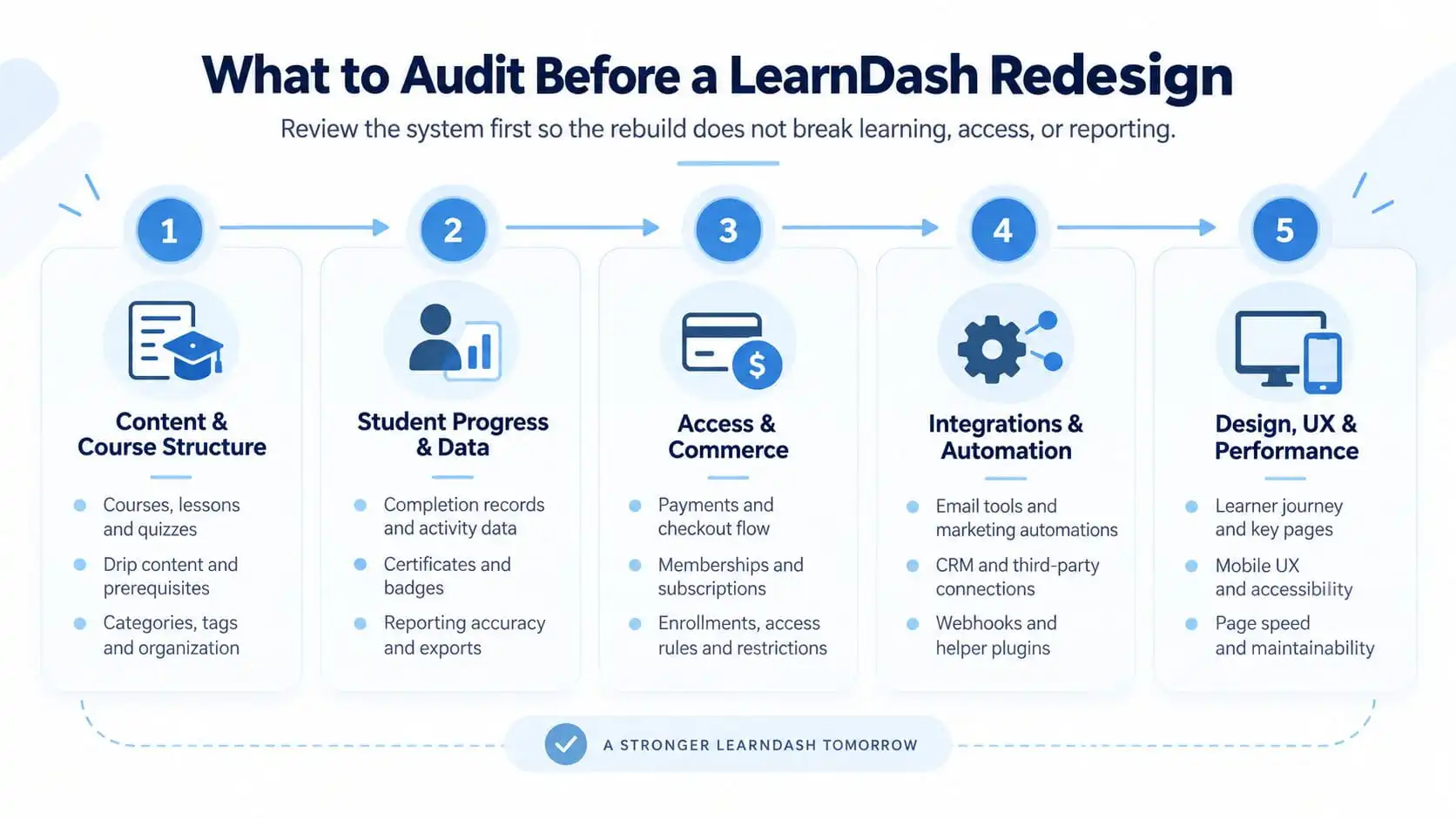
The LearnDash Audit Map
A useful audit can be reduced to five practical areas.
1. Content and course structure
Check:
- courses
- lessons
- topics
- quizzes
- progression
- prerequisites
- drip schedules
2. Student progress and data
Check:
- completions
- quiz history
- certificates
- enrollment dates
- historical reporting
3. Access and commerce
Check:
- direct enrollment
- Groups
- memberships
- subscriptions
- WooCommerce
- expiration
4. Integrations and automation
Check:
- CRM
- webhooks
- BuddyBoss
- external systems
- custom automation
5. Design, UX, and performance
Check:
- templates
- navigation
- dashboards
- mobile
- accessibility
- speed
- technical debt
Once those are mapped, redesign decisions become much easier.
What Must Be Preserved
I would be especially careful with:
Student progress
Completion and quiz history may have real value.
Course relationships
Course, lesson, topic, and quiz IDs can matter to existing progress records.
Group relationships
Groups may control access, reporting, or corporate structure.
Enrollment history
Access and timing logic may depend on it.
Reporting data
Especially for certification or B2B training.
Stable integrations
A working CRM or payment integration should not be rebuilt simply because the visual design changes.
What Can Often Be Redesigned Safely
The safer areas usually include:
- public marketing pages
- branding
- typography
- page spacing
- course cards
- navigation
- dashboard presentation
- sales pages
- responsive layout
Even here, I would still test logged-in states and conditional content.
But these are generally more appropriate places to be ambitious visually.
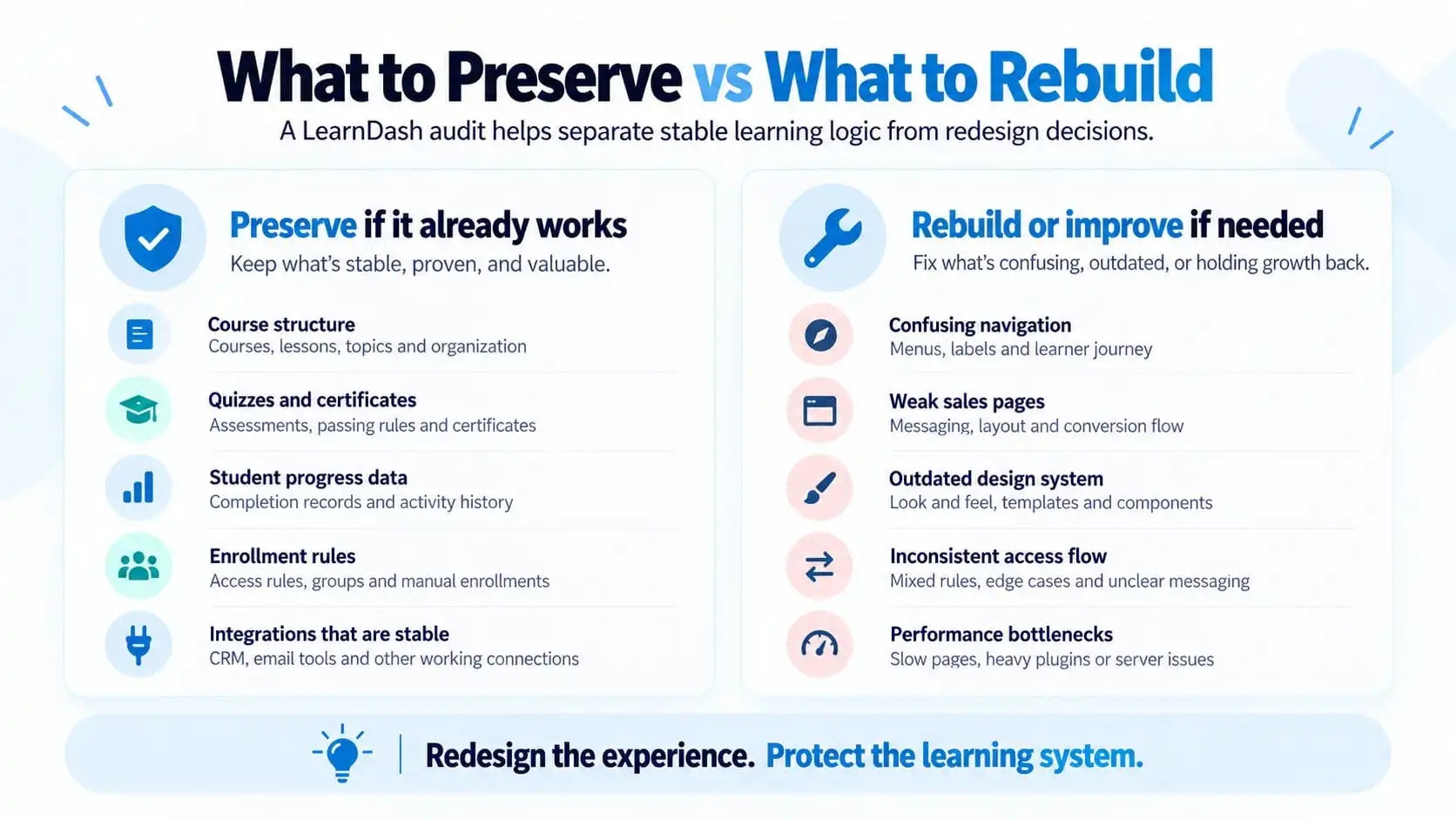
What to Preserve vs What to Rebuild
The rule I use is simple:
Preserve if it is stable, understood, and valuable
That may include:
- course structure
- quiz logic
- learner progress
- Group relationships
- stable integrations
Rebuild when it is confusing, fragile, outdated, or actively limiting the business
That may include:
- poor navigation
- outdated design
- broken mobile UX
- duplicated access logic
- old custom code
- slow templates
- unnecessary plugin dependencies
A rebuild should solve known problems.
It should not create new ones just because “fresh” sounds better than “existing.”
Redesign vs Migration vs Rebuild
These terms are often used interchangeably, but they should not be.
Redesign
The underlying architecture largely stays.
You improve:
- visual design
- navigation
- UX
- templates
- conversion
Migration
The system moves.
For example:
- new host
- new WordPress installation
- staging to production
- new domain
- consolidated site
The priority is preserving data and relationships.
Rebuild
You intentionally replace parts of the architecture.
For example:
- old membership plugin
- messy theme
- fragile custom code
- duplicate access rules
- broken reporting
A project can include all three.
But the scope should say which one you are actually doing.
Build a Staging Plan
I would never make a serious LearnDash rebuild directly on production.
LearnDash itself recommends testing course transfers on a development site first.
A good staging workflow should include:
- current-site backup
- database backup
- file backup
- staging environment
- migration/rebuild
- controlled user testing
- data comparison
- final production sync
- launch validation
The exact workflow depends on how active the live platform is.
If users are completing courses every day, you also need a plan for changes that happen while the rebuild is in progress.
Pre-Launch Validation Checklist
Before launch, I would test the platform as several user types.
Learner
- login
- dashboard
- enrollment
- progress
- quiz
- certificate
- mobile experience
New customer
- checkout
- account creation
- course access
- email delivery
Member
- membership access
- renewal
- upgrade/downgrade
- expiration
Group user
- course access
- progress
- reporting
- Group Leader
- learner visibility
- reports
- exports
- management tools
Administrator
- enrollment
- support workflow
- reporting
- integrations
- automation
Do not launch based only on pages looking correct while logged in as an administrator.
When a Rebuild Is Better Than a Redesign
Sometimes the audit reveals that the existing platform has too much technical debt.
Examples:
- overlapping membership plugins
- undocumented custom code
- abandoned theme
- duplicated access rules
- serious performance problems
- broken mobile UX
- inconsistent course structure
At that point, preserving everything may be more expensive than rebuilding selected parts properly.
The audit should make that decision evidence-based.
When a Redesign Is Enough
A full rebuild may be unnecessary when:
- LearnDash data is healthy
- enrollment works
- Groups are organized
- memberships are stable
- reporting works
- integrations are reliable
- the main problem is the frontend experience
Then I would preserve the operating system and redesign the experience around it.
That is usually lower risk.
Final Recommendation
A LearnDash redesign should not start with Elementor, Figma, templates, or a new theme.
It should start with:
What does this platform currently do?
Then:
What does the business actually depend on?
Then:
What needs to change?
A proper LearnDash website audit should map:
- courses
- learner progress
- quizzes
- Groups
- memberships
- commerce
- reporting
- integrations
- automation
- custom code
- performance
- frontend UX
Only after those relationships are understood would I decide what to preserve, redesign, migrate, or rebuild.
That is how you improve the platform without accidentally breaking the parts that already run the business.