



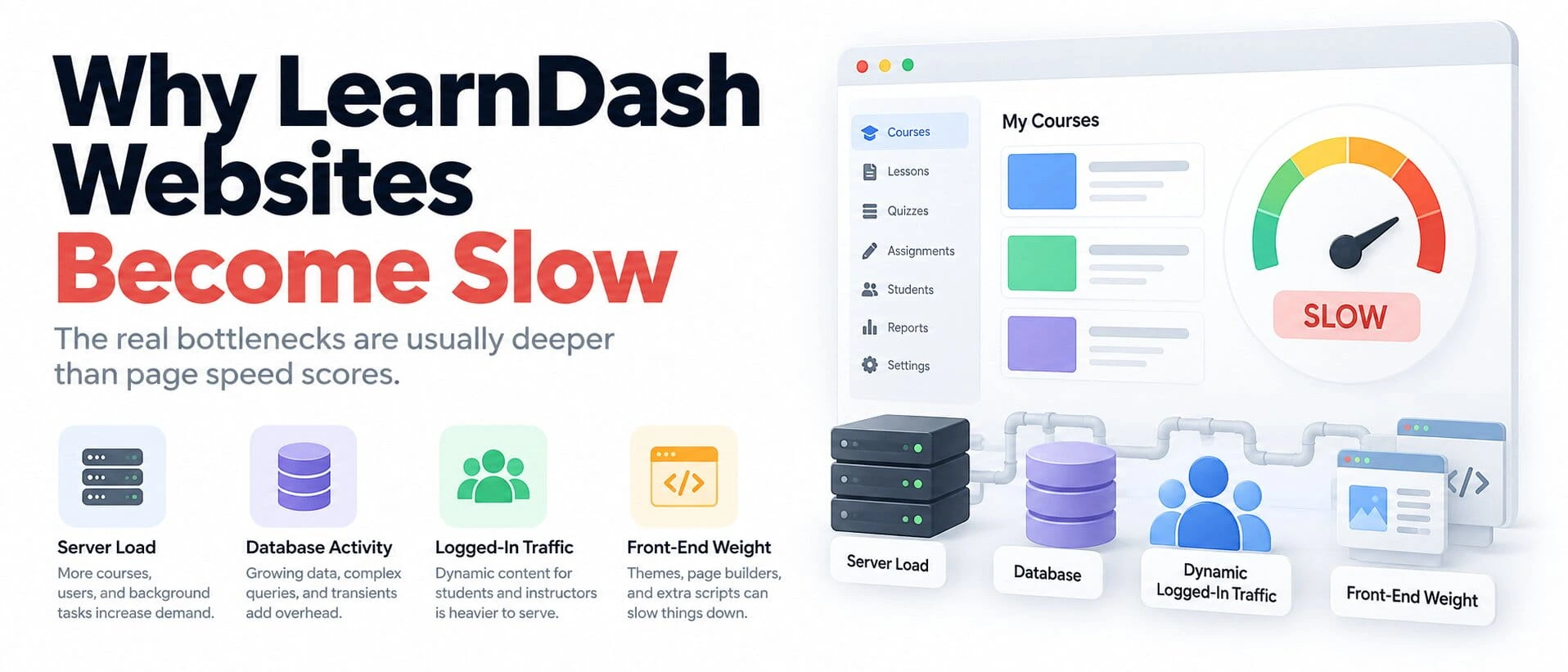
If your LearnDash website is slow, the problem is usually deeper than a bad PageSpeed score or an unoptimized image.
A serious LearnDash platform has logged-in users, course progress, quizzes, reports, memberships, background jobs, database queries, and often integrations with tools such as BuddyBoss, MemberPress, or WooCommerce.
That means the site behaves more like a web application than a simple marketing website.
The biggest mistake is treating that kind of performance problem with generic advice like:
install a caching plugin, compress a few images, and hope for the best.
Sometimes that helps.
Often it does not.
The real fix usually comes from identifying which layer is doing too much work.
LearnDash Website Slow: The Short Answer
When a LearnDash site becomes slow, I usually look at four areas first:
- server resources
- database activity
- platform architecture
- front-end weight
A site may also have several bottlenecks at the same time.
For example:
A weak server may struggle with logged-in users.
A large database may make course progress and reporting queries expensive.
BuddyBoss may add dynamic social activity.
A page builder may add heavy JavaScript on top.
Then a speed plugin gets installed and is expected to fix all of it.
That is not really optimization.
That is hiding the root problem.
When a LearnDash website is slow, the goal is to identify which layer is creating the delay before changing hosting, plugins, or caching.
Why LMS Performance Is Different From a Normal WordPress Site
A public WordPress website can often cache most pages aggressively.
The same homepage may be served to thousands of anonymous visitors with very little work required from PHP or the database.
A LearnDash site is different.
A logged-in student may need to see:
- their enrolled courses
- their course progress
- completed lessons
- quiz status
- assignments
- certificates
- group access
- personalized dashboard data
That information is user-specific.
The server often has to build it dynamically.
If BuddyBoss is also part of the platform, add things such as:
- activity feeds
- messages
- notifications
- community Groups
- member directories
- social interactions
BuddyBoss has specifically invested in query optimization and extended object-caching support for dynamic areas of its platform, and currently recommends Redis where possible.
That tells you something important:
logged-in LMS and community traffic is a different workload from a normal cached WordPress site.
What Actually Makes a LearnDash Site Slow
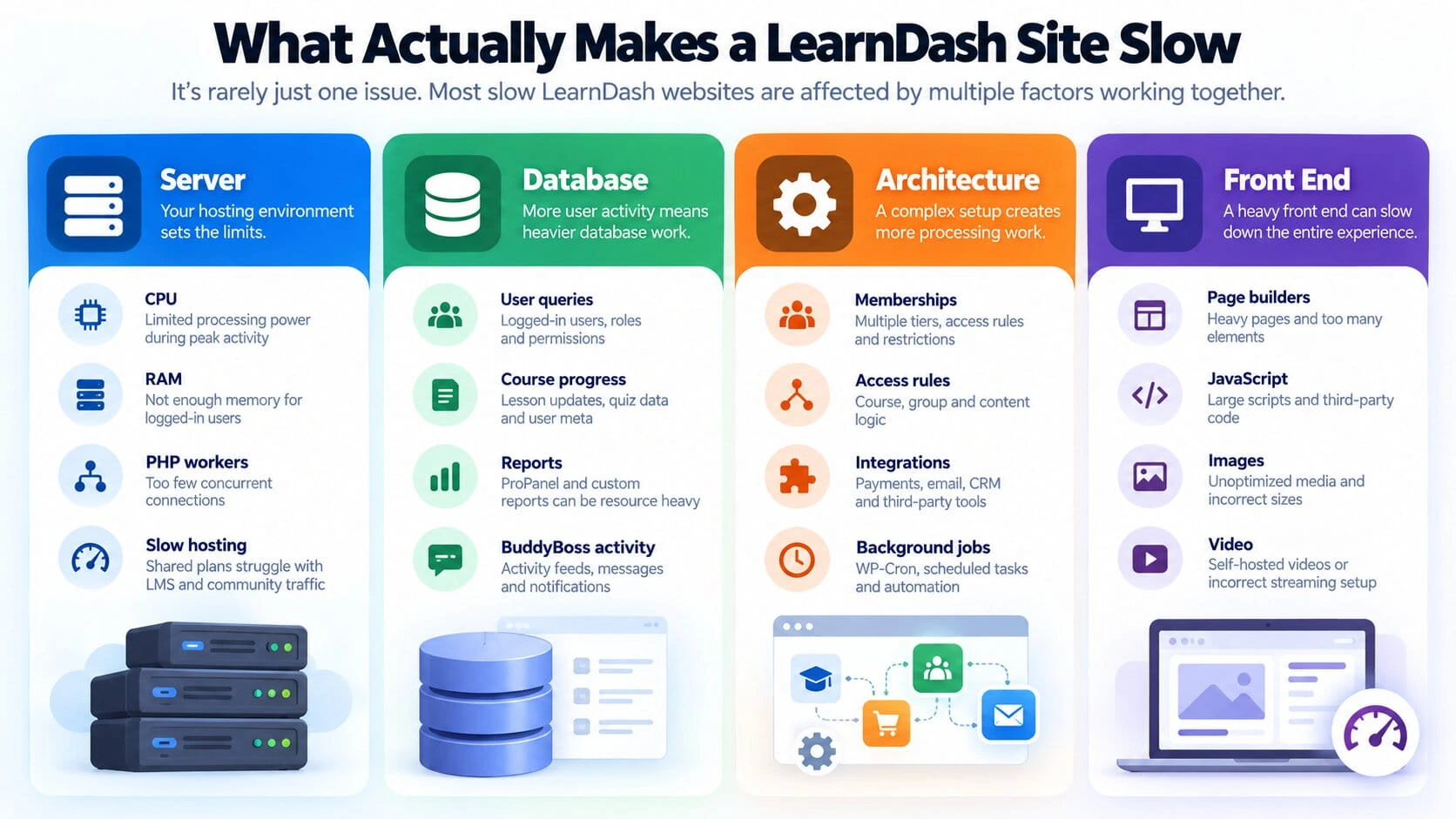
The most useful way to diagnose LearnDash performance is to separate the problem into four layers: server, database, architecture, and front end.
The server layer determines how much real-time activity the platform can handle. CPU, memory, PHP workers, storage performance, and hosting limits become especially important when many logged-in learners are active at the same time.
The database layer becomes heavier as the LMS accumulates users, course progress, quiz attempts, reports, membership information, and BuddyBoss activity. A large database is not automatically a slow database, but inefficient or repeatedly executed queries can become expensive as the platform grows.
The architecture layer is about how much work the application creates for itself. Membership checks, overlapping access rules, integrations, automation, scheduled jobs, and unnecessary custom logic can all add processing that would not exist in a simpler setup.
The front-end layer affects what happens after the server has responded. Heavy page-builder layouts, JavaScript, third-party scripts, oversized images, and poorly delivered video can make an otherwise healthy LMS still feel slow to the learner.
The important point is that these problems require different fixes.
A hosting upgrade will not repair a bad query. A cache plugin will not simplify messy access logic. Image optimization will not solve exhausted PHP workers.
That is why I would identify the slow layer first rather than applying the same optimization checklist to every LearnDash site.
The Biggest Bottleneck Is Often the Server
A weak hosting environment can make every other issue look worse.
If PHP workers are exhausted, users wait.
If RAM is insufficient, heavier reporting or large queries become slower.
If CPU is under pressure, simultaneous logged-in activity can create delays across the platform.
LearnDash itself documents that reporting performance depends on the number of users, available RAM, PHP memory limits, and the specific report being generated. Its current ProPanel documentation recommends more memory as user counts increase and notes that larger report datasets can take significant time to generate on first load.
That is why a site can feel fast with 100 users and struggle later with several thousand even if the theme has not changed.
Shared Hosting Becomes a Problem Earlier Than Expected
Shared hosting can work for a small LearnDash site.
But it becomes risky when the platform starts doing more dynamic work.
LearnDash’s current hosting guidance for its app goes further and states that shared hosting lacks the resources required for highly dynamic real-time API traffic. It recommends stronger cloud infrastructure and caching for that workload.
A web LMS is not identical to the app use case, but the principle is relevant:
dynamic learner traffic needs real server resources.
If the site is slow only when several users are active at once, I would inspect hosting capacity before spending hours tweaking CSS.
Dynamic Logged-In Traffic Changes Caching
Caching is useful.
But not all caching solves the same problem.
Page cache
Page cache works extremely well when many visitors receive the same HTML.
That is why it is so effective on:
- homepages
- blog posts
- service pages
- public landing pages
But logged-in LMS pages are often personalized.
You cannot safely serve the same course dashboard to every student.
Object cache
Object caching works at a different layer.
Instead of caching the whole page, it can reduce repeated database work.
That becomes useful for:
- logged-in requests
- repeated WordPress object queries
- user metadata
- dynamic platform data
BuddyBoss specifically says it supports Memcached and Redis and that its evaluations showed the best results with Redis enabled.
So when someone says:
“We already use cache.”
I would ask:
What exactly are you caching?
Why Redis Can Matter
Persistent object caching can reduce the amount of repeated work WordPress performs against the database.
That does not mean Redis automatically fixes every slow LMS.
It will not fix:
- poor custom SQL
- inadequate CPU
- a badly written plugin
- a huge JavaScript bundle
- an external API taking five seconds
- inefficient access architecture
But on a dynamic WordPress platform with many repeated database lookups, it can materially reduce database pressure.
That is why I see Redis as part of the infrastructure layer rather than as a magic optimization plugin.
Database Queries and Large User Datasets
LearnDash stores and retrieves a large amount of user-specific activity.
As the platform grows, the database may need to answer questions such as:
- Which courses is this user enrolled in?
- Which lessons are complete?
- Which quiz attempts belong to this learner?
- Which Groups does this user belong to?
- Which members should appear in this report?
- What activity belongs to this BuddyBoss feed?
With a few hundred users, many queries feel inexpensive.
At several thousand users, the same operations can behave very differently.
That is why database size alone is not the best metric.
The more important question is:
Which queries are expensive, and how often are they being executed?
LearnDash Reporting Can Be Expensive
Reporting deserves special attention.
LearnDash’s ProPanel documentation explicitly says that report performance varies with:
- user count
- server specifications
- available RAM
- memory limits
- the report being generated
It also documents caching and data upgrades designed to improve report loading.
LearnDash additionally documents a way to disable core reports when admin screens are loading slowly after report functionality has been enabled.
That is a useful diagnostic clue.
If:
the public site is fine
but:
WordPress admin becomes painfully slow
I would investigate reporting before assuming the entire website needs a new theme or CDN.
BuddyBoss Adds Another Dynamic Layer
LearnDash tracks learning activity.
BuddyBoss adds social activity.
Now the server may also need to process:
- activity posts
- comments
- reactions
- group activity
- messages
- notifications
- member directories
- visibility rules
BuddyBoss has documented performance work specifically around queries, loops, and object caching across these dynamic areas.
This is why LearnDash + BuddyBoss sites need more careful performance planning than basic course websites.
The architecture itself adds workload.
If both are part of your platform, it is worth making sure their responsibilities are cleanly separated. I covered that in LearnDash + BuddyBoss: How the Architecture Should Actually Work.
Too Many Plugins Is Not the Full Explanation
People often say:
“Your WordPress site is slow because you have too many plugins.”
That is too simplistic.
Ten well-written plugins may cause fewer problems than one badly designed plugin.
The real questions are:
- What does each plugin execute?
- Does it run on every request?
- Does it query large datasets?
- Does it create background jobs?
- Does it duplicate another plugin?
- Does it call external APIs?
- Does it load large front-end assets?
Plugin count is a clue.
It is not a diagnosis.
Plugin Conflicts and Poor Integrations
LearnDash’s own troubleshooting guidance recommends temporarily disabling non-LearnDash plugins and re-enabling them one at a time when diagnosing problems.
It specifically says to pay close attention to plugins affecting:
- logins
- registrations
- memberships
- ecommerce
- content access
It also warns that performance and optimization plugins can interfere with quizzes and recommends disabling them during troubleshooting.
That is important.
Optimization can become a source of bugs when it is applied without understanding the LMS workflow.
Page Builders and Front-End Weight
Not every performance problem is server-side.
A course page can still feel slow because the browser has too much work to do.
Common causes include:
- deeply nested page-builder layouts
- large JavaScript bundles
- excessive animation
- third-party scripts
- oversized images
- too many fonts
- large CSS files
- chat widgets
- marketing trackers
If server response time is healthy but pages still feel sluggish after the HTML arrives, the front end deserves attention.
This is why I would not use PageSpeed Insights alone to diagnose an LMS.
It can reveal front-end problems.
It cannot tell you the whole story about dynamic WordPress processing.
Video Hosting and Media
Course video is another common source of poor performance.
Large videos should generally not be treated like ordinary WordPress uploads.
Self-hosting many large video files can increase:
- bandwidth
- storage
- backup size
- server load
- delivery complexity
A dedicated video platform or suitable external media delivery strategy usually makes more sense.
Then WordPress handles the course experience while the video infrastructure handles streaming.
WP-Cron and Background Jobs
WordPress also runs scheduled jobs.
Depending on the stack, these may include:
- subscription processing
- email automation
- membership expiry
- data synchronization
- reporting
- cleanup tasks
- ecommerce jobs
A badly behaving scheduled task can consume resources even when nobody is actively browsing the site.
This is especially important on platforms using:
- WooCommerce
- memberships
- automation
- email tools
- external integrations
If performance drops at predictable times, background processing is worth checking.
External APIs, Email and Automation
Sometimes WordPress is waiting on another system.
Examples include:
- CRM
- payment gateways
- email services
- webhook endpoints
- external reporting
- SSO
- custom APIs
If a page request synchronously waits for a slow external API, faster hosting may not solve the real problem.
The integration design needs to be changed.
That is one reason I prefer background processing for tasks that do not need to complete before the user sees the page.
What Actually Fixes LearnDash Performance
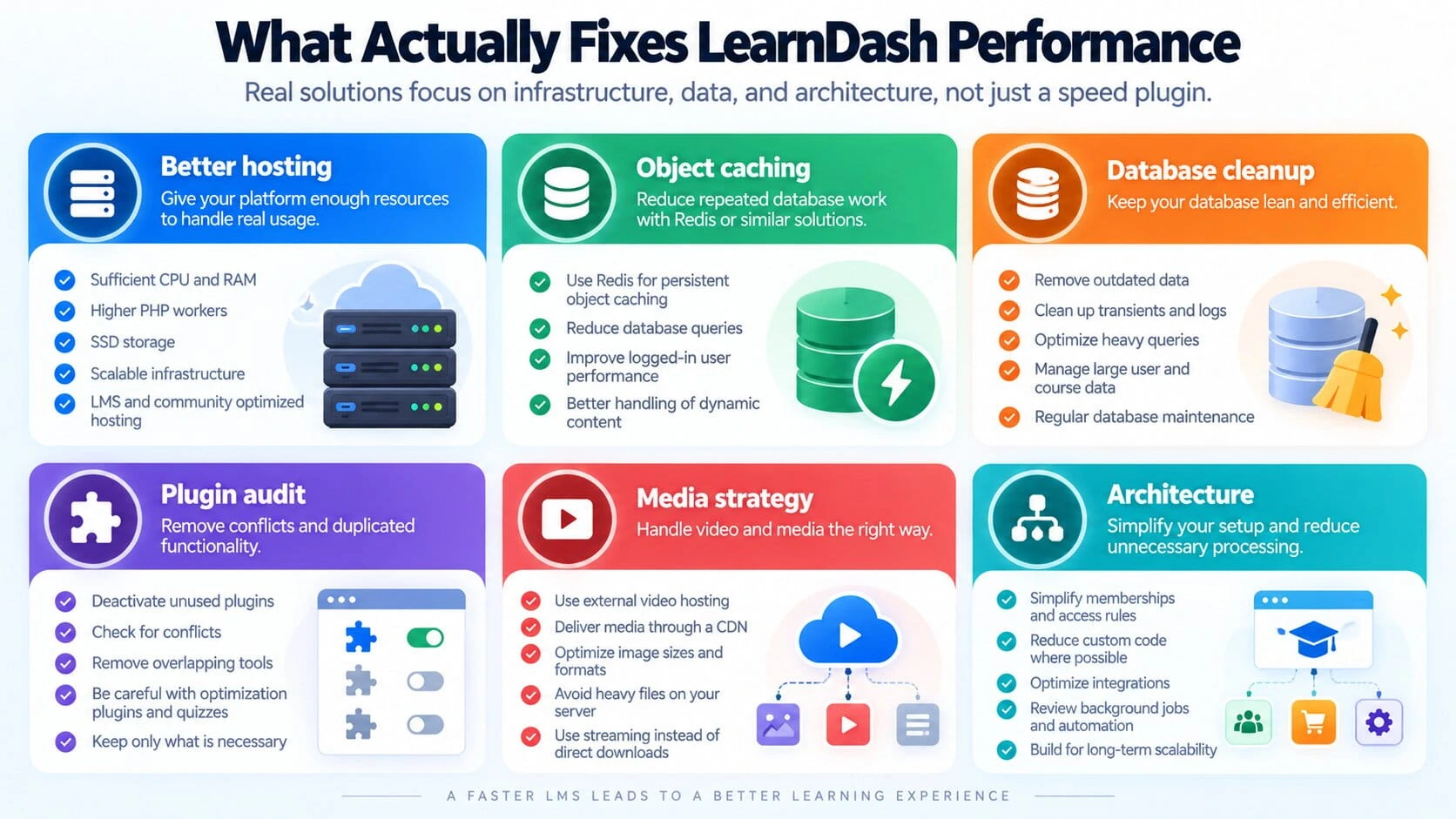
There is no single fix.
The right solution depends on the bottleneck.
The six areas I would usually investigate are:
Better hosting
Make sure the platform has enough:
- CPU
- RAM
- PHP workers
- storage performance
- concurrency capacity
Object caching
Use persistent object caching such as Redis where the workload benefits from it.
Database cleanup and query optimization
Review:
- slow queries
- oversized options
- stale transients
- log tables
- orphaned data
- custom queries
- reporting load
Plugin audit
Remove:
- unused plugins
- duplicated functionality
- badly behaving integrations
- unnecessary front-end assets
Media strategy
Move heavy video delivery away from the application server where appropriate.
Optimize images and use suitable CDN/media infrastructure.
Architecture
Simplify:
- access rules
- memberships
- automation
- overlapping responsibilities
- custom workflows
Architecture is often the least obvious performance fix.
It can also be one of the most valuable.
What I Would Diagnose First
I would not start by randomly changing settings.
I would first separate the problem.
If the whole site is slow
Check:
- server response time
- CPU/RAM
- PHP workers
- database health
- plugin behavior
If only logged-in users are slow
Check:
- personalized queries
- user metadata
- LearnDash progress
- BuddyBoss activity
- membership checks
- object caching
If only admin is slow
Check:
- LearnDash reports
- large admin queries
- scheduled jobs
- plugin dashboards
If pages load fast but feel sluggish
Check:
- JavaScript
- CSS
- page builder
- images
- video
- third-party scripts
If performance drops only under traffic
Check:
- concurrency
- PHP workers
- uncached dynamic requests
- database saturation
- external services
This makes the investigation much more focused.
What Not to Do
I would avoid these approaches:
Install several optimization plugins at once
You make troubleshooting harder and may create new conflicts.
Cache everything aggressively
Dynamic LearnDash pages and quizzes need careful exclusions.
LearnDash itself notes that optimization plugins can interfere with quizzes.
Blame the theme immediately
The theme may be part of the problem.
It may also be completely unrelated to slow database processing.
Upgrade hosting without measuring anything
Better hosting can mask poor architecture.
Measure first.
Delete large amounts of LMS data blindly
Course progress, reporting data, and user history may be commercially important.
Optimize carefully.
When Better Hosting Is Actually Necessary
Hosting becomes the likely answer when you can demonstrate that the platform is resource-constrained.
For example:
- CPU repeatedly maxes out
- PHP workers are saturated
- memory limits are reached
- concurrent logged-in users create queues
- database response deteriorates under load
LearnDash’s own reporting benchmarks show that server specifications materially affect reporting performance at higher user counts.
At that point, staying on an underpowered plan to save a small monthly amount can create a larger support problem.
This is also why infrastructure belongs in the real ownership budget I covered in The Real Cost of Running LearnDash + BuddyBoss + Memberships.
When Custom Development Is the Real Fix
Sometimes no hosting upgrade will solve the underlying problem.
Examples:
- a custom query scans too much data
- access logic runs repeatedly on every page request
- several integrations perform the same checks
- an external API is called synchronously
- custom dashboard widgets load unnecessary data
- scheduled jobs are poorly designed
That needs engineering work.
Not another cache plugin.
The same applies when memberships, ecommerce, LearnDash, and BuddyBoss all independently calculate access.
Simplifying the course, membership, and community access architecture can reduce both operational complexity and unnecessary processing.
Performance Checklist
Before I would call a LearnDash optimization project complete, I would check:
- server capacity
- PHP configuration
- database performance
- Redis/object cache where appropriate
- plugin conflicts
- LearnDash reporting
- BuddyBoss activity
- membership/access rules
- scheduled jobs
- external APIs
- page-builder weight
- JavaScript
- image delivery
- video delivery
- logged-in performance
- admin performance
- performance under concurrent users
The key phrase there is:
logged-in performance.
A homepage loading quickly for an anonymous visitor does not prove that the LMS is healthy.
Final Recommendation
If your LearnDash website is slow, treat it as a diagnosis problem before treating it as an optimization problem.
Do not start with:
Which speed plugin should I install?
Start with:
Where is the time actually being spent?
Then fix the layer responsible.
If the server is underpowered, improve infrastructure.
If repeated database work is the problem, use object caching and optimize queries.
If the database is unhealthy, clean and tune it.
If plugins overlap, simplify the stack.
If the front end is heavy, reduce the browser workload.
If the architecture is creating unnecessary access checks or automation, redesign it.
That is what produces a faster LMS that stays fast as the business grows.