



If your BuddyBoss site is slow, the problem is usually not that BuddyBoss suddenly became “too heavy.”
The more common issue is that the site is doing far more dynamic work than it did when the community was smaller.
A growing BuddyBoss platform has to handle:
- more logged-in sessions
- more activity-feed requests
- more messages
- more notifications
- more Group relationships
- more profile queries
- more media
- more database writes
- more concurrent requests
That changes the performance problem completely.
A BuddyBoss community is not like a normal WordPress marketing site where most visitors see the same cached page.
Each member may be seeing something different.
That is why community performance depends much more on infrastructure, database efficiency, caching strategy, and architecture than many site owners expect.
BuddyBoss Site Slow: The Short Answer
When a BuddyBoss site slows down as the community grows, I would usually investigate four areas first:
- member activity
- database workload
- concurrent requests
- server capacity
The important part is that these areas are connected.
More members usually mean more activity.
More activity means more database reads and writes.
More database work creates more dynamic requests.
More concurrent requests put more pressure on CPU, RAM, PHP workers, and the database.
That is why a site that worked comfortably with a few hundred active members may behave very differently later.
Why BuddyBoss Performance Is Different From a Normal WordPress Site
A normal WordPress blog or company website can often cache most public pages.
The same page can be served repeatedly to different visitors with relatively little processing.
BuddyBoss does not work like that.
A logged-in member may have personalized:
- activity feeds
- notifications
- messages
- Groups
- profile data
- connections
- permissions
- community content
BuddyBoss itself describes its platform as highly dynamic and explains that members are constantly logging in, posting, and interacting, which creates frequent database activity. Its hosting documentation also notes that traditional page caching is less effective for these personalized community experiences.
That distinction matters.
You cannot solve a dynamic community workload by treating it like a static website.
What Creates BuddyBoss Performance Load
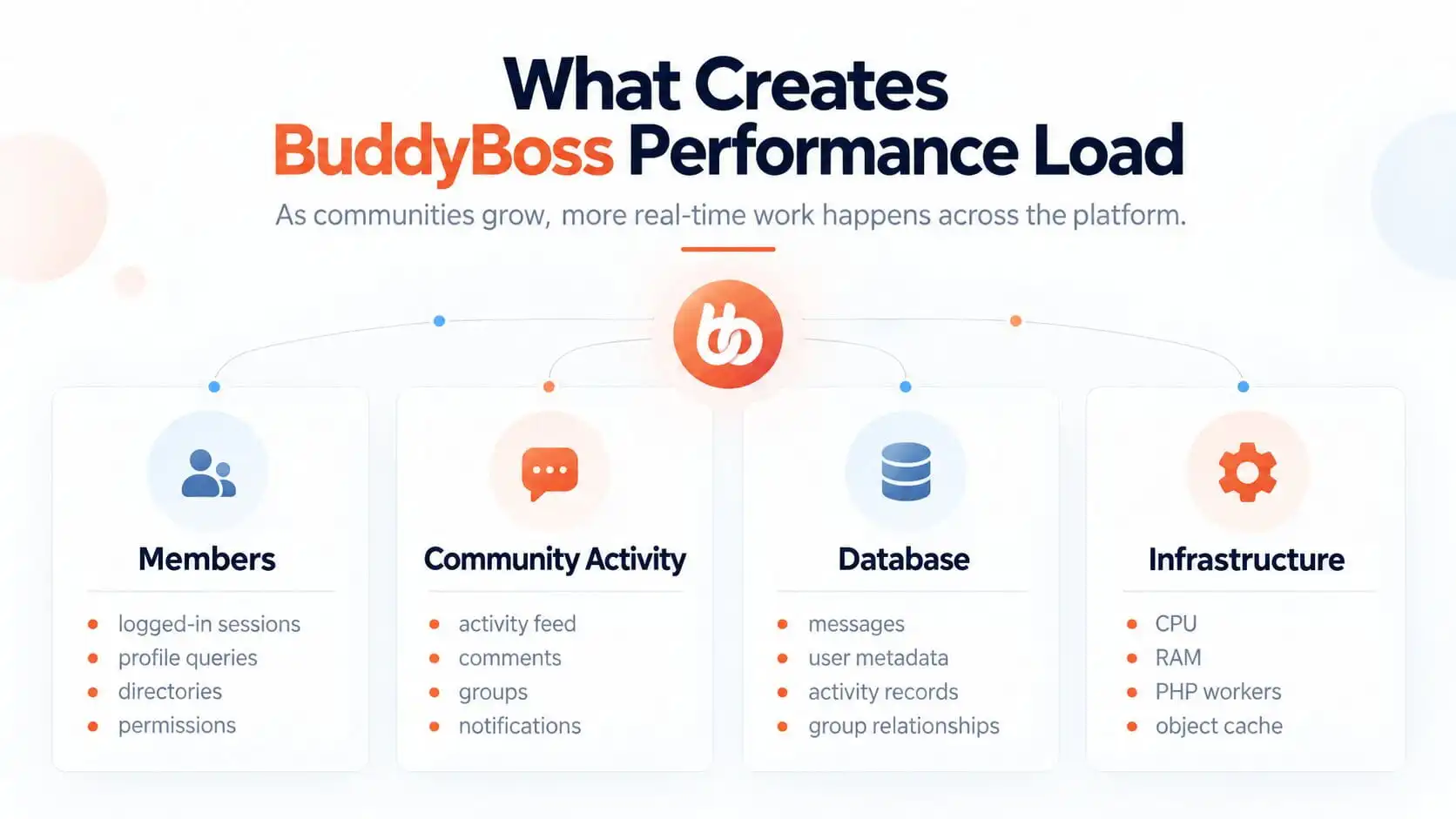
BuddyBoss performance usually comes down to four connected areas: members, community activity, database work, and infrastructure.
As the community becomes more active, each area starts putting pressure on the next.
More logged-in members create more profile, directory, permission, and relationship checks. More community activity creates more feed requests, comments, Groups, messages, and notifications. All of that increases database reads and writes, while the server has to process more dynamic requests at the same time.
The important point is that these problems rarely exist in isolation.
A database may be perfectly healthy at low activity but struggle once concurrent requests increase. Strong hosting may still feel slow if expensive queries are running repeatedly. Redis may reduce repeated database work, but it will not compensate for poor architecture or badly designed custom logic.
That is why I would not ask only:
“Which part of BuddyBoss is slow?”
I would ask:
“Which layer is creating the workload, and which layer is failing to keep up with it?”
More Members Is Not the Same as More Traffic
This is one of the biggest misunderstandings around community scaling.
A marketing website might receive more traffic without creating much additional application work because most visitors are anonymous and pages can be cached.
A BuddyBoss community is different.
An extra member may:
- log in
- load an activity feed
- open notifications
- check messages
- visit a Group
- post a comment
- upload media
- update a profile
That is not just another page view.
It is additional application activity.
BuddyBoss’s own server guidance emphasizes that community interactions require real-time processing and personalized experiences, which increases demands on both the web server and database.
Why More Members Create More Dynamic Work
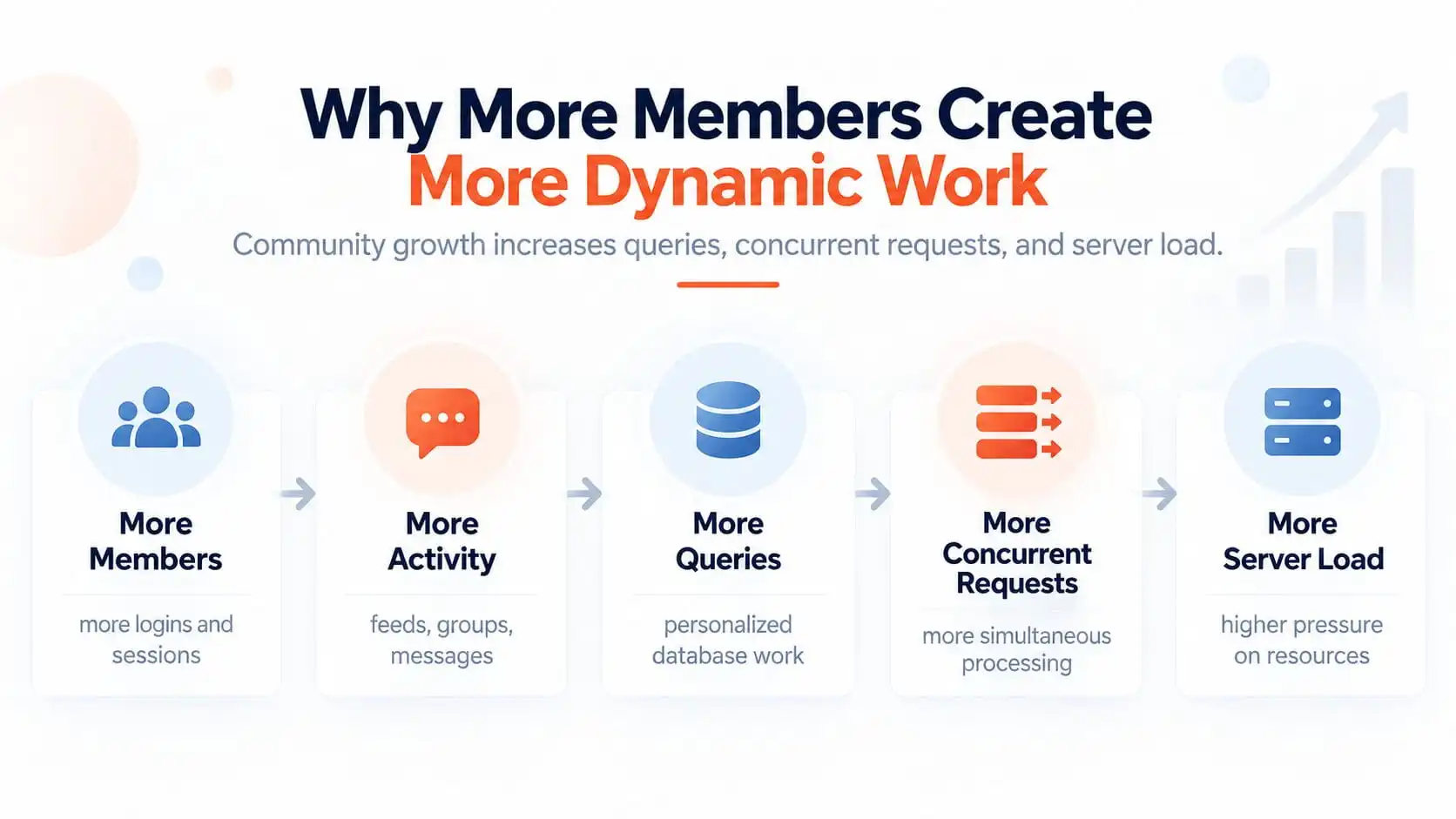
The basic pattern is:
More members → more activity → more queries → more concurrent requests → more server load
This does not mean every new member creates the same workload.
An inactive account barely affects the system.
A highly active member can create much more work through:
- messaging
- notifications
- comments
- reactions
- Groups
- feed activity
That is why active users matter more than total registered users when thinking about performance.
A community with 10,000 registrations and 300 active members may behave very differently from one with 3,000 registrations and 2,000 active members.
Activity Feeds Create Continuous Dynamic Work
The activity feed is one of the most important areas to understand.
It may need to:
- retrieve relevant activity
- respect privacy
- check Group relationships
- load comments
- load reactions
- display user data
- paginate or fetch more content
That is much more complicated than serving a static blog post.
BuddyBoss has specifically optimized its performance settings around activity feeds. Its current documentation allows administrators to reduce page requests and control whether 5, 10, or 15 activity posts are loaded at once.
That tells you where performance pressure often exists.
The feed itself can become a significant part of the workload.
Messages and Notifications Add More Database Activity
Private messaging creates another layer.
The platform may need to determine:
- which conversations belong to the member
- which messages are unread
- who sent them
- conversation participants
- message state
Notifications have similar requirements.
Each event can create additional records and later require more queries when the member returns.
On an active community, those records accumulate quickly.
That does not automatically mean the database is badly designed.
It means the database workload naturally grows with engagement.
Social Groups Multiply Relationships
BuddyBoss Groups add another dimension.
Now the platform may need to understand:
- which users belong to which Groups
- what role they have
- what content they can see
- which activity belongs to the Group
- whether content is public or private
- which notifications should be shown
Every new Group creates more relationships between users and content.
As those relationships grow, the queries become more important.
This is why poor Group architecture can become a performance issue as well as an organizational problem.
If LearnDash is also involved, I would keep learning Groups and community Groups clearly separated. I explained that distinction in LearnDash Groups vs BuddyBoss Groups.
Member Directories Become More Expensive
Directories look simple on the front end.
They are not always simple underneath.
A member directory may need to:
- query users
- check profile visibility
- search profile fields
- filter by metadata
- paginate results
- determine relationships
- load avatars and other profile information
That gets more expensive as the user base grows.
This is one reason large communities need more careful database monitoring than small ones.
The important question is not just:
“How many members do we have?”
It is:
“How expensive are the queries we run against those members?”
Why Full-Page Caching Helps Less
Full-page caching is excellent for public content.
It is less useful when every user receives personalized information.
BuddyBoss specifically notes that traditional page caching can be ineffective for dynamic community pages because it may serve outdated information to logged-in users.
That does not mean caching is useless.
It means you need the right kind of caching.
Public pages can still benefit from page cache.
Dynamic community requests often benefit more from:
- persistent object caching
- optimized database access
- efficient application logic
Why Redis and Object Caching Matter
Redis can store frequently requested data in memory so WordPress does not have to repeatedly ask the database for the same information.
That can be particularly useful in a community where:
- users are logged in
- pages are personalized
- similar queries happen repeatedly
- the database is doing constant work
BuddyBoss currently recommends Redis or other persistent object caching solutions as part of an optimized environment.
BuddyBoss has also published performance testing showing significant reductions in database requests and improved AJAX throughput after platform optimizations.
Redis is not a cure for bad architecture.
But it can reduce unnecessary repeated database work.
Hosting Becomes More Important as Concurrency Grows
A BuddyBoss community can reach a point where shared hosting simply does not have enough resources.
BuddyBoss’s own performance guidance recommends moving from shared hosting to VPS or cloud hosting when database activity and concurrent logged-in sessions increase.
The important word here is:
concurrent
Ten thousand registered users do not all hit the site at once.
But if hundreds of members are simultaneously:
- loading feeds
- opening messages
- browsing Groups
- posting content
then the server needs enough resources to process those requests.
That means paying attention to:
- CPU
- memory
- PHP workers
- database performance
- storage I/O
A better hosting plan can make a major difference when infrastructure is genuinely the bottleneck.
It should still be based on measurement rather than guesswork.
Activity Feed Settings Can Affect Performance
BuddyBoss currently includes performance controls directly in the platform.
Its documentation says the activity feed now defaults to fewer page requests and allows control over how many posts are loaded per page.
Those settings matter because every request has a cost.
Loading less data at once can improve responsiveness.
But there is also a user-experience tradeoff.
If you load too little, users need to request more data constantly.
So the goal is not:
“use the smallest number possible.”
The goal is:
find the right balance for your server and your community behavior.
Media Uploads Add Another Scaling Problem
Community sites often become media-heavy over time.
Members may upload:
- images
- documents
- avatars
- videos
- attachments
That creates pressure on:
- disk storage
- bandwidth
- backup size
- media processing
- page delivery
For growing communities, I would usually separate media delivery from the application server where practical.
A CDN or external storage strategy can reduce the amount of work the main server has to handle.
Video especially should usually have a dedicated delivery strategy rather than being treated like a normal image upload.
BuddyBoss + LearnDash Makes the Workload Heavier
BuddyBoss becomes more demanding when LearnDash is part of the same platform.
Now the site handles community activity plus:
- courses
- lessons
- progress
- quizzes
- reporting
- enrollments
- learning Groups
Those are two different dynamic workloads living on the same WordPress installation.
That does not mean the combination is wrong.
It means it needs to be architected properly.
I covered the broader separation of responsibilities in LearnDash + BuddyBoss: How the Architecture Should Actually Work.
And if the learning side itself is struggling, see Why LearnDash Websites Become Slow and What Actually Fixes Them.
Membership and Access Rules Add More Processing
Many BuddyBoss communities are also paid platforms.
That can introduce:
- MemberPress
- Paid Memberships Pro
- WooCommerce
- subscription plugins
- custom entitlement logic
Now every request may need to answer questions like:
- Is this membership active?
- Which tier does the user have?
- Which Groups can they access?
- Which courses should be available?
- Did a subscription expire?
- Did they upgrade?
If several plugins independently calculate the same access rules, the platform becomes harder to maintain and potentially more expensive to process.
That is why I prefer a clear access hierarchy.
I explained that approach in How Course, Membership and Community Access Should Work Together.
Too Many Plugins Is Not the Whole Problem
A BuddyBoss site does not become slow simply because the plugin count reaches a certain number.
What matters is what those plugins do.
One plugin can create more load than ten lightweight plugins.
I would ask:
- Does it run on every page?
- Does it query users?
- Does it modify BuddyBoss activity?
- Does it add background jobs?
- Does it load scripts everywhere?
- Does it duplicate existing functionality?
- Does it call an external service?
The goal is not to reach an arbitrary low plugin count.
The goal is to remove unnecessary work.
What Actually Fixes a Slow BuddyBoss Site
There is rarely one solution.
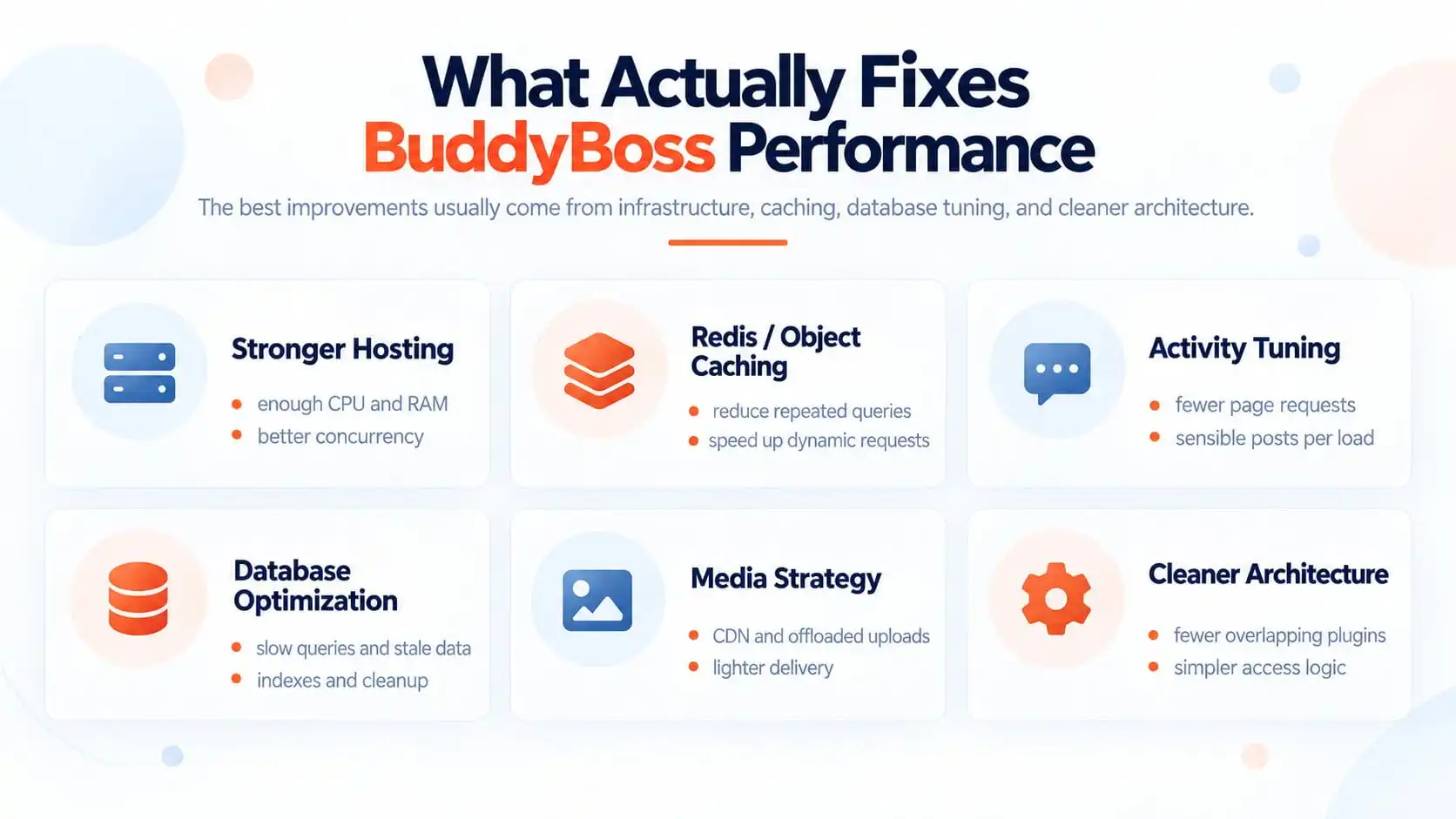
I would usually work through these six areas.
Stronger hosting
Make sure the server has enough:
- CPU
- RAM
- PHP workers
- database capacity
- concurrency headroom
Redis / object caching
Reduce repeated database queries for dynamic logged-in requests.
Activity tuning
Review:
- page requests
- activity posts per load
- infinite scroll behavior
- feed behavior
Database optimization
Investigate:
- slow queries
- stale transients
- oversized tables
- metadata growth
- missing indexes
- unnecessary logs
Media strategy
Use:
- CDN delivery
- media offloading
- external video hosting
where appropriate.
Cleaner architecture
Reduce:
- overlapping plugins
- duplicated access rules
- unnecessary integrations
- synchronous external calls
- expensive custom logic
This last category is often overlooked.
Sometimes the fastest improvement does not come from better hardware.
It comes from asking the system to do less unnecessary work.
What I Would Diagnose First
I would not start by installing more performance plugins.
I would first isolate the symptom.
|
Symptom
|
What I would investigate
|
|---|---|
|
Every BuddyBoss page is slow
|
Server resources, database response, plugin conflicts, object caching
|
|
Only the activity feed is slow
|
Feed queries, performance settings, activity volume, AJAX requests
|
|
Messages or Groups are slow
|
Database size, relationships, permissions, custom logic
|
|
Only slow when many users are online
|
PHP workers, CPU, RAM, database concurrency, object cache
|
That tells you which layer deserves attention first.
When Better Hosting Is Necessary
Better hosting is necessary when the infrastructure itself is being saturated.
For example:
- CPU repeatedly maxes out
- PHP requests queue
- memory becomes constrained
- the database slows under concurrent traffic
- requests time out during peak periods
BuddyBoss explicitly recommends more capable VPS or cloud environments for communities where shared hosting is no longer sufficient.
At that point, trying to save money on hosting can become more expensive through:
- support issues
- member frustration
- churn
- emergency optimization work
This is one reason infrastructure belongs in the long-term budget I covered in The Real Cost of Running LearnDash + BuddyBoss + Memberships.
When Database Optimization Is the Real Fix
If server capacity looks healthy but BuddyBoss pages are still slow, I would look closely at the database.
Important areas include:
- slow queries
- large usermeta tables
- activity tables
- notification data
- message data
- transients
- plugin logs
- unnecessary metadata
BuddyBoss’s own scaling guidance emphasizes database optimization because community features create frequent database writes as activity grows.
Sometimes adding more CPU helps.
Sometimes it simply makes an inefficient query fail slightly faster.
You need to know which one you are dealing with.
When Architecture Is the Real Fix
This is the part many performance audits miss.
A community can be technically optimized and still do too much work.
For example:
- three plugins all check membership status
- multiple systems calculate Group access
- external APIs are called during page loads
- custom code runs for every logged-in request
- automation fires unnecessarily
- duplicated plugins perform similar jobs
At that point, optimization means simplifying the architecture.
Not adding another cache layer.
If the platform is heavily customized, I would review whether the current BuddyBoss setup still matches the business model rather than assuming every performance problem should be solved at server level.
For deeper BuddyBoss customization and architecture work, see BuddyBoss Development Services.
Performance Checklist for a Growing BuddyBoss Community
Before I would consider a BuddyBoss performance project complete, I would review:
- active user concurrency
- server CPU and RAM
- PHP workers
- database response time
- Redis/object caching
- activity-feed requests
- activity posts per load
- member directories
- messages
- notifications
- Groups
- membership rules
- background jobs
- custom codeexternal integrations
- media delivery
- logged-in performance
- peak-hour performance
The key metric is not simply:
How fast is the homepage?
It is:
How does the platform behave when real members are using the community at the same time?
Final Recommendation
A slow BuddyBoss community should be treated as a scaling problem, not just a page-speed problem.
The right question is not:
“Which optimization plugin should I install?”
It is:
“What workload has grown, and which part of the platform can no longer handle it efficiently?”
If the server is constrained, improve infrastructure.
If repeated database queries are the problem, add proper object caching and optimize the queries.
If the activity feed is too expensive, tune it.
If the database has become unhealthy, clean and optimize it.
If media is overwhelming the server, move delivery elsewhere.
If several plugins are doing the same work, simplify the architecture.
That is how you build a BuddyBoss community that remains usable as member activity grows.